

 microsoft
Google Analytics Dashoboard empty - "no data available"
Hello,
last week I integrated Clarity on several Domains/Projects and connected it manualy with their Google Analytics properties (UA-IDXYZ + Dimension-ID from "Clarity Playback URL). All Dashboards (Main-Dashboard, Recordings, Heatmaps) collect data and work without any problems, also in Google analytics itself and I can find all the Clarity-Events and also the secondary Dimension "Clarity Playback URL" BUT not the Google Analytics Dashboard in Clarity, it's still empty.
I got the same problems in every connected Domain/Project, all empty.
 .
I tested if something is misconfigurated and disconnect and reconnected it, but still the same.
Can someone help me please?
Thank you in advance!
Best, NT
.
I tested if something is misconfigurated and disconnect and reconnected it, but still the same.
Can someone help me please?
Thank you in advance!
Best, NT

same problem me, I don't kow if depends by analytics in the section "share data with third parts" i deny everything...

@tauschn and @StefanoTesla I had the same issue but think I found the solution (or atleast, this seemed to work for me).
Step 1. Log into your GA account, click on the "ADMIN" button on the bottom
Step 2. From here, you should see a Property column, scroll down on that column and you should see "Custom Definitions" > "Custom Dimensions", click into this
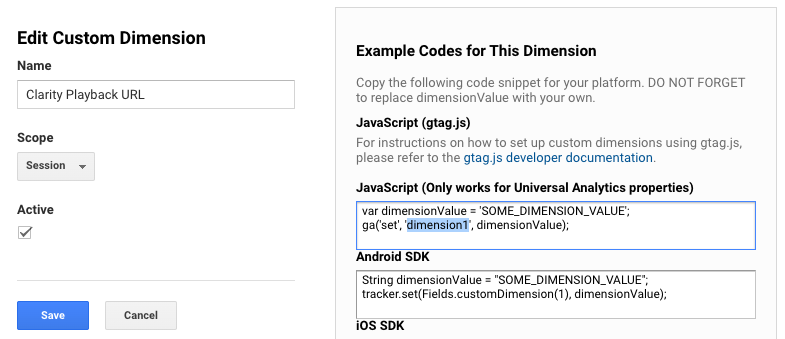
Step 3. Create New Dimension, name it something like "Clarity Playback URL" with scope set as "Session"
Step 4. Once the new dimension is created, click into it, copy this value (most likely "dimension1")
Step 6: Wait a few mins.
Step 7: Go into the Clarity Dashboard > setup > and reconnect to Google Analytics
Step 8: Click on "Can't find your site? Try adding it manually."
Step 9: The Dimension ID you copied (dimension1) paste it into Dimension ID input field
Step 10: Fill out the rest of the fields, here's the guide: https://docs.microsoft.com/en-us/clarity/ga-integration#:~:text=Friendly%20name%3A%20Your%20site%27s%20name.
Connect
After about 2-3 days you should start seeing data on the Google Analytics Tab in the Clarity Dashboard
Hope this helps
