

 microsoft
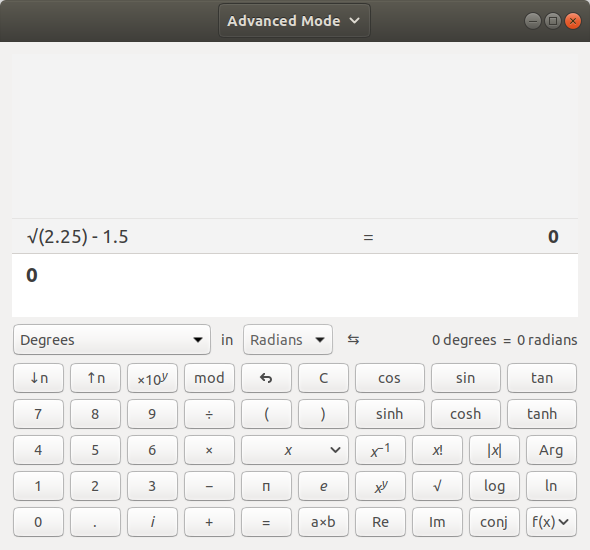
Wrong result for e.g. √(2.25) - 1.5
Describe the bug
√(2.25) is 1.5 and the result shown is correct. However, subtracting 1.5 from that shows an incorrect result such as -2.1115953280960553738983525708397e-38.
This bug happens in all equivalent cases, e.g. with √(0.81) or any other square root that is a terminating decimal.
Steps To Reproduce
- Use standard or scientific mode
- Enter 2.25
- Press √
- Subtract 1.5
- Result is wrong
Expected behavior
Result is 0
Device and Application Information (please complete the following information):
- OS Build: 10 0 17763 0
- Architecture: X64
- Application Version: 10.1812.10048.0
Additional info Until recently, it also used to be that "√(4) - 2" didn't result in 0. It was fixed in the UWP app, but is a bug in calc.exe in older versions of Windows.

Relevant article: https://blogs.msdn.microsoft.com/oldnewthing/20040525-00/?p=39193



This is your friendly Microsoft Issue Bot. I've seen this issue come in and have gone to tell a human about it.



@uhliksk Can you provide some details here on the fix you've proposed?
There is already fix in code which is rounding result and calculating back inverted function to see if result of inverted funcion is same as input. If result is same as input then rounded value is used as result of function. Otherwise non-rounded result is used. This funcion is currently limited to round to integer numbers and thats why sqrt(4) is working well and sqrt(2.25) is not working. My solution is extension of actual fix to use up to 32 digits after decimal point instead of integers only.

@uhliksk Can you provide some details here on the fix you've proposed?
But I'm already preparing another pull request because I found another range of inputs where fix have to be little bit modified.
Thanks! Please also include some unit tests as requested on the PR to capture the effect of the change.
Thanks! Please also include some unit tests as requested on the PR to capture the effect of the change.
I made all changes, but I can't edit pull request description because it is locked now. New solution is to round not to 32 decimals but to find how many decimals original input have, divide by two and round result to that number of decimals. It is because "nice" inputs for Sqrt have 2 times more digits than result. I also added unit tests for new behavior.
It is because "nice" inputs for Sqrt have 2 times more digits than result.
This function also handles nth roots, besides square roots. Does this property always apply?

Please add the following test cases:
`
    Command commands19[] = { Command::Command8, Command::CommandPWR, Command::CommandOPENP,
        Command::Command2, Command::CommandDIV, Command::Command3, Command::CommandCLOSEP,
        Command::CommandSUB, Command::Command4, Command::CommandADD, Command::CommandNULL };
    TestDriver::Test(L"0", L"8 ^ (2 \x00F7 3) - 4 + ", commands19, true, true);
    Command commands20[] = { Command::Command4, Command::CommandPWR, Command::CommandOPENP,
        Command::Command3, Command::CommandDIV, Command::Command2, Command::CommandCLOSEP,
        Command::CommandSUB, Command::Command8, Command::CommandADD, Command::CommandNULL };
    TestDriver::Test(L"0", L"4 ^ (3 \x00F7 2) - 8 + ", commands20, true, true);
`
@uhliksk, @jlaanstra, the current proposed fix operates on an assumption that can be extrapolated to:
Non-integer rational numbers whose n th root is a rational number have n times as many digits after the decimal separator as their n th root.
For example, the cube root of 3.375 is 1.5, which has 1/3 as many digits after the decimal.
Do we have any mathematical proof of this assumption being true? Whether we do or not, is there a better way to solve this?
Another approach might be to express the original value as a fraction - in that case, are the numerator and denominator always themselves perfect powers (e.g. 2.25 -> 9/4, where 9 and 4 are perfect squares)?
@uhliksk, @jlaanstra, the current proposed fix operates on an assumption that can be extrapolated to:
Non-integer rational numbers whose n th root is a rational number have n times as many digits after the decimal separator as their n th root.
For example, the cube root of 3.375 is 1.5, which has 1/3 as many digits after the decimal. Do we have any mathematical proof of this assumption being true? Whether we do or not, is there a better way to solve this? Another approach might be to express the original value as a fraction - in that case, are the numerator and denominator always themselves perfect powers (e.g. 2.25 -> 9/4, where 9 and 4 are perfect squares)?
I'm sorry, I was so focused on square roots I actually forgot I'm editing pow code :) ... I'll fix that for nth root of course as mentioned before to "n many digits" for "nth root" and not only "2 many digits" for "2nd root". Thank you for suggestion.
Another approach might be to express the original value as a fraction - in that case, are the numerator and denominator always themselves perfect powers (e.g. 2.25 -> 9/4, where 9 and 4 are perfect squares)?
Yes, of course, but much simpler method is to just change exponent by multiple of n for nth root. For example sqrt(2.25) = sqrt (225 / 100) = 15 / 10 = 1.5 or sqrt (87654320.29740996) = sqrt (8765432029740996 / 100000000) = 93623886 / 10000 = 9362.3886 ... It's very similar to what I'm doing now but I'm multipliing result instead of input because it is easier to verify if result is not affected by any kind of rounding I think.
Another approach might be to express the original value as a fraction - in that case, are the numerator and denominator always themselves perfect powers (e.g. 2.25 -> 9/4, where 9 and 4 are perfect squares)?
Yes, of course, but much simpler method is to just change exponent by multiple of n for nth root. For example sqrt(2.25) = sqrt (225 / 100) = 15 / 10 = 1.5 or sqrt (87654320.29740996) = sqrt (8765432029740996 / 100000000) = 93623886 / 10000 = 9362.3886 ... It's very similar to what I'm doing now but I'm multipliing result instead of input because it is easier to verify if result is not affected by any kind of rounding I think.
Ok, now I found your method with fractions is actually not working because even sqrt(4) is not returned precisely 2 and that means you have to round two results (sqrt 9 and 4) instead of one in original method. It is much more complicated.
Ok, now I found your method with fractions is actually not working because even sqrt(4) is not returned precisely 2 and that means you have to round two results (sqrt 9 and 4) instead of one in original method. It is much more complicated.
The fractional method does require rounding both values, but we can use the existing algorithm to do so since they are both integers. Additionally, I believe it requires us to validate/update the (currently unused) gcdrat function in order to handle cases like sqrt(27 / 12), since 27 and 12 are not perfect squares but it simplifies to 9 / 4, which are perfect squares.
However, I believe it would provide us a complete solution as it would also handle non-terminating rational numbers, such as sqrt(1 / 9) = 1 / 3, which would display as sqrt(0.111..) = 0.333..., which the proposed rounding solution would not cover.
However, I believe it would provide us a complete solution as it would also handle non-terminating rational numbers, such as sqrt(1 / 9) = 1 / 3, which would display as sqrt(0.111..) = 0.333..., which the proposed rounding solution would not cover.
It's hard to say if number with "lot of same digits" after decimal point is non-terminating or if it is terminated right after last digit. For example if you try 1/9 - 0.1111111111111111111111 (with insane number of digits) result from MS calculator is -5.8011710351499162125529111843377e-142. That means even for finding it is 1 / 9 we need to do some rounding and there is no way to check for 100% if we can do that. What if at some point there is no other 1 for reason? How many repetitive digits we need to tell it is non-terminating? I think actual method with rounding result and checking back if inverse operation is returning exactly input is best and simplest one.
(1/9) - 0.1111111111111111111111111111111111111 (manually entered, with a finite number of digits) should return a non zero amount, since 1/9 > 0.111111 {to any number of manually entered digits). What we should be able to handle is (1/9) - (1/9) = 0. Or, in the case of perfect powers: sqrt(1/9) - (1/3) = 0.
(1/9) - 0.1111111111111111111111111111111111111 (manually entered, with a finite number of digits) should return a non zero amount, since 1/9 > 0.111111 {to any number of manually entered digits). What we should be able to handle is (1/9) - (1/9) = 0. Or, in the case of perfect powers: sqrt(1/9) - (1/3) = 0.
Problem is 0.11111111...1111111111 x 9 = 0.99999999999...9999999999. We can't verify if we found correct fraction because we don't know how much rounding we can actually use.
But for me bigger question now is why exactly we have 2e-38 difference for sqrt(2.25)-1.5 with precision set to 128 digits and 7e-20 for precision set to 64 digits. I think something is wrong with actual pow algorithm at all.
Ok, I think I found answer to my question. Pow is calculated tricky way:
                lograt(px, precision);
                mulrat(px, y, precision);
                exprat(px, radix, precision);
That's why so much rounding difference occurs.
(1/9) - 0.1111111111111111111111111111111111111 (manually entered, with a finite number of digits) should return a non zero amount, since 1/9 > 0.111111 {to any number of manually entered digits). What we should be able to handle is (1/9) - (1/9) = 0. Or, in the case of perfect powers: sqrt(1/9) - (1/3) = 0.
Now I understand what you were trying to tell me :) ... I found what's wrong with calculator and actual solution is much easier now. I was confused by part of code which wasn't what I thought. I solved everything now. I will do another PR because whole philosophy is changed now.
@joshkoon Thank you for advice about gcdrat. Pow calculation is now absoultely perfect in all cases. I'll add sqrt(27/12) to unit tests.
Something is wrong with gcdrat. This test is failing after I added gcrdat:
        Command commands24[] = { Command::Command2, Command::Command5, Command::Command7,
            Command::CommandSQRT, Command::CommandSQRT, Command::CommandSQRT, Command::CommandNULL };
        TestDriver::Test(L"2.0009748976330773374220277351385", L"\x221A(\x221A(\x221A(257)))", commands24, true, true);
Result is 1.98..., less than 2, which means something is really wrong with that. I'm debugging gcdrat now.
sqrt(1/9) - (1/3) = 0
If the above input is meant to give a correct result (despite being intermediately shown as a finite precision decimal), then there is a related problem with some other mathematical functions as well. For example trigonometry:
In DEG mode: arcsin(1) - 90 != 0 sin(30) - 0.5 != 0 In RAD mode: sin(π/2) - 1 != 0 but interestingly: cos(±π) + 1 == 0
Maybe this needs a separate issue or the scope of this one should be expanded.
Please open separate issues - let's keep this issue scoped to power operations. Thanks!
@grochocki The problem still persists after all this time.
Device and Application Information: OS Build: 10.0 19045.2364 Architecture: x64 Application Version: 11.2210.0.0

I sent a PR for this fix. Please take a look. https://github.com/microsoft/calculator/pull/2424
