

 microsoft
Graphing mode disabled sometimes
Describe the bug Graphing mode is not available sometimes when starting calculator. Restarting fixes it.
Steps To Reproduce Open calculator, try to go to graphing mode, button is inactive. Seems to happen randomly.
Expected behavior Should be always available.
Screenshots
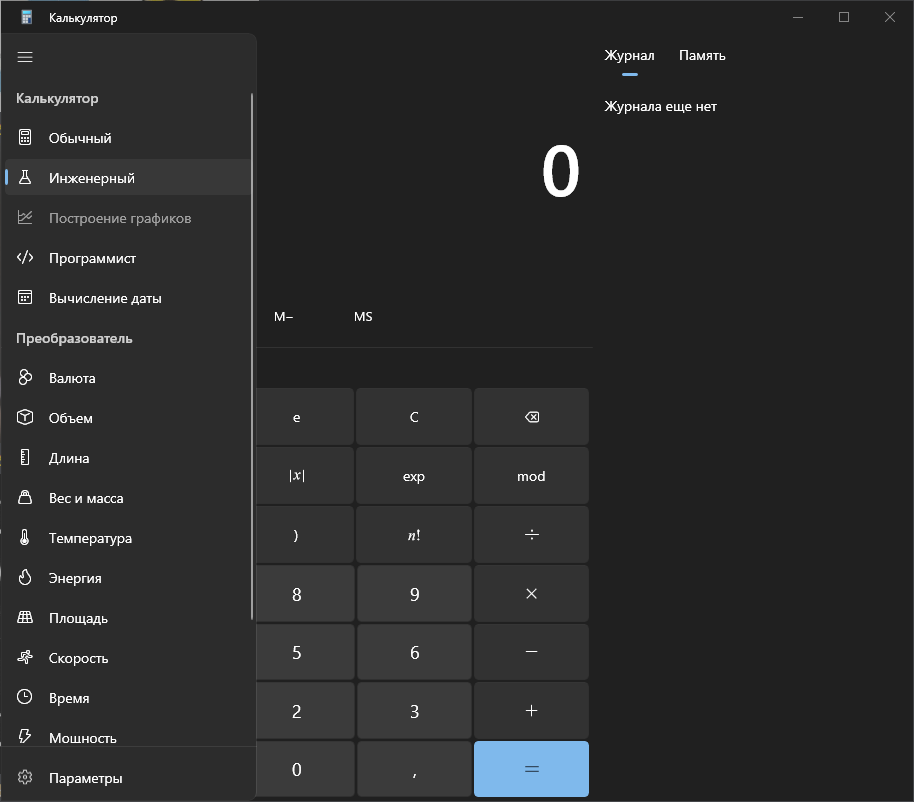
Device and Application Information
- OS Build: Windows 10 21H2 19044.2364
- Architecture: x86_64
- Application Version: 11.2210.0.0
- Region: ru-RU
- Dev Version Installed: No
Requested Assignment I'm just reporting this problem. I don't want to fix it.


I just experienced the same issue. I opened Calculator, and the "Graphing" menu item was disabled. I closed and re-opened Calculator, and "Graphing" was enabled.
Edition: Windows 10 Enterprise Version: 22H2 OS build: 19045.2486 Experience: Windows Feature Experience Pack 120.2212.4190.0
Architecture: x86_64 Application Version: 11.2210.0.0 Region: en-US Dev Version Installed: No

Got this too.
Windows: Windows 10 Education 21H1, Build 19043.2364, Windows Feature Experience Pack 120.2212.4190.0 Hardware: 64-bit operating system, x64-based processor Calculator: Calculator 11.2210.0.0

Sometimes restarting calculator fixes it, but sometimes I have to restart my computer. The time I had to restart my computer I also had settings open, but this time, after I restarted, I experienced the issue too, but closing and opening calculator fixed it. This suggests it could be an issue with WinUI or UWP, but I don't know.
Same issue here. I don't restart my computer, I just wait 'till it's back up and use desmos.com in the meantime :)

I just encountered this myself. I had to close and reopen the calculator, and then I could use it again. Very odd.
