

 microsoft
Circles don't look circle-ey ?
Describe the bug
The circles aren't properly graphed. Take a look for yourself :
 I got my friends to see that if they see what I see i.e. a circle is being graphed as an oval shape
Steps To Reproduce
Expected behavior
A nice little circle of radius 1 unit to be graphed with center at origin
Screenshots
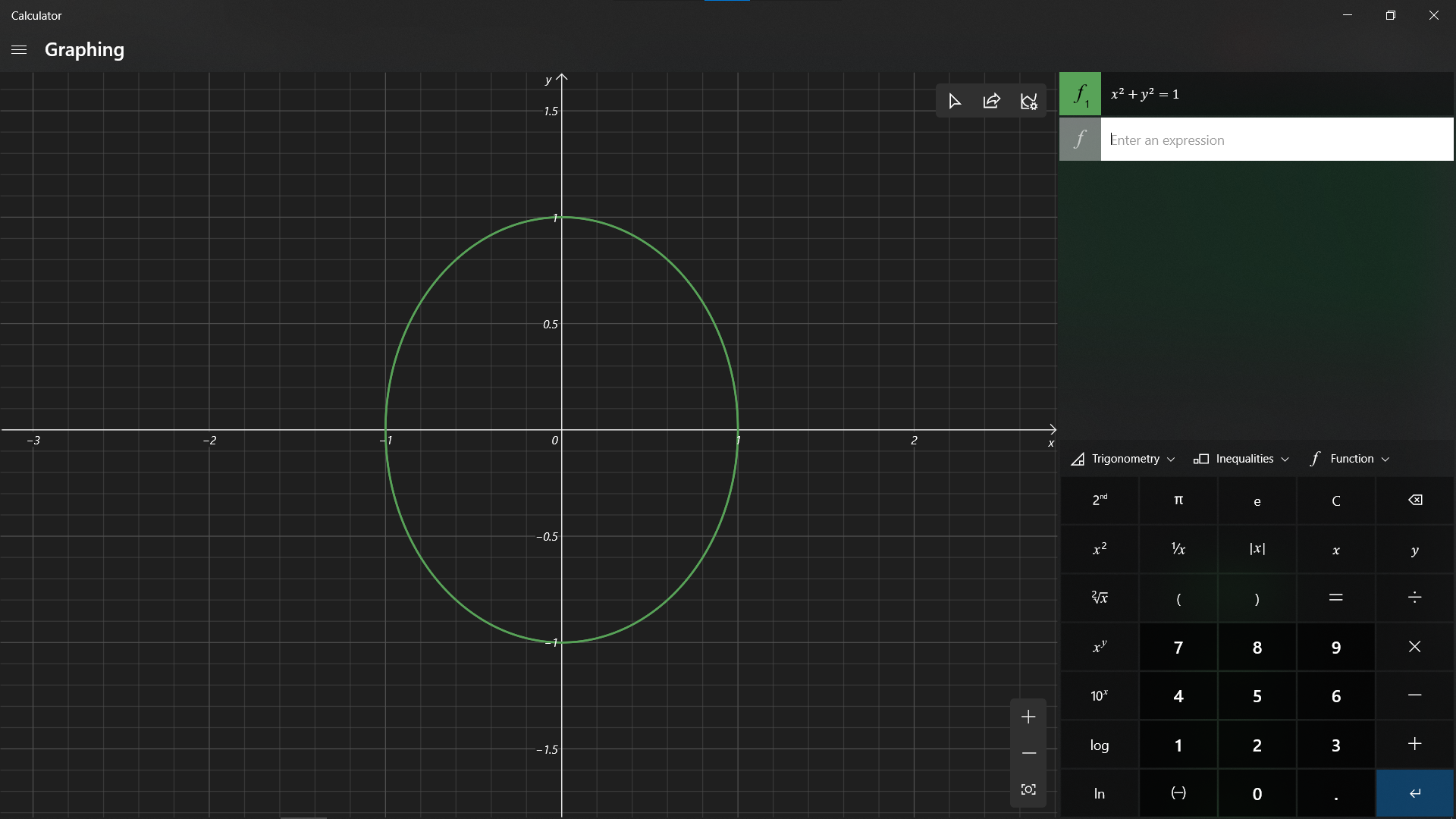
Device and Application Information
- OS Build: Windows 10 build 19041.450
- Architecture: X64
- Application Version: 10.2007.1.0
- Region: en-IN
- Dev Version Installed: False
Additional context
Requested Assignment I'm just reporting this problem. I don't want to fix it as I don't know anything about fixing this stuff.

This is your friendly Microsoft Issue Bot. I've seen this issue come in and have gone to tell a human about it.

@Justaphysicsnerd Yes, that's really an issue with the Graphing mode. And that's because it sets different scales for the X-Axis and Y-axis. Due to this, the cells appear to be rectangular instead of a square. We need to manually adjust the scale from the Graph Properties, so that our figures appear as expected.

@Rahul-Dixit @Justaphysicsnerd I think we could potentially address this by auto-scaling on a single axis to maintain aspect ratio, but then how might we account for times where the user wants to specifically set certain scales on one or both axes.
Reset could clear:


@grochocki I meant to say that the scales should be adjusted in such a manner that the cells appear square-shaped to the user. (You can try it yourself. If you try to plot y = x, you will see rectangles on your screen; Circles appear to be ovular).
This would prevent any distortion of the figures that we draw on the screen.
Even the graph sheets that we purchase from the market have square shaped cells instead of rectangular ones.
However, if the user wants to have custom scales, then he should be able to adjust it from the Graph Options flyout.
The Reset View button should revert to the default scale (having square shaped cells).
I meant to say that the scales should be adjusted in such a manner that the cells appear square-shaped to the user.
I agree. The cells are distorted because the scales for x/y are held constant as you resize the window. In order to maintain square cells, as the user resizes the window, we need to auto-scale x or y to maintain the aspect ratio of those cells, otherwise we start stretching.


The Reset View button should revert to the default scale (having square shaped cells)
Yes, I don't know what the reset view button does. Clicking it do not set it to 1:1
It needs to have a settings to set xaxis : yaxis and if we should lock the ratio
this image is from https://www.geogebra.org/classic