
calculator

calculator copied to clipboard
 microsoft
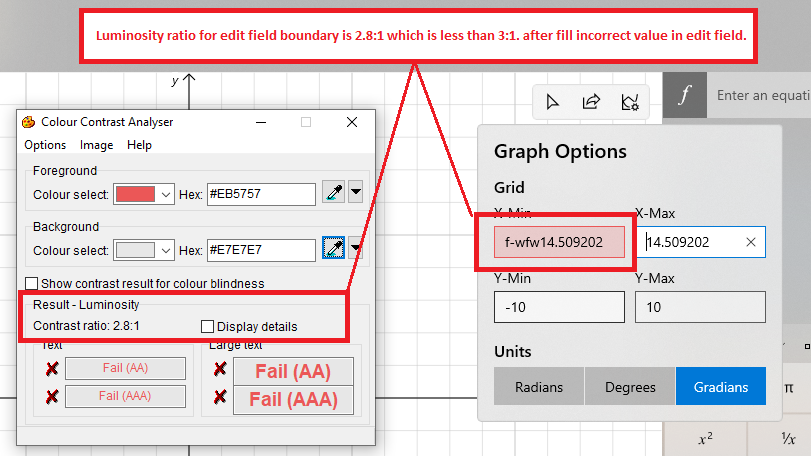
Luminosity ratio for edit field boundary is 2.8:1 which is less than 3:1 after filling incorrect value in edit field
Repro Steps:
- Launch 'Calculator'.
- Home screen will be displayed.
- Navigate through Menu using keyboard and select 'Graphing'. 'Graphing' Calculator opens.
- Navigate to 'Grid Options' button and activate it.
- Graph options pop up will open.
- Navigate to edit field and fill incorrect value.
- Verify the luminosity of edit field using color contrast analyzer tool.
- Observe the issue.
Actual Result: Luminosity ratio for edit field boundary is 2.8:1 which is less than 3:1 after filling incorrect value in edit field.
Expected Result:
Luminosity ratio for edit field boundary should be minimum 3:1 after filling incorrect value in edit field. To achieve this, we should not update the background color of the textbox and leverage SystemControlErrorTextForegroundBrush as the border color.

This is your friendly Microsoft Issue Bot. I created this issue automatically as requested by a team member.