
botframework-components
 botframework-components copied to clipboard
 microsoft
Microsoft.Bot.Components.AdaptiveCards - OnDataQuery trigger doesn't work as expected
Describe the bug
OnDataQuery trigger from Microsoft.Bot.Components.AdaptiveCards package doesn't start when Data.Query activity received from adaptive card.
Version
Tested on 1.3.0, 1.4.0 Composer version - 2.1.2
To Reproduce
-
Send adaptive card containing Input.ChoiceSet with dynamic typeahead search to user as described in this example: https://learn.microsoft.com/en-us/microsoftteams/platform/task-modules-and-cards/cards/dynamic-search?tabs=mobile%2Cjson#example
-
On user side start typing something in 'Multi-Game' field. As a result 'Data.Query' activity will be sent to the bot.
Expected behavior
The trigger should start when Data.Query activity received from adaptive card.
Additional context
I think the issue is related to https://github.com/microsoft/botframework-components/blob/main/packages/AdaptiveCards/Triggers/OnDataQuery.cs
line 64:
Expression.Parse($"{TurnPath.Activity}.name == 'adaptiveCard/action'"),
The activity which bot receives from adaptive card contains different name :
"value": { "queryText": "test", "queryOptions": { "skip": 0, "top": 15 }, "dataset": "xbox" }, "name": "application/search",


Hi @GennadyM73,
I'm able to reproduce this issue. After typing in Multi-game input field, it appears the OnDataQuery is not triggered.
Sharing the steps to repro this issue:
-
Create a Composer Bot
-
Add Microsoft App Id and App Password to the composer bot in "Development Resources" settings
-
In Composer, install package Microsoft.Bot.Components.AdaptiveCards
-
In
Unknown intent, click + icon and select "Adaptive Cards -> Send an Adaptive Card"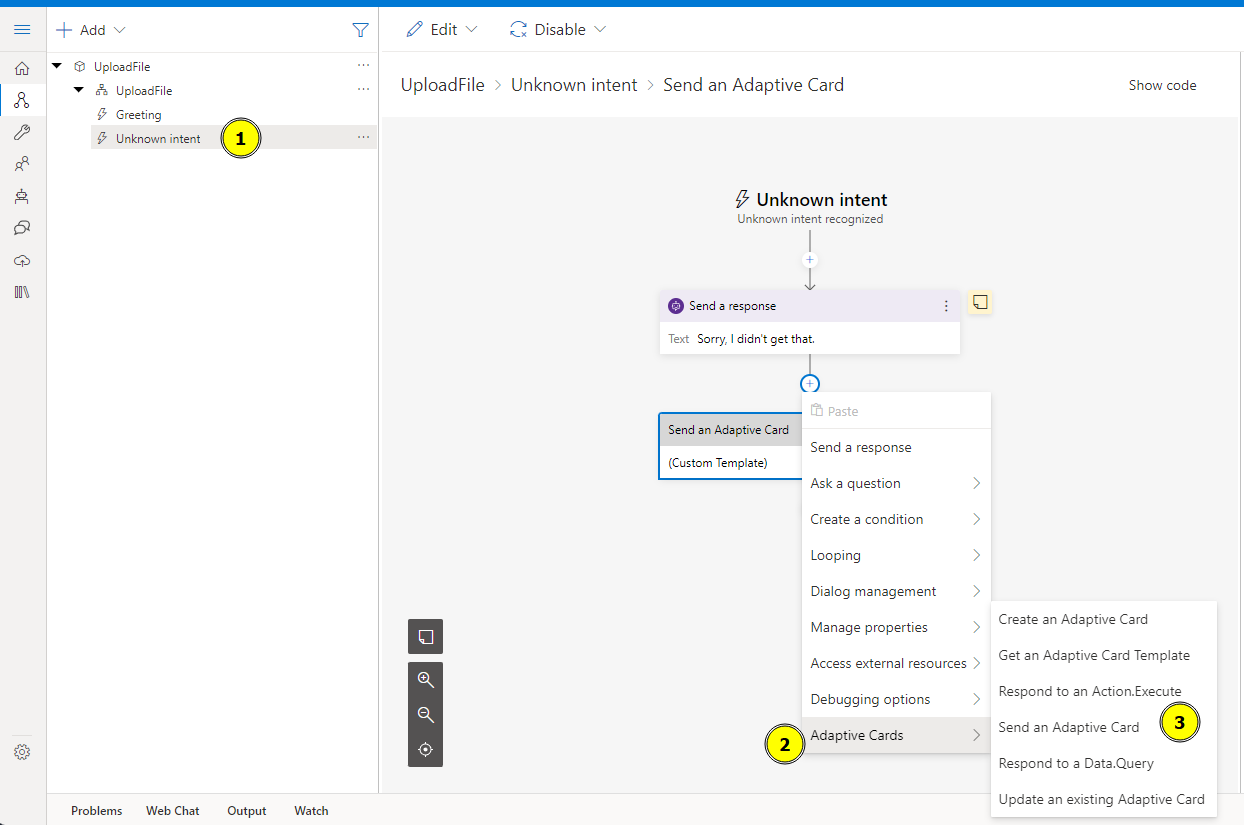
-
In Template property, copy and paste the following dynamic typeahead search adaptive card
-
Run the bot in Teams Channel. Used ngrok tunnelling solution.
-
Chat with the bot in Teams and trigger the
unknown intentto display the adaptive card -
In
Multi-Gameinput field, start typing -
Notice error message in ngrok terminal
501 Not Implemented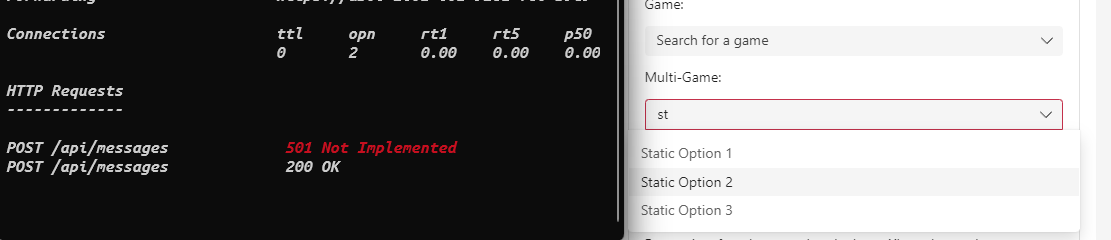
/api/messages POST request
{
    "name": "application/search",
    "type": "invoke",
    "timestamp": "2022-10-25T07:11:43.887Z",
    "localTimestamp": "2022-10-25T00:11:43.887-07:00",
    "channelId": "msteams",
    "serviceUrl": "https://smba.trafficmanager.net/amer/",
    "from": {
        "name": "Ram Fattah",
    },
    "conversation": {
        "conversationType": "personal",
    },
    "value": {
        "queryText": "st",
        "queryOptions": {
            "skip": 0,
            "top": 15
        },
        "dataset": "xbox"
    },
    "locale": "en-US",
    "localTimezone": "America/Los_Angeles"
}
We are discussing internally for the next steps. Thanks for your patience @GennadyM73.
Hey @JuanAr, we are able to reproduce this issue.
I shared the steps to repro in above discussion, please let me know if you have any questions. Thanks
Hi @ramfattah! Do you want to assign me the issue and we'll add it to our backlog and tackle it next week.
Thanks!
