

 microsoft
[MCS-DE-GO] JSON object with non-string parameters
Currently we are facing the issue that we cannot find the right syntax in a JSON object within the https-Action to send numbers and booleans to an external API.
The only working syntax Composer allows in JSON in https-request body object is:
 {
     "question": "${conversation.string",
     "scoreThreshold": "${conversation.number}",
     "context": {
         "previousUserQuery": "${conversation.string2}",
         "boolean": "${conversation.boolean}"
     }
 }
This creates this JSON body on API call as output:
{
     "question": "und mein hund auch?",
     "scoreThreshold": "70",
     "context": {
         "previousUserQuery": "wer ist alles versichert",
         "boolean": "true"
     }
 }
What we want to have however is this: JSON body on API call expected output:
 {
     "question": "Hello World",
     "scoreThreshold": 70,
     "context": {
         "previousUserQuery": "Who are you?",
         "boolean": true
     }
 }
We tried different ways of adding the parameters inside the JSON object but the syntax validation and auto-correction in Composer does not allow us to create the correct output.
Please advise on options or the proper syntax for this or add this as a bug.
@joaollq @garypretty @cwhitten


Hi @goergenj Sorry for the delay. I will have an update for you today.
Update: still investigating.
@srinaath and I am still struggling to getting any approach to work (even though we believe we have previously). Any functions, etc will be evaluated, but then get still enclosed in quotes as strings (ex: "scoreThreshold": "${isInteger(conversation.number)}" would become "true" and not true).
Using a response template:
# MyAPIRequestBody()
-```
{
  "intFromVar": ${dialog.trueint},
  "boolFromVar": ${dialog.truebool},
  "int": 569,
  "bool": true,
  "converttoint": ${int(dialog.intstring)},
  "converttobool": ${bool(dialog.boolstring)}
}
```
Works for a simple response:
- ${MyAPIRequestBody()}
But when used in the HTTP activity body, we get:
MyAPIRequestBody does not have an evaluator, it’s not a built-in function or a custom function.
We'll push more into this next week and hopefully have more info for you. Sorry for the delay.
@dmvtech use an expression for your body instead.

You can also use SetProperties to build up your object in memory and you should then be able to just say =dialog.body

also try setting this for your "object" definition under body. It looks like you're going to get strings back but the binding logic should coerce the fields to their appropriate types. I prefer the expression syntax so that's what I tend to use but this should work also.
{
  "intFromVar": "${dialog.trueint}",
  "boolFromVar": "${dialog.truebool}",
  "int": 569,
  "bool": true,
  "converttoint": "${int(dialog.intstring)}",
  "converttobool": "${bool(dialog.boolstring)}"
}
Thanks @Stevenic
The first two solutions work great. For an example of using SetProperties, I used:
        {
          "$kind": "Microsoft.SetProperties",
          "$designer": {
            "id": "O5f7AN"
          },
          "assignments": [
            {
              "property": "dialog.trueint",
              "value": 4578
            },
            {
              "property": "dialog.truebool",
              "value": false
            },
            {
              "property": "dialog.intstring",
              "value": "55"
            },
            {
              "property": "dialog.boolstring",
              "value": "true"
            }
          ]
        },
        {
          "$kind": "Microsoft.SetProperty",
          "$designer": {
            "id": "V5clC3"
          },
          "property": "user.apibody",
          "value": {
            "intFromVar": "${dialog.trueint}",
            "boolFromVar": "${dialog.truebool}",
            "int": 569,
            "bool": true,
            "converttoint": "${int(dialog.intstring)}",
            "converttobool": "${bool(dialog.boolstring)}"
          }
        },
        {
          "$kind": "Microsoft.SetProperties",
          "$designer": {
            "id": "mz7dUe"
          },
          "assignments": [
            {
              "property": "user.apibody.intFromVar",
              "value": "=dialog.trueint"
            }
          ]
        },
(only implementing the value for inFromVar in this example)
For the third:
It looks like you're going to get strings back but the binding logic should coerce the fields to their appropriate types.
This just doesn't seem to be the case. Not for me at least. Seems to be a bug.
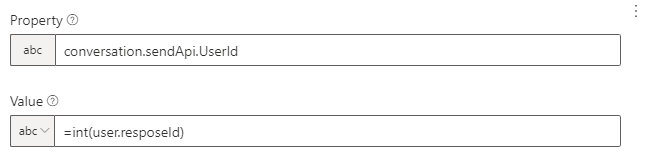
The solution I found was to create an object with each of the variables and transform to integers the values that I want to be numeric.

Then I simply call the object in the HTTP body

@dmvtech use an expression for your body instead.
You can also use
SetPropertiesto build up your object in memory and you should then be able to just say=dialog.body
This worked for me:
={"question":turn.activity.text,"scoreThreshold":int(dialog.scoreThreshold),"context":{}}
If you set the property as "number" you can also use this:
={"question":turn.activity.text,"scoreThreshold":dialog.scoreThreshold,"context":{}}
This also works when you put it in a "Set Property" action as expression. When you try using the "Set property" as "object" the JSON parser will not allow you to add properties without the "${}" syntax which then will always create a string, even when you add the "int()" funtion to it.
I believe this is probably a bug but as the expression syntax works there is a work around. This should however be very clearly documented, if the "object" element cannot be fixed.