

 microsoft
Visual Studio fails to deploy app but does not show any errors
Describe the bug
My app uses Windows App SDK 1.1.5 with WinUI 3.0 and is entirely written in C++/WinRT. Every so often, Visual Studio (both 2019 and 2022) fails to deploy the debug build and instead just shows the following dialog:

None of the logs show any error message, all I'm getting is
========== Deploy: 0 succeeded, 1 failed, 0 skipped ==========
in the build output. I cannot find ANY hint on what went wrong.
I have no workaround for this. Completely cleaning the output and building everything again does not change anything. Switching to the release configuration usually works, i.e. I can deploy the app there but that does not help me debugging stuff.
Why on earth would there be no error message? This is absolutely killing the remaining tiny little bit of productivity I had.
Please give me an error message so that I have at least a small chance of figuring out what the actual problem is!
Steps to reproduce the bug
Absolutely no clue. It happens on a regular basis but I have no clue what the trigger for it is.
Expected behavior
Simply let me deploy the app from Visual Studio.
Screenshots
No response
NuGet package version
1.1.5
Packaging type
Unpackaged
Windows version
Windows 10 version 21H2 (19044, November 2021 Update)
IDE
Visual Studio 2019
Additional context
No response

The workaround that I'm using right now once I'm encountering that issue is to do a meaningless change in the .vcxproj that builds the app. Just adding a single space and building the app again will usually allow me to deploy the app in debug mode again. Just rebuilding the app from scratch does not help which makes me scratch my head.
What magic does changing the .vcxproj file trigger that suddenly allows me to deploy the app?
One issue that I have here is that the information you gave is either inaccurate or incomplete.
An unpackaged C++ project doesn't deploy by default. This is because the local Windows debugger is able to launch the executable directly from the output directory. The build system makes sure that all files are in the correct location too.
To show this:
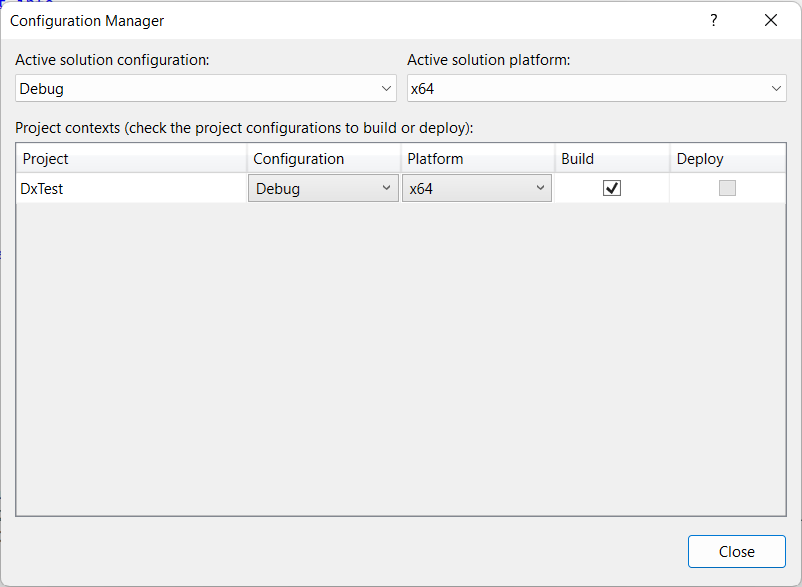
This is the native x64 debugging on my system. The project is unpackaged and configured to use the local Windows debugger. Notice how the Deploy option is greyed out?
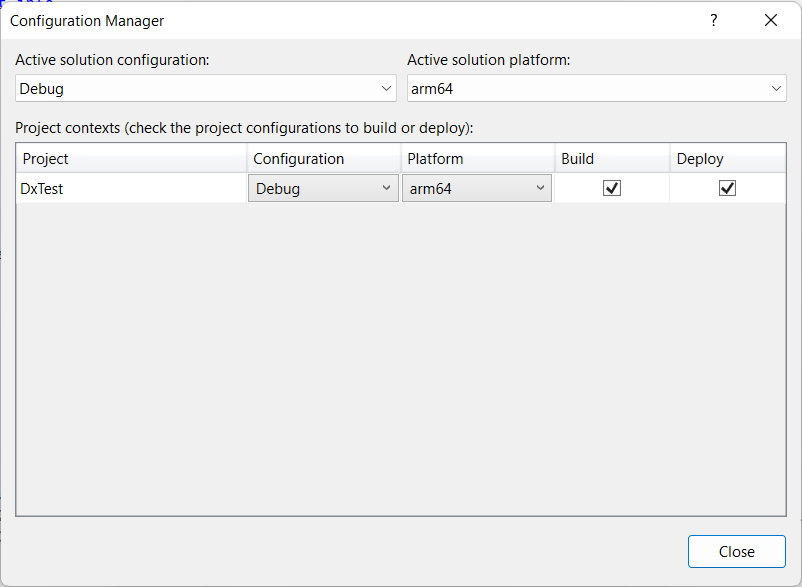
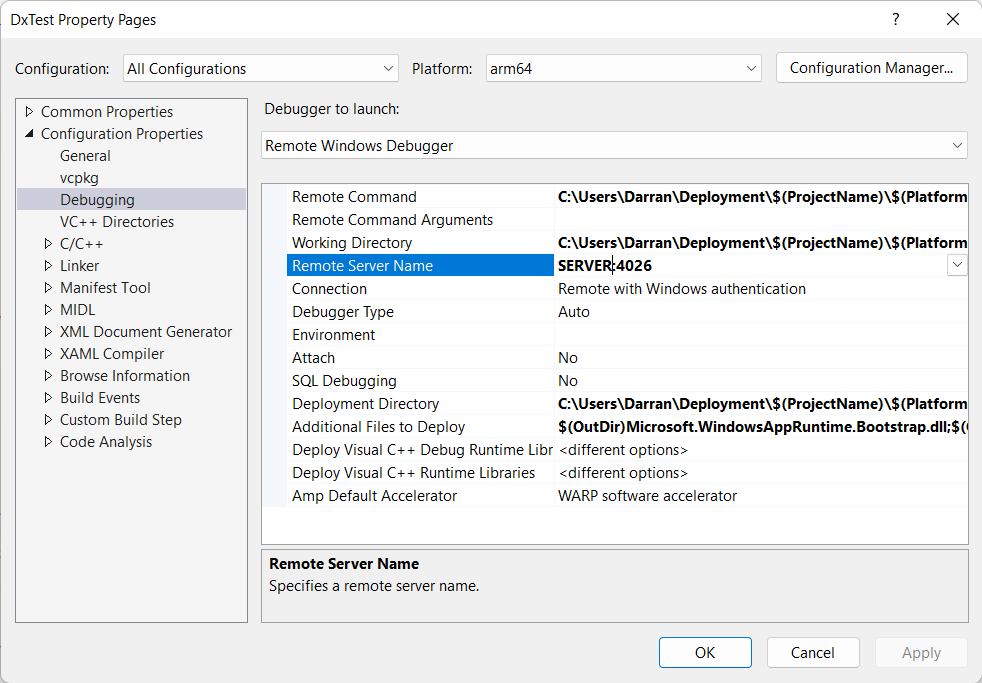
This is the same project set to target the ARM64 platform. The project, still unpackaged, is configured to deploy the files through the remote debugger. The important thing is that you have to specifically configure Visual Studio to deploy in the debugger options:
Another reason why the project could deploy is if an application is packaged:
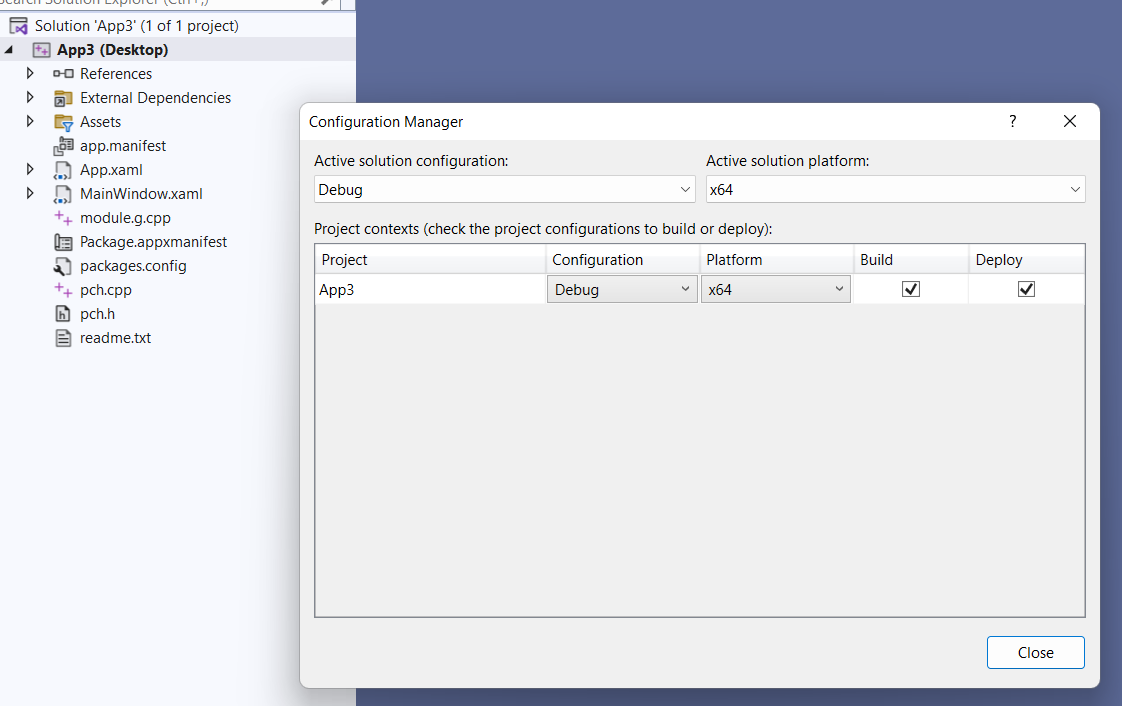
The presence of the package.appxmanifest in the project files means that it is packaged. The deployment is then used to install the packaged application.
So why is your application deploying? Is it actually packaged? Is it deploying using the remote debugger? Is there some other non-default option set which is enabling the deployment?

I used the template named "Blank App, Packaged (WinUI 3 in Desktop)" to create the app project. So, there is a file named "Package.appxmanifest" and the "Deploy" checkbox is enabled for my project and it is ticked. Once I'm able to run the app via debugger the result is a start menu entry with which I can start the app.
Right, so it is a packaged application, not unpackaged like the original post stated. As stated, the deployment for a packaged application is where the application is installed.
If you don't need the application to be packaged, then you can convert it to an unpackaged project. The Microsoft documentation indicates how you should do this.
Is there any way to debug this so that I can at least figure out what the underlying problem is?
Visual Studio's Build > Build/Rebuild/Clean Solution commands eventually invoke the MSBuild targets Build, Rebuild and Clean. That way I can dig into the build process that is executed when I build. But I'm clueless what is going on behind the Build > Deploy Solution command. Is there a way to go through the steps that are executed when this command is running?
I'll have to double check, since it would be in the MSBuild stuff, but it should essentially be Add-AppxPackage. In particular, Add-AppxPackage with the -Register parameter.

@DarranRowe Is there a chance that someone from Microsoft looks into this issue soon? I'm stuck with debugging it because I'm not finding anything in the MSBuild process which makes me think that Build > Deploy Solution is wired up in Visual Studio itself.
VS F5 registers the package using the project's $(OutDir), equivalent to
Powershell -c Add-AppxPackage -Register $(OutDir)\appxmanifest.xml
Or
var uri = new Uri("$(OutDir)\appxmanifest.xml"); PackageManager.RegisterPackageByUriAsync(uri, new RegisterPackageOptions(){ DevelopmentMode=true });
But...VS F5 tries to optimize "run now now now" so it doesn't register the package if it thinks changes don't affect registration. Thus if you fix a null pointer deference and recompile there's no change to registration info so F5 won't (re)register the package.
It's sounds like this may be the source of your discrepancies.
I don't know all the conditions VS chooses to/not register the package on F5 and I don't know if VS has ever documented the details. As you might guess, this is a Visual Studio implementation detail and not WinAppSDK, Windows or MSIX. If you'd like to know more I suggest following up on one of VS' support forums.

@DrusTheAxe Thanks for the insights you provided. I have opened a corresponding Visual Studio bug here.
Due to discussion, it's a VS F5 experience issue, hence closing this issue.
