
WindowsAppSDK
 WindowsAppSDK copied to clipboard
 microsoft
Make Sideloading easier
Proposal: Make Sideloading easier
Sideloading an app should be as easy, if not easier than installing an app through a regular installer. Users should not have to go through installing a certificate in order to Sideload an app, just like they don't when installing a traditional desktop app. It makes the Microsoft Store the only consumer-friendly place to host packaged apps, but what if the app breaks Store Regulations or is an older version of the app?
With WinUI3 Desktop apps, it seems ever so important to make this happen as a lot of these apps will likely break Store Regulations.
Why can't we have something as simple as a popup saying "This app is not signed and could be dangerous. Do you wish to proceed?", or un-ideally but better than nothing, something like macOS.
Rationale
- It allows pretty much any user to Sideload apps, not just the few that know how to install a packaged app's certificate.

@dynamiquel Please see the following comment: https://github.com/microsoft/ProjectReunion/issues/57#issuecomment-637614754. There it says Microsoft plans on launching a free of charge MSIX-signing service sometime “this summer.” Once this is available for use, anyone can obtain a trusted cert from this service that won’t need to be manually installed. Hope this helps!

That sounds good. I'm kinda surprised they're making an entirely new service, surely they could have used a service similar to the Microsoft Store. Like, give every Windows & Xbox partner a certificate?
Users should not have to go through installing a certificate in order to Sideload an app
They don't. By default, Windows trusts a lot of Certificate Authorities and you can purchase a certificate from any one of them and sign your apps (just like you'd sign any regular Win32 app as well). That said, signing is an extra step that can "get in the way" if you just want to (e.g.) build a quick app and hand it to a friend or co-worker sitting right next to you.
So in terms of scope, are you specifically thinking of mass-distribution of an application to the general public, or are you thinking more about sharing directly with a small number of people who already trust you personally, or maybe developer scenarios where developers are more likely to understand the trade-offs of running unsigned software?

So in terms of scope, are you specifically thinking of mass-distribution of an application to the general public, or are you thinking more about sharing directly with a small number of people who already trust you personally, or maybe developer scenarios where developers are more likely to understand the trade-offs of running unsigned software?
I believe he meant "Mass-distribution of an application to the general public", just like the way they install a regular win32 app and they dont need to bother about installing certificates or what not. This is all every UWP devs want.

One of the feature users ask a lot is ability to install apps as "Portable Apps" (Install app on an external drive once and being able to use the app in any user account or any pc, and the all the app data is stored in the installed location). May be this could be worked upon in reunion.

@m98770 / @dynamiquel what do you see as the value of building a packaged app (vs. a normal unpackaged app) if the package is not going to be signed?
@soumyamahunt please open another issue for that suggestion.
@m98770 / @dynamiquel what do you see as the value of building a packaged app (vs. a normal unpackaged app) if the package is not going to be signed?
@soumyamahunt please open another issue for that suggestion.
It's a simple one click installer and uninstaller. It also makes installing/uninstalling consistent within the Windows eco-system as more developers publish with it.
Is it possible to have an unpackaged UWP app? I always thought packaging was just part of the process.
Not currently, no. But the goal of Reunion is to make the "UWP features" available to all apps. Which specific UWP features are you looking to use?
I haven't spent that much time with UWP, but WinUI 3 and the libraries they can access (such as RoamingStorage) seems to hit most boxes (for me anyway). I haven't checked if this can work, but WinUI 3 Desktop apps as Game Bar widgets? Not really that important though.
My previous comment was in reference to:
@ptorr-msft what do you see as the value of building a packaged app (vs. a normal unpackaged app) if the package is not going to be signed?
If UWP apps have to be packaged, then unsigned UWP apps could also benefit from easier Sideloading.
One question I've always wanted to know, is WebView 2 coming to actual UWP or is it only for Desktop?
WinUI 3 is designed to work with desktop apps, but unfortunately roaming storage has been deprecated. GameBar has a hosting model that I'm not too familiar with. WebView 2 for UWP is in preview.
Personally, I’d be open to graduated MSIX signing requirements based on the “riskiness” of the packaged application. Sandboxed AppContainer applications are much safer than arbitrary Win32 apps - a good start might be to relax signing requirements for those first.
I do strongly agree with the general thrust of this issue - signing is one of the tallest hurdles for native Windows development. I’m excited about the forthcoming Azure signing service in a professional capacity, but even that will be too much effort for many hobbyists.
The ease of sharing what you build with friends+family is a huge part of web development’s appeal. I worry about the long-term health of native Windows development without a similarly easy sharing+distribution story to attract new developers. MSIX feels like it’s almost there but the signing requirement is a big limitation.

Speaking of websites, in general do you think that "hobbyists" / people who primarily share with friends & family use SSL on their websites? (As more features are added as web standards, it does become strange that you can do X in a website but not with sandboxed native code... although things like "being a PWA" do require an SSL-protected site).
That’s a good question, I’m not sure. Running your own SSL certificate is certainly difficult, but many people can leave that to their web host and/or Let’s Encrypt.
I’ve used Let’s Encrypt via Netlify to secure my static websites, and Let’s Encrypt/Certbot on its own to secure ASP.NET Core APIs. Both were remarkably easy+cheap compared to code signing on Windows.
I'm going through the process of verifying my identity to purchase a code signing certificate and it is being a real pain in the ass. I'm a student that still lives with my parents so many of the documents that are required (like utility bills to verify my residence location) are in my parent's name. They also want a mobile phone bill, but since I'm on a prepaid plan my carrier does not emit bills. They want a government issued ID with my address: the only one I have is my passport (I don't have a drivers license since I use public transport) but they denied that because on Canadian passports the address is handwritten!
Their support is also not being really useful, consistent, or clear.
Not to mention that they are expensive in general. It cost me 200 for 3 years.

Windows allows installation of unsigned non-packaged apps. Not allowing unsigned packaged apps makes them inferior to non - packaged. Give unsigned packaged apps a generic or arbitrary publisher identity and let them install without a certificate. This should be allowed as along as non-packaged apps have that freedom.

I would rather see a mechanism for small developers to get code signing certs inexpensively than a move towards not requiring signing. Signing helps improve confidence in apps and the Windows ecosystem in general, and being tied to a real-world identity likely discourages some bad behavior.

I would rather see a mechanism for small developers to get code signing certs inexpensively than a move towards not requiring signing. Signing helps improve confidence in apps and the Windows ecosystem in general, and being tied to a real-world identity likely discourages some bad behavior.
Windows already has the ability to install unsigned packages (by self-signing the package on your own machine) but when compared to macOS, it's annoyingly much more complicated to do.
I was mainly thinking of a feature that simplifies the self-signing process for (slightly tech-literate) users, but still shows the dangers of doing so. Perhaps something like these message prompts:
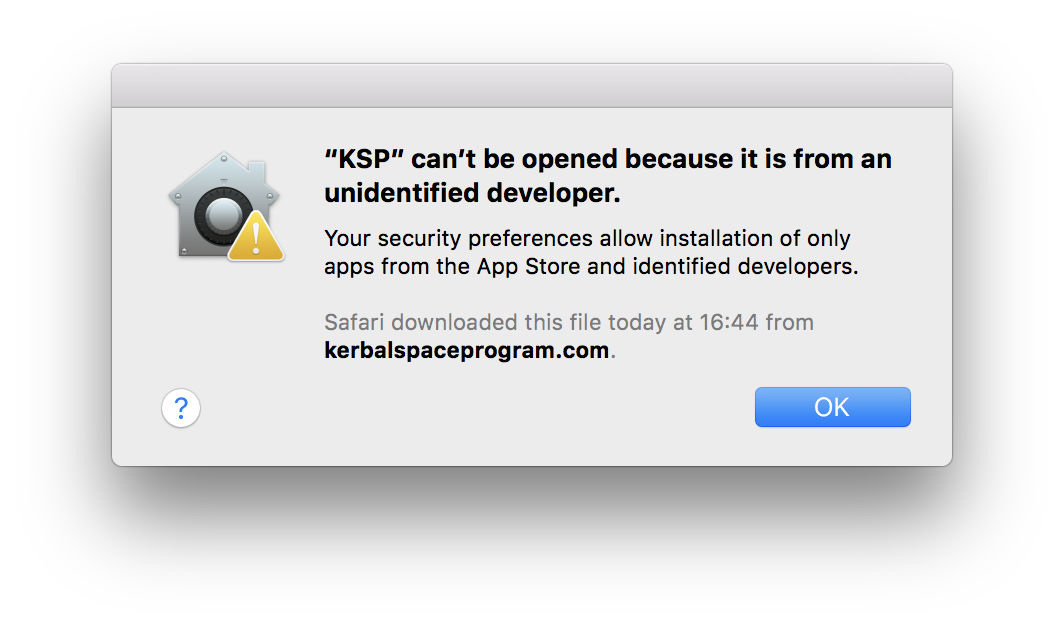
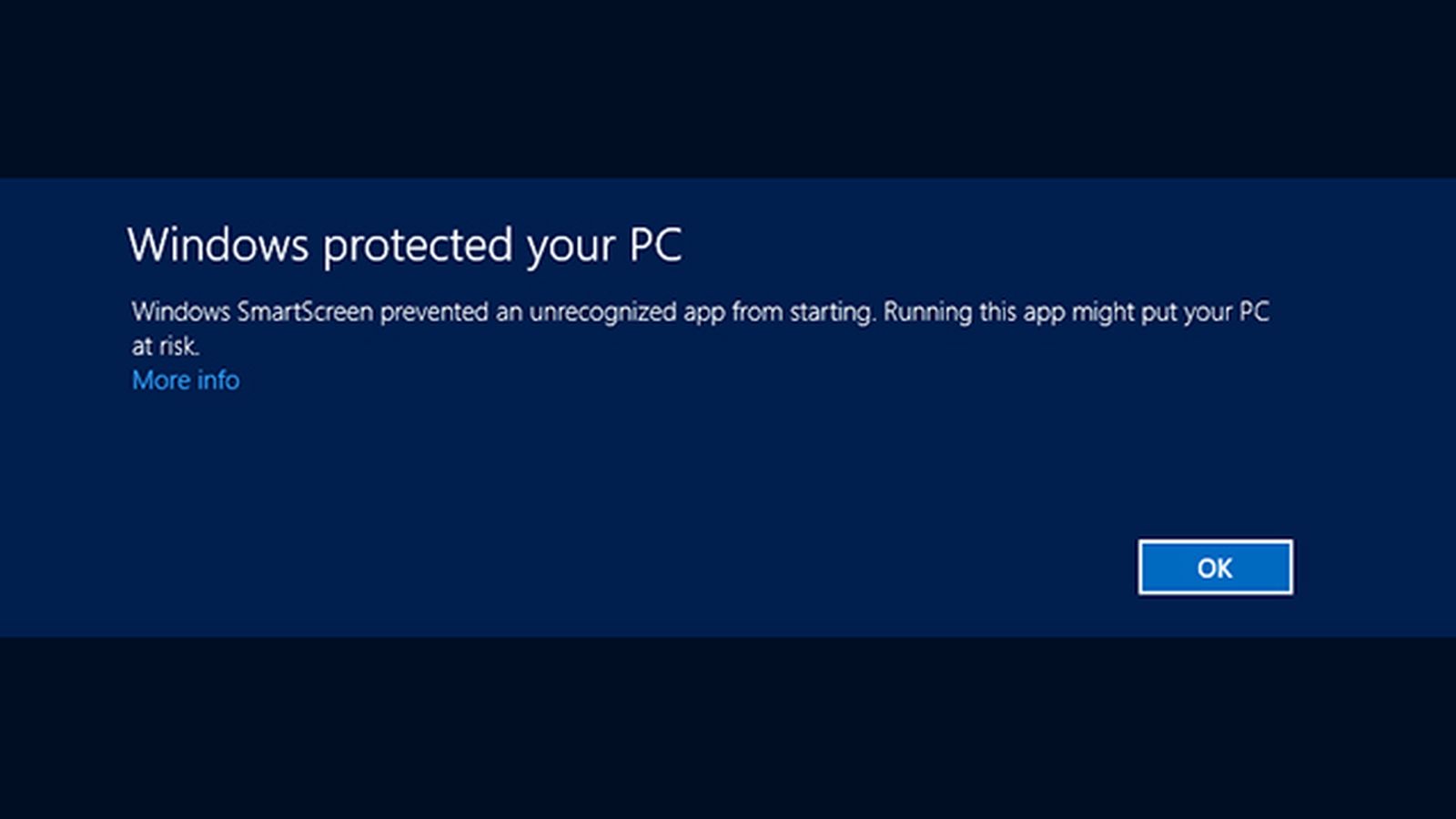

Hiding the 'install anyways' button under a small little 'More details' hyperlink would be a great way of adding a barrier of entry, as most tech-illiterate users will not know pressing this link will proceed with the installation.
I'd say the scarier the prompt, they more developers will be encouraged to sign their apps.
Just like every OS, aside from iOS, every user should have the choice to install what they want, as long as they are aware of the risk
Windows can't really install unsigned packages. The only way is to enable developer mode and to register an already extracted package. Developer mode doesn't allow you to bypass the signature requirement on .msix files.

@Jaiganeshkumaran first of all I shouldn't have to go through a painful, convoluted, and expensive process to acquire a code signature certificate that allows me to distribute my packages.
@sylveon You can create a console application or a portable desktop application that first copies your certificate to Trusted People or Trusted root store and then installs the package by downloading it.
@sylveon Many desktop applications use .exe installers rather than .msi installer so you can do something similar.
But they don't install arbitrary certificates into the computer's ultimate root of trust.
@Jaiganeshkumaran you are missing the point here, the whole point is making side loading easier. Why should anyone choose msix if they can write an installer themselves?? The whole point of MSIX was it makes installation simpler both for user and developer.
@sylveon You can use Trusted People instead or Trusted Root. Last time I tried it works. Users will not know.