

 microsoft
How to do parallel testing using WinAppdriver?
Hi Team,
My problem statement :
1.Execute the test cases of two different window applications like Notepad , Alarm clock at the same time in parallel way? 2.Execute the test case of two different window applications like Notepad , Alarm clock linearly i.e one after another?
Note: I am currently using testng , java .
Please help.
Regards, Ankush

Hi Team, Please help how can we do parallel testing and testing in headless mode using winAppDriver.
Regards, Ankush
Hi @testingsdk1,
Running tests in parallel with WinAppDriver is not something that is recommended. Unlike functional tests, UI tests rely on replicating user interactions through different input methods such as the mouse and keyboard. With the Windows architecture, there is one keyboard input, one mouse input. While there are multiple windows, only the one with focus will get the input from the keyboard. So if a test is running and getting keyboard input and another test tries to run in parallel and get the system focus, the input will now be routed to the second even though it might be sent from a different test. The same is true of mouse interactions. A test doing mouse operations can easily be interrupted and confused by another test trying to do mouse interactions at the same time.
Think of each test as a user sitting in front of the computer. If you have 2 tests running in parallel, you would have two people sitting at the same mouse and keyboard each trying to interact with their own application and fighting for the behavior they expect.
You might want to look at issue #515 which addresses this issue.
Thanks ~Gilles

Hi khouzam,
Thank you. Can we do testing of window applications in headless mode?
Regards, Ankush
Hi @testingsdk1,
It really depends what you mean by headless mode. You should take a look at our FAQ for CI systems: https://github.com/Microsoft/WinAppDriver/wiki/Continuous-Integration-with-WinAppDriver
You do need to have an active session otherwise, Windows will not route the input to the application (when a session is locked or if running as a service).
Hi khouzam,
I meant that can we do execution when the windows application is not in focus. Like it happens in the case of selenium.
Regards, Ankush
Hi @testingsdk1, we don't have a headless mode. That's a browser construct that we don't have an equivalent for with native apps.

I suppose you should be able to make it work the way Selenium Grid works. Did you try?

it works well with selenium grid. tried it on one system. I made one system hub and same system node.
On Tue, Mar 12, 2019 at 10:54 PM Naeem Akram [email protected] wrote:
I suppose you should be able to make it work the way Selenium Grid works. Did you try?
— You are receiving this because you were mentioned. Reply to this email directly, view it on GitHub https://github.com/Microsoft/WinAppDriver/issues/592#issuecomment-472099653, or mute the thread https://github.com/notifications/unsubscribe-auth/AgYTgp5sezHVJBwWi6uSaZwn65CQXlKAks5vV-LdgaJpZM4atmir .
parallel testing was only achieved when we run single instance of application across different nodes or systems.
On Wed, Mar 13, 2019 at 12:46 PM ankush vashist [email protected] wrote:
it works well with selenium grid. tried it on one system. I made one system hub and same system node.
On Tue, Mar 12, 2019 at 10:54 PM Naeem Akram [email protected] wrote:
I suppose you should be able to make it work the way Selenium Grid works. Did you try?
— You are receiving this because you were mentioned. Reply to this email directly, view it on GitHub https://github.com/Microsoft/WinAppDriver/issues/592#issuecomment-472099653, or mute the thread https://github.com/notifications/unsubscribe-auth/AgYTgp5sezHVJBwWi6uSaZwn65CQXlKAks5vV-LdgaJpZM4atmir .
Cool, that means we can reduce overall test execution time using multiple machines. Although I guess it won't be possible to pass data from one test to another test.
Asked for this feature with Hyper-V integration years ago. https://github.com/Microsoft/WinAppDriver/issues/132

Hi team !
Is there any update?
Currently , I'm trying to use grid(1 machine is hub and other is node) as first stage parallel test execution we use Appium with WinAppDriver in our project and main obstacles is run Appium node on remote machine from hub machine .
I've used tool psexec for starting appium node on remote machine
C:\psexec.exe -i \\192.168.0.107 cmd /с appium -p 4723 -a 192.168.0.107 --log-level info --nodeconfig C:\Node.json
as a result UI of CMD looks like broken
 But expected is next;
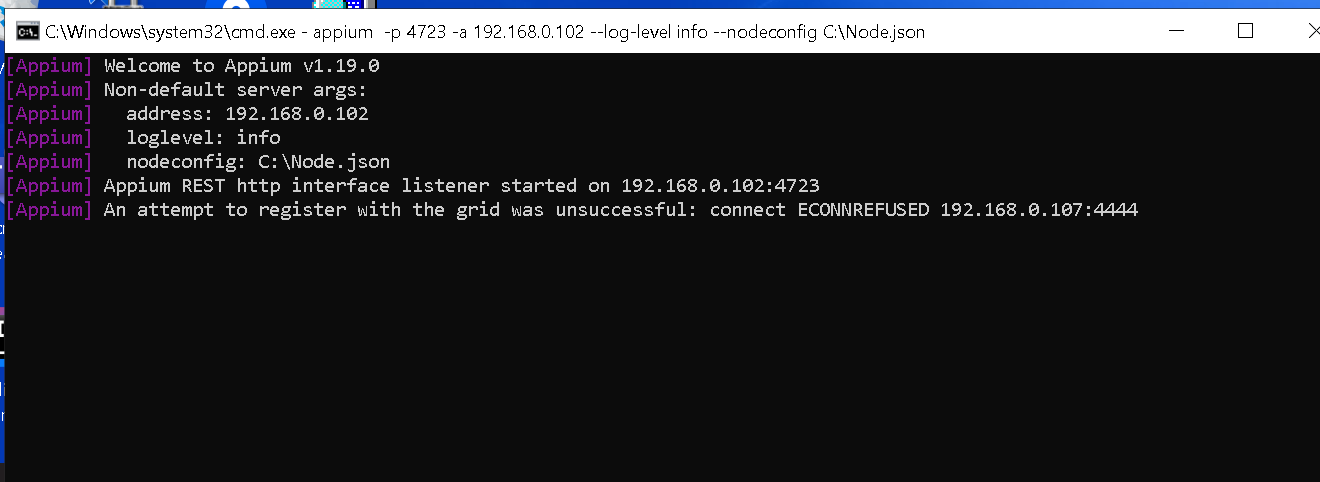 As a result application starts with black screen as well and driver can't click anywhere perhaps anyone faced similar issue
I have tried run node on remote machine via PowerShell but result is same
As a result application starts with black screen as well and driver can't click anywhere perhaps anyone faced similar issue
I have tried run node on remote machine via PowerShell but result is same

Hi, My case is the opposite, it is by default running in parallels and i want to configure the winappdriver to run sequentially can you help?

@khouzam Thank you so much for your help! Your comment really cleared things up for me.
I have a follow-up question: I'm running automation tests with WinAppDriver in sequence. For each test case, I need to log in first. After each test, I close the app and reopen it for the next test. However, if the app crashes during a test (for example, if TC1 fails and the app crashes), the next test (TC2) won't run, correct?
Is it the right approach to reopen the app and run the next test in this case?
