

 microsoft
Error raised when launching the app: Specify either app or appTopLevelWindow to create a session
I am trying to launch my test with the following capabilities:
{
  "capabilities": {
    "firstMatch": [
      {

      }
    ],
    "alwaysMatch": {
      "appium:app": "C:\\AeroScoutEngineManager\\bin\\Rte\\EngineManager.exe",
      "appium:winAppDriverHost": "127.0.0.1:4723",
      "platformName": "Windows",
      "appium:platformVersion": "10",
      "appium:automationName": "Windows",
      "appium:appArguments": "ShellLayout.xml ShellCnf.xml",
      "appium:appWorkingDir": "c:\\AeroScoutEngineManager\\bin\\Rte"
    }
  }
}
My application must be launched with the arguments above. from that specific path.
The error I am getting is:
Windows Application Driver listening for requests at: http://127.0.0.1:4723/
Press ENTER to exit.


==========================================
POST /session HTTP/1.1

Accept: application/json

Accept-Encoding: identity

Connection: keep-alive

Content-Length: 387

Content-Type: application/json;charset=UTF-8

Host: 127.0.0.1:4723

User-Agent: appium/python 2.6.0 (selenium/4.3.0 (python windows))

X-Idempotency-Key: 4479771e-d340-492a-9486-c96fe20d15c2


{"capabilities": {"firstMatch": [{}], "alwaysMatch": {"appium:app": "C:\\AeroScoutEngineManager\\bin\\Rte\\EngineManager.exe", "appium:winAppDriverHost": "127.0.0.1:4723", "platformName": "Windows", "appium:platformVersion": "10", "appium:automationName": "Windows", "appium:appArguments": "ShellLayout.xml ShellCnf.xml", "appium:appWorkingDir": "c:\\AeroScoutEngineManager\\bin\\Rte"}}}
HTTP/1.1 400 Bad Request

Content-Length: 141

Content-Type: application/json


{"status":100,"value":{"error":"invalid argument","message":"Bad capabilities. Specify either app or appTopLevelWindow to create a session"}}


==========================================
POST /session HTTP/1.1

Accept: application/json

Accept-Encoding: identity

Connection: keep-alive

Content-Length: 387

Content-Type: application/json;charset=UTF-8

Host: 127.0.0.1:4723

User-Agent: appium/python 2.6.0 (selenium/4.3.0 (python windows))

X-Idempotency-Key: e71805eb-5c48-40b8-8a38-c45b801d244d


{"capabilities": {"firstMatch": [{}], "alwaysMatch": {"appium:app": "C:\\AeroScoutEngineManager\\bin\\Rte\\EngineManager.exe", "appium:winAppDriverHost": "127.0.0.1:4723", "platformName": "Windows", "appium:platformVersion": "10", "appium:automationName": "Windows", "appium:appArguments": "ShellLayout.xml ShellCnf.xml", "appium:appWorkingDir": "c:\\AeroScoutEngineManager\\bin\\Rte"}}}
HTTP/1.1 400 Bad Request

Content-Length: 141

Content-Type: application/json


{"status":100,"value":{"error":"invalid argument","message":"Bad capabilities. Specify either app or appTopLevelWindow to create a session"}}
==========================================
What is the problem?
Thanks!

Are you using the latest release of Appium? if yes then you need to downgrade as WAD is not w3c compliant yet.

Are you using the latest release of Appium? if yes then you need to downgrade as WAD is not w3c compliant yet.
Can it work with Selenium v4? I've upgraded to latest version of Appium in a way for it to work with Selenium v4.

@anunay1 I am bit confused, I am running with appium version 1.22.3 and these are my python libs:
setuptools==63.2.0
Appium-Python-Client==2.6.0
configparser==5.2.0
requests==2.28.1
pyserial==3.5
robotframework==5.0.1
selenium==4.3.0
robotbackgroundlogger==1.2
robotframework-metrics==3.3.3
webdriver-manager==3.8.1
What lib version is wrong?
@anunay1 I downgraded to selenium 3.141.11 but I am still facing the same error
@anunay1 I really need your advice, I downgraded to selenium 3.141.1 but I am still facing the same error.
@anunay1 No, I don't have a splash screen, I must say that I am getting the same error when trying to launch notepad.
@anunay1 sure, what about zoom: https://stanleyblackanddecker.zoom.us/j/97591280882?
I am there.
Problem was related to Appium-Python-Client lib version, I had to downgrade from 2.6.0 to 2.2.0 and the issue solved.
In addition to downgrade Selenium version 3.141.1
(Thanks @anunay1)
I am also facing the same issue, but as mentioned above, I have downgraded the Appium-python-client lib version to 2.2.0 but for the selenium, I couldn't find the 3.141.1 version.

uninstalled the previously installed selenium version by pip uninstall selenium and then I am trying to install the selenium 3.141.1 version using pip install selenium==3.141.1 but getting this error - ERROR: Could not find a version that satisfies the requirement selenium==3.141.1
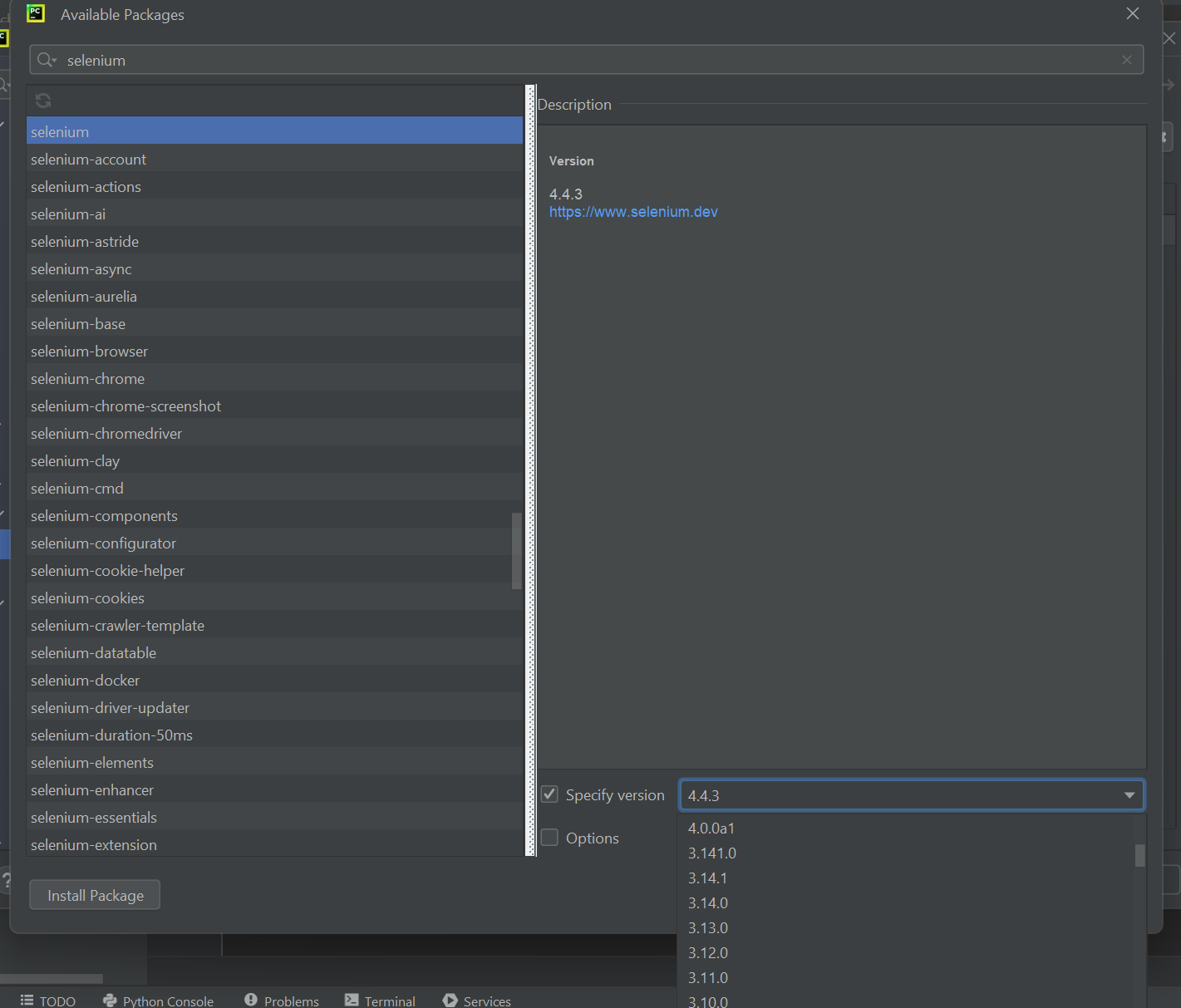
Hey, I am trying to launch outlook using winappdriver but i am not able to do that. I am new to python and winappdriver both. not sure what's wrong. i ran the calculator program and its working fine but not any Office app. @anunay1 can you please help me
Hey, I am trying to launch outlook using winappdriver but i am not able to do that. I am new to python and winappdriver both. not sure what's wrong. i ran the calculator program and its working fine but not any Office app. @anunay1 can you please help me
What's the error?
selenium.common.exceptions.WebDriverException: Message: Bad capabilities. Specify either app or appTopLevelWindow to create a session
@Shilpiiiii what are your python versions of Appium-Python-Client and selenium? from my experience with that error you need to downgrade these libs versions
@anunay1 After reading this thread, I want to make sure I understand correctly...
WinAppDriver is not W3C compliant yet? And due to this, there might be gaps in API with new versions of Appium? Our team is currently on Appium "appium": "2.0.0-beta.41" due to some compliance issues with packages that Appium v1 brought in.

I got - "appium-python-client 2.2.0 requires selenium~=4.1, but you have selenium 3.14.1 which is incompatible." ??
Problem was related to Appium-Python-Client lib version, I had to downgrade from
2.6.0to2.2.0and the issue solved. In addition to downgrade Selenium version3.141.1(Thanks @anunay1)

Answering my own question: I'm on Win11 so this only works on Win10 as well.