

 microsoft
WinAppDriver is not running using task scheduler
WinAppDriver when run through task scheduler, it is running in the background with the specified port number passed as argument. But the events from the test cases are not captured and they are failing. WinAppDriver only works when it is run manually by a user logged under an active session
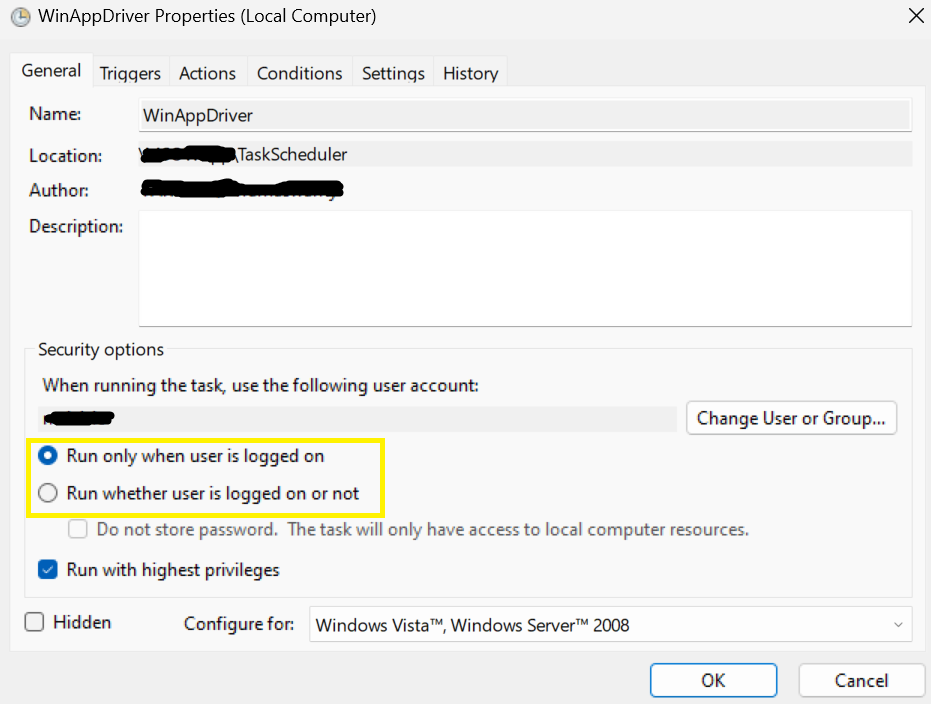

This likely has to do with the fact that WinAppDriver can not run without at least some active host machine. Windows tests are different than selenium tests, they need at least some connection to a GUI to function.
Ive pasted a comment I made on a similar question - essentially you need a host VM hosting whatever machine you run this on
"Sounds to me like you may not have your VMs configured for windows UI tests. You will need atleast a minimized RDC session so the VMs can inherit the GUI.
I don't know what your CI/CD pipeline is like, but for us we have a VM which acts as the host. On that we use hyper v to connect to our UI test VMs. These are then minimized on the host. They HAVE to be minimized, an active connection must be there so the GUI can be used.
You can disconnect from the host no problem, so just make sure atleast one of your VMs is dedicated as the host.
Here is an easy to read article on how to configure your host VM for minimized RDC sessions https://support.smartbear.com/testcomplete/docs/testing-with/running/via-rdp/in-minimized-window.html
You can even do this locally, and then just have that minimized while you go about your business"
