

 microsoft
WSL 2 consumes massive amounts of RAM and doesn't return it
-
Your Windows build number: 18917
-
What's wrong / what should be happening instead: WSL 2 starts using huge amounts of RAM after a while, just using it like normal. At the moment I'm using phpstorm, and did a dump/load of a database.
Vmmemis using 7 GB of my 16 GB of RAM and not returning any, even though Ubuntu is actually using much less. I have seen it grow until nearly 100% of my system memory is in use, and it will not release it until I shut down the WSL 2 VM.
This may or may not be related to #4159
corey@Corey-Laptop:/mnt/c/WINDOWS/system32$ vmstat -s
     15235516 K total memory
       920348 K used memory
      1886048 K active memory
      6434312 K inactive memory
      6606548 K free memory
        76280 K buffer memory
      7632340 K swap cache
            0 K total swap
            0 K used swap
            0 K free swap
       163729 non-nice user cpu ticks
          298 nice user cpu ticks
        13177 system cpu ticks
     68988300 idle cpu ticks
         8962 IO-wait cpu ticks
            0 IRQ cpu ticks
        10022 softirq cpu ticks
            0 stolen cpu ticks
      1481417 pages paged in
      6792976 pages paged out
            0 pages swapped in
            0 pages swapped out
      1079177 interrupts
      5131981 CPU context switches
   1560599814 boot time
         8772 forks


After moving to WSL2, VmMem seems to be constantly pegging my CPU. Please see attached screenshots.
Anything I can do to help your team troubleshoot?
Relevant details:
- Ubuntu 18.04 and Debian on WSL2, but none are running anything at the moment.
- Windows insider build 18917.1000 on Macbook Air (8 GB, 4 proc).
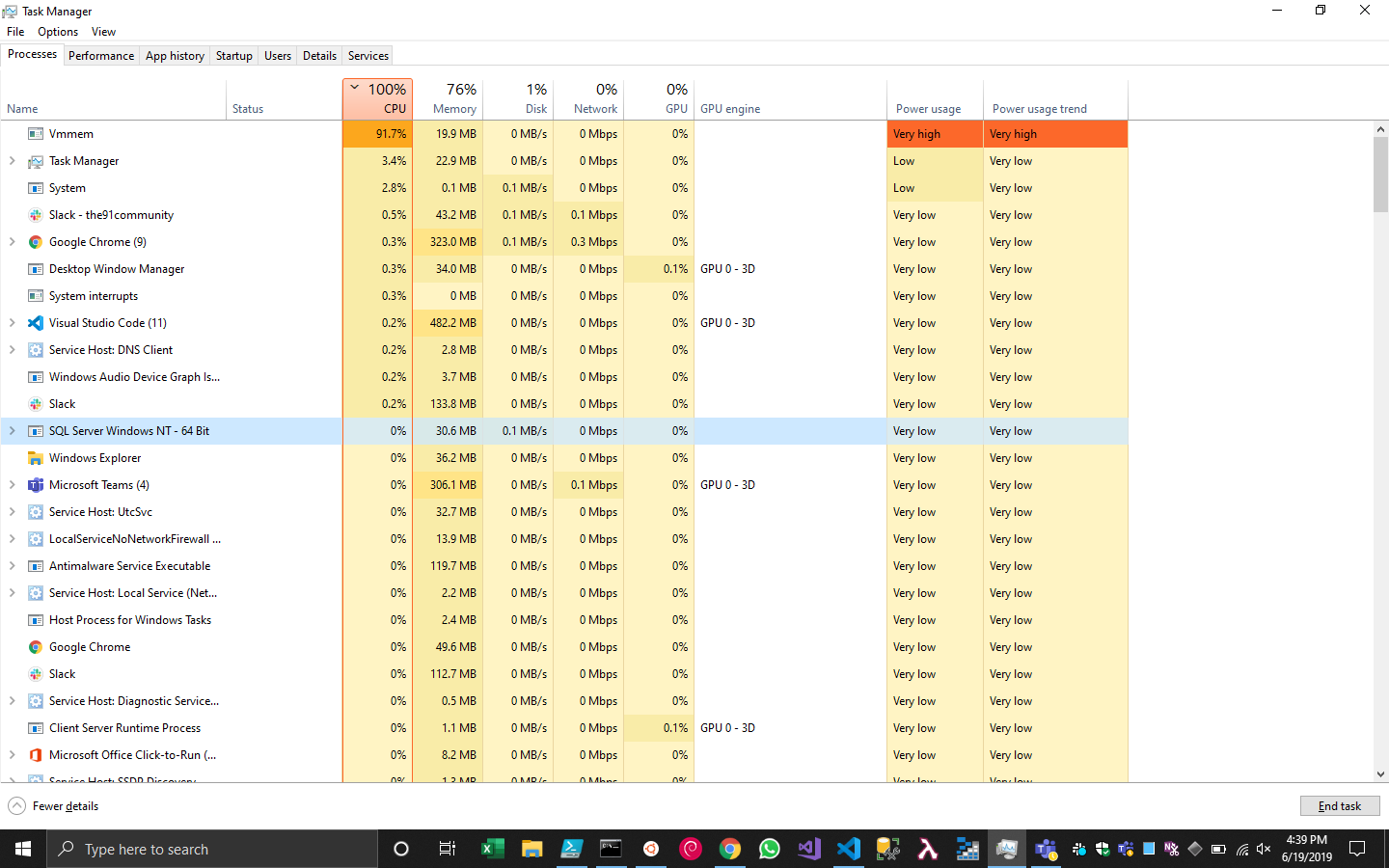


After moving to WSL2, VmMem seems to be constantly pegging my CPU. Please see attached screenshots.
I'm experiencing this too. It happens every time I run wsl after some elapsed time (varying from minutes to hours). It continues regardless of what's running in wsl, and I need to issue a wsl --shutdown to stop it.
Windows insider build: 18922.1000 Linux distro: 18.04
I assume this really belongs in a new issue, but wanted to group my comment with that of @mithunshanbhag so I'll leave it here.

Hi, Same problem here. Lots of memory consumption with WSL2, nodejs app and VS Code with Remote - WSL while very low consumption in WSL1 with the same tasks.


@benhillis - Do we have a rough ETA on the fix? I'm actually hitting OOM issues on a machine with 32 gigs while just running a normal ninja build that should succeed.
Build 18955

@zachChilders - ETA on this one is a bit hard unfortunately. Certainly before WSL2 ships to non-insiders.
Can confirm this on 18963 as well. WSL 2 ate most (29GB+ of 32GB) of my RAM after less than 15 minutes of uptime for no good reason; all I've done is a rsync from the host NTFS volume to the ext4 volume, and an apt-get update.


I can confirm the same issue on Microsoft Windows [Version 10.0.18963.1000]
C:\Users\david_d>wsl -l -v NAME STATE VERSION
- Ubuntu-18.04 Running 2 Ubuntu Stopped 1

I at the time was running gdb

how about a workaround? this just started happening for me (with 18965) and it has effectively killed my WSL 2 environment

Depending of your usage, nocache utility can be used as a workaround to greatly reduce WSL 2 memory consumption, especially if whatever you're running inside it does a lot of filesystem operations...

thanks! nocache has changed my env from "completely broken" to "merely sucks"
thanks! nocache has changed my env from "completely broken" to "merely sucks"
Hi, could you explain how nocache should be used?

Hi @benhillis , any update on when a fix for this might be deployed to insiders? My 8gb of ram is really getting hammered by this issue... :(

I wrap compilations in nocache to keep limping along. wrapping nocache around a shell works, but breaks emacs. I've also ordered more RAM :-(
Sorry no firm timeline, certainly before WSL2 is out of Insider builds though.
Hi @benhillis , do you have a workaround you could recommend though ?

Well...I need it all day long and the memory consumption goes crazy after only a few minutes (using docker and a quite heavy stack: elastic search, lots of workers, some databases etc). So...not an option unfortunately. Maybe go back to linux while it is not fixed 😎
I am facing the same issue. Is there any workaround (except shutting wsl down) for this @benhillis ?

Not currently. For some additional context this change requires some changes to the Linux kernel that are in the process of being upstreamed. We will be integrating these changes into the WSL2 kernel as soon as we can.
Workaround: Create a %UserProfile%\.wslconfig file in Windows and use it to limit memory assigned to WSL2 VM.
Example
[wsl2]
memory=6GB
swap=0
localhostForwarding=true
This will still consume the entire 6GBs regardless of Linux memory usage, but at least it'll stop growing more than that.
Supported settings are documented here.

Hey @apostolos, got here from Google after running into the memory leak issue in my WSL2 instance. I'm on build 18970 and I created a .wslconfig file in my home directory as follows:
[wsl2]
memory=2GB
swap=0
localhostForwarding=true
but it doesn't seem to have any effect on the memory actually allocated by the instance - right now I'm running a compile job and it's at 5.6GB allocated and climbing. Do I have to reboot or do something else to get WSL2 to detect the configuration?

@apostolos @pikajude didn't work for me either. Ditched WSL 2 for now due to that.

@arthurgeron and @pikajude I created a .wslconfig file this morning and it's been working for me. Did you run wsl --shutdown to fully restart WSL?

@joemaller which build are you on? I've run wsl --shutdown many, many times since creating the config file. Also what distro?
@pikajude Oh so many times... I'm running build 18970, with the unlabeled Ubuntu (18.04.3 LTS), clean installed yesterday