microsoft
Intellisense chooses schema so fast
TS Template added by @mjbvz
TypeScript Version: 5.0.1-rc
Search Terms
Does this issue occur when all extensions are disabled?: Yes
- VS Code Version: 1.72.2
- OS Version: Windows10
Steps to Reproduce:
- Declare below code:
declare class MyClass {
	addObject(config: {
		type: "Triangle",
		base: number,
	});

	addObject(config: {
		type: "Circle",
		diameter: number,
	});
}

const myClass = new MyClass();
-
Now when you want to use
addObjectmethod and check possible options fortypeall works well, like below:
-
Make parameters
baseanddiameteras optional, so declare below code:
declare class MyClass {
	addObject(config: {
		type: "Triangle",
		base?: number,
	});

	addObject(config: {
		type: "Circle",
		diameter?: number,
	});
}

const myClass = new MyClass();
Now, until I write type parameter, all works well, because I see, that possible values for type are Triangle and Circle:
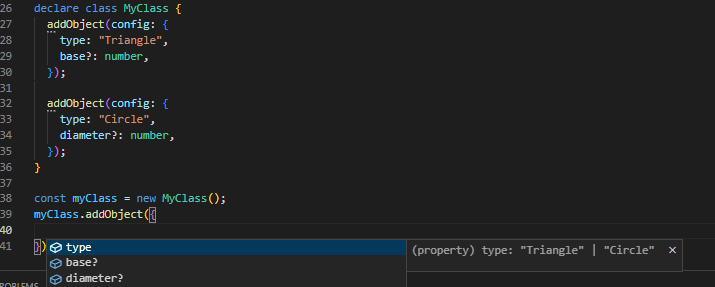
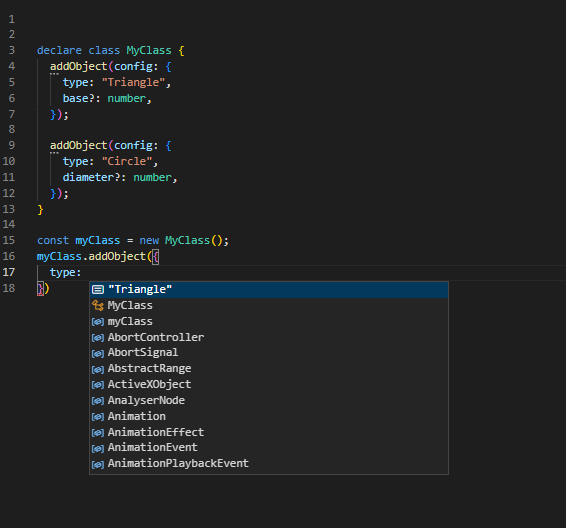
but after writing type, Intellisense decided to chose first option, and I don't see another possible values to choose, although they have correct schema still and could be possible to select also:

Thanks for creating this issue! It looks like you may be using an old version of VS Code, the latest stable release is 1.76.2. Please try upgrading to the latest version and checking whether this issue remains.
Happy Coding!

can confirm the aforementioned behavior
 but if you add double quote then ctrl+space the suggestion comes back correctly

An omitted expression like this is replaced with any so the overload selection mechanism essentially checks if the provided argument with type { type: any } is assignable to the param with type { type: "Triangle"; base?: number | undefined; }. This succeeds so the first overload gets selected.
Fixing this might require some effort/a different approach to how completions are provided in cases like this. Note that, for example, getStringLiteralCompletionsFromSignature is already using a different - overload-capable~ - strategy to provide completion directly at argument positions. This one is nested in the argument and thus a simpler approach of getContextualType is used here.