

 microsoft
Order member intellisense by inheritance
Suggestion
I would like to see an optional way to allow the members of an object be displayed in the order in which they are inherited. In other words, the members should be listed from most specific to most general. Subclasses before superclasses. Perhaps a user could have this be their default intellisense behavior, or there could be a key-press to toggle this behavior.
Use Cases
In several systems I've either worked in or looked at, I found myself thinking that it would be beneficial to order members by their order of inheritance. Consider this case: You have a Node in TypeScript or ESLint, and you narrow it to a certain kind of Node, for example, a CallExpression. You narrowed it to a CallExpression type because you want to do something specific to the Node only if it is the CallExpression type. You probably want to call a certain method or access a certain member which did not exist on Node but exists on CallExpression. As far as I'm concerned, the most important members in any particular object are the ones most recently inherited. If I only needed the information from Node, I would not have needed to narrow the type. Hence, I would like to see members from subclasses prioritized over members from superclasses.
Often times when working in a system where objects have tons of methods and properties, I find myself putting the ts.CallExpression type somewhere so I can go-to-definition and look for myself what the "latest" methods are for a narrowed object. Here's a little reenactment of what I've actually done during development many times:

This example actually uses ts-node, which, as a side effect of being a wrapper for TS, wraps properties as methods. E.g. returnType: Type becomes getReturnType(): Type in ts-node. It also aggregates all useful operations you could perform on/with an object, e.g. it allows you to do things like call getType() directly on any Node, which under the hood delegates to the proper TS typechecker API.
Examples
How it could look:
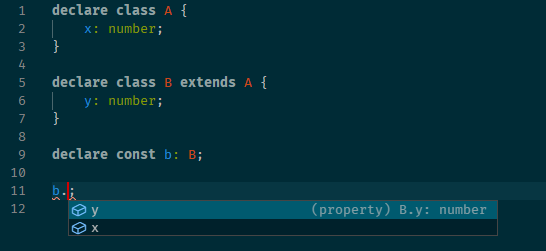
In the above image, B.y comes before A.x because B is the lowest subclass and A is the superclass.
Members inherited from the same class or same type would be sorted alphabetically.
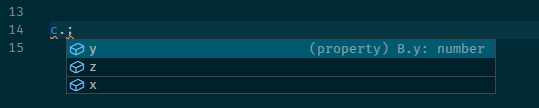
It is possible for a particular type to inherit members from multiple types along the same inheritance level via intersection types. In this case, members of each individual type would be grouped together, with subsequent intersected types taking priority. E.g. A & B would display all the members of B as a group, followed by all the members of A as a group.

Groups could optionally be separated by extra spacing or perhaps a horizontal bar:
Keep in mind that types which have been reconstructed out of intersected types would not be affected:
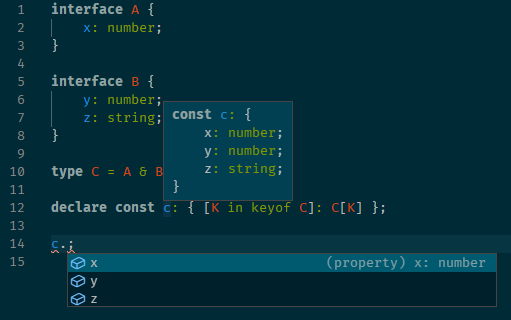
Members from subclasses or subsequent types in an intersection which intersect with superclasses or prior types in an intersection should be listed with the superclass or prior type group.

There could also optionally be a keybind for VSCode which toggles this setting, so you could switch between alphabetical and inheritance-based ordering on the fly.
Checklist
My suggestion meets these guidelines:
- [x] This wouldn't be a breaking change in existing TypeScript/JavaScript code
- [x] This wouldn't change the runtime behavior of existing JavaScript code
- [x] This could be implemented without emitting different JS based on the types of the expressions
- [x] This isn't a runtime feature (e.g. library functionality, non-ECMAScript syntax with JavaScript output, etc.)
- [x] This feature would agree with the rest of TypeScript's Design Goals.


This is a must have when building custom elements. HTMLElement has hundreds of properties, so my custom component's properties (which is a derived class) gets lost although they are the top priority when finally using the component.
It's not relevant to see HTMLElement's properties first because everyone basically knows it's properties already, but the custom element's properties are the relevant ones everyone needs to see to learn the features of the component.
