

 microsoft
VidSage: Video Insights using Graph RAG
Project Name
VidSage
Description
VidSage: Video Insights using Graph RAG
https://www.youtube.com/watch?v=IUSCWtB9jWk
VidSage focuses on processing video data, storing it in Azure AI services, and enabling advanced local and global querying through techniques - Azure AI Search (Native RAG), Graph-based Retrieval (Graph RAG), Open AI CLIP Model (Image Embeddings), Azure GPT-4o.
Introduction
VidSage provides detailed business insights of videos using Azure AI Search, Advanced Graph RAG capability to analyze all the videos. Platform intelligent multi-modal chunking strategy helps it to point to the exact section in the video where a particular topic is discussed.
Architecture
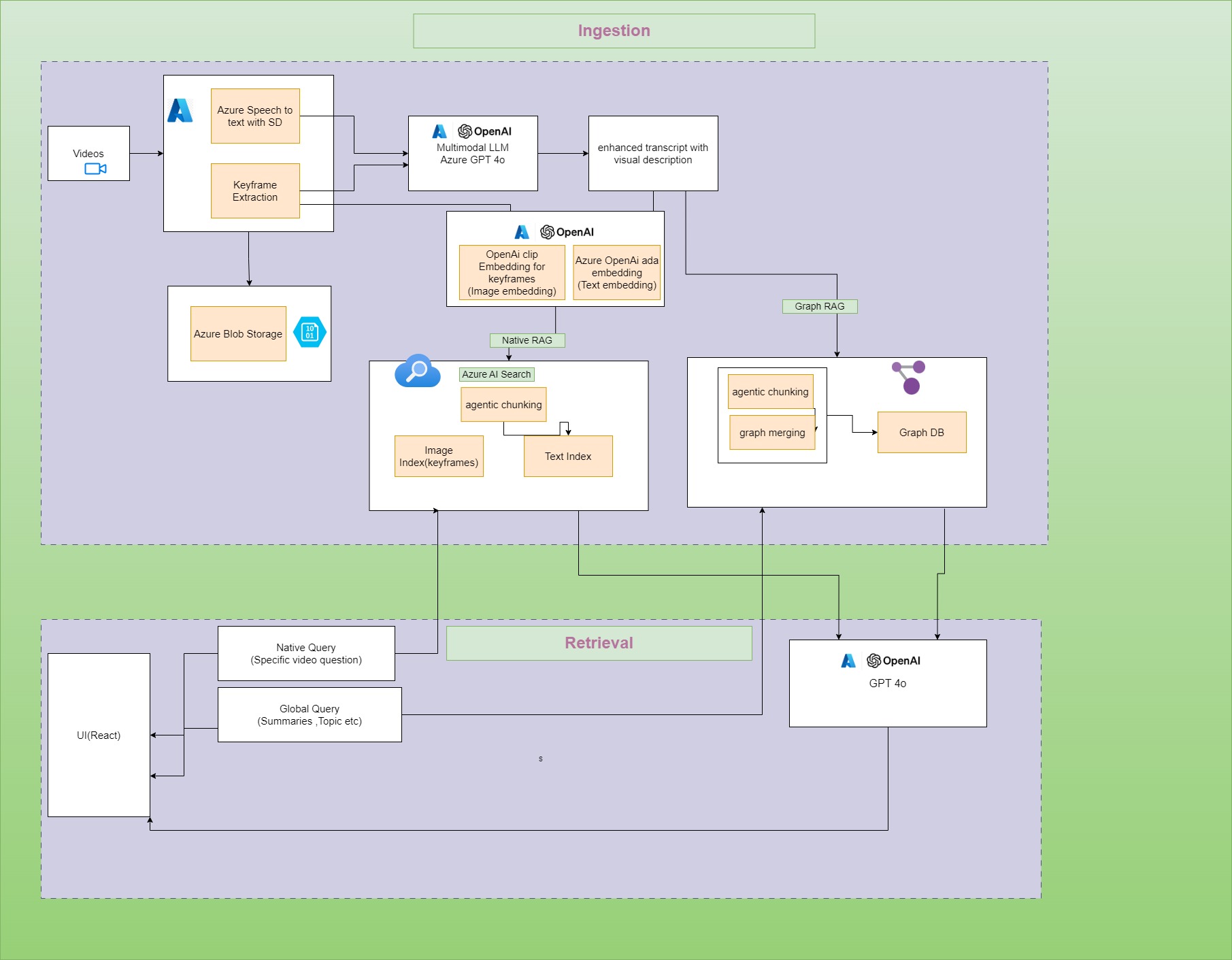
The architecture consists of several stages:
-
Video Upload: Videos are uploaded to the repository.
-
Processing: Extract text using Azure Speech-to-Text (STT) service with speaker diarization and image keyframes from the videos.
-
Transcript Enhancement:
- Text transcripts are enhanced with keyframe descriptions using Azure OpenAI GPT-4o.
-
Embedding Creation:
- Text embeddings are generated using the Azure OpenAI Ada embedding model.
- Image embeddings are generated using OpenAI CLIP model.
-
Azure AI Search:
- Store text embeddings in a text index.
- Store image embeddings in an image index.
-
GRAPH RAG:
- Graph database to create a graph for our enhanced transcripts.
- For the GraphRAG we use advanced agentic chunking to convert all the sentences in a transcript to standalone sentences and then chunk the transcripts into relevant and meaningful chunks using GPT 4o mini. These chunks are connected to Video node.
- For any video, we extract all the entities and relationships along with it, we create a Video node and summary node which contains video text transcript, Summary of the transcript as well as all the topics, features, issues, speakers and sentiment of the video.
- Whenever a new video gets uploaded we use entity disambiguation to ensure that the entities with similar name and meaning are not repeated.
- Graph is structured in a way that any point of time it represents the overall discussions happening through all the videos processed by the platform. This helps the Graph RAG to better answer queries compared to native RAG. Native RAG will be able to answer based only on the chunks retrieved which may miss out the overall knowledge representation.
-
Storage: Enhanced text transcripts and image keyframes are stored in Azure Vector Index for efficient retrieval.
Querying
Local Querying
Local querying is performed for questions based on a specific video.
- Native Retrieval-Augmented Generation (RAG): Uses Azure AI Search to retrieve relevant text chunks and image keyframes related to the query.
- Response Generation: The retrieved information is passed through Azure GPT-4o to generate answers.
Global Querying
Global querying is performed across the entire video repository, including summary-based questions.
- Graph RAG: Extracts relevant nodes from the graph using vector search and graph traversal.
- Response Generation: Passes the structured data to Azure GPT-4o to generate a detailed response.
Features
- Speaker Diarization: Distinguish between multiple speakers in the video transcripts.
- Keyframe Extraction: Extract image keyframes to associate with text data.
- Advanced Embeddings: Use OpenAI models for generating text and image embeddings.
- Graph Database Integration: Store and retrieve data in a structured graph format using Graph RAG.
- Entity Disambiguation: Avoid repetition of entities with similar names and meanings.
- Local and Global Querying: Retrieve information specific to a video or across the entire video repository.
Technology Stack
- Azure AI Search for text and image indexes
- Azure Speech-to-Text (STT) with speaker diarization
- Azure OpenAI (Ada embedding model, GPT-4o)
- OpenAI CLIP for image embeddings
- Graph RAG for graph-based retrieval
- Entity and Relationship Extraction for knowledge graph construction
Technology & Languages
- [X] JavaScript
- [ ] Java
- [ ] .NET
- [X] Python
- [ ] AI Studio
- [X] AI Search
- [ ] PostgreSQL
- [ ] Cosmos DB
- [ ] Azure SQL
Project Repository URL
https://github.com/sujithrkumar/ms_raghack
Deployed Endpoint URL
No response
Project Video
https://www.youtube.com/watch?v=IUSCWtB9jWk
Team Members
MayankKeshariC5, sujith-rkumar, maheshpandeycourse5, saurabhkanekar

Hello @MayankKeshariC5, thank you for participating in RAG Hack!
The team is working hard to distribute badges. Please have each team member fill out this form: aka.ms/raghack/badge-dist
Thank you!
