

 microsoft
Setting a different absorption coefficient for each frequency bin/critical band
I was just reading the documentation and the overview video for Unreal Engine on YouTube, but it seems the acoustic materials apply the same absorption coefficient to all frequencies.
How to go about the simulating acoustic materials that have different coefficients at given bin, you could have a low or high bin size (of course, put a warning in case the bin size is too large). Can I create my own acoustic material based on datasheet from real materials? Could these custom acoustic materials have different absorption coefficients for the critical bands? i.e. 50.100,200,400,800,1600... or 30, 60, 120, 240... The possibility of arbitrarily selecting different critical band ranges and bin size (how many bands).
The coefficient could have a gradient like function between the bands or a naive model based on limit.
Meanwhile, will keep looking into the source code and the documentation to check this feature feasibility. I will share my findings. Any suggestions are welcomed

Example of multiple absorption values of materials

Even assets like players, chairs and other props could have their own absorption values

I believe currently, one can only set a single value but should be easy to mod it, will look into it
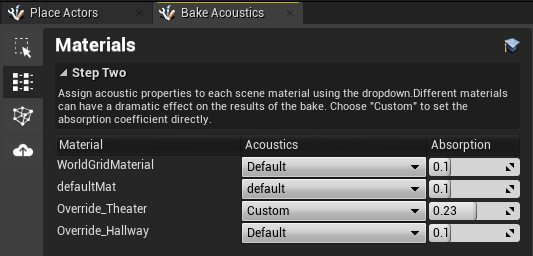
@240db thanks for your interest in Project Acoustics. The simulation engine currently doesn't support any per-band properties for absorption although this is a common request so I'm confident that the project will include support for this concept in the future.
