
PowerToys
 PowerToys copied to clipboard
 microsoft
Cap/Num/Scroll Lock Onscreen Indicator
📝 Provide CAPS/NUM/SCROLL Onscreen Indicator.
Some computers/laptops don't have the Keyboard LED indicators for CAPS/NUM/SCROLL locks. In such cases, PowerToys can show an onscreen indicator. This can be a great feature for Keyboard Users
If you'd like to see this feature implemented, add a 👍 reaction to this post.

Please take a look at ModernFlyouts - https://github.com/ShankarBUS/ModernFlyouts
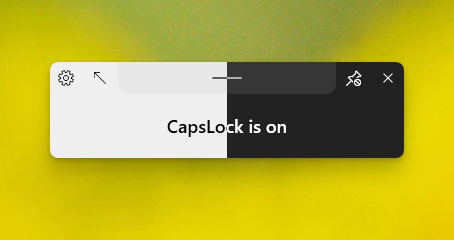 Enough for you?

I guess, an icon could be placed in the systray, next to the keyboard layout selector (Language Bar). Hovering it could display a tooltip with information about the state of Caps Lock / Num Lock ...

See also: Keyboard-LEDs: https://keyboard-leds.com/ (freeware) CapsLock Indicator : https://cli.jonaskohl.de/ (open-source: Github repository)

I could do with extending this idea to include when other modifier keys are down (Ctrl, Shift, Alt). There is a program called TrayStatus that does this. I haven't tried it however, as I want it for work and would need to pay for it.


Hi! We've identified this issue as a duplicate of another one that already exists on this Issue Tracker. This specific instance is being closed in favor of tracking the concern over on the referenced thread. Thanks for your report!
![microsoft-github-policy-service[bot] avatar](https://avatars.githubusercontent.com/in/95686?v=4 "Published by a pub.dev verified publisher")
/dup #981
Hi. This is not a duplicate. #981 is about key press. This is about key status. Please reopen this feature request.