
PowerToys
 PowerToys copied to clipboard
 microsoft
[KBM] Remapped key remains actively when changing to Japanese IME
Environment
Windows build number: Microsoft Windows [Version 10.0.18363.836]
PowerToys version: v0.18.0
PowerToy module for which you are reporting the bug (if applicable): Keyboard Manager
Steps to reproduce
- In Keyboard Manager, map Caps Lock key to Ctrl (Left) key
- Changing keyboard IME from English (US) to Japanese
- Enter some Japanese characters
- Copy some text by using Caps Lock + C key
- Press whatever keys, the Caps Lock key is remained actively
- Need to go back to English IME and press Caps Lock key again to release
Expected behavior
Remapped key does not remains actively. Pressing some keys like s will input s character.
Actual behavior
Caps Lock key remains actively. Pressing s will show Save Dialog
Screenshots
No need to attach screenshots

I don't know if this bug can be fixed as PowerToys team collaborates with AHK. Because I have tested in AHK environment, the bug is still exist (even since 2016). There are some information I found, please refer and hope this can help... https://www.autohotkey.com/boards/viewtopic.php?t=9701
I can repro the issue. For some reason, if you remap Caps Lock to ctrl/alt/shift while on Japanese IME, only the key down message gets sent, but key up does not occur, resulting in the state that the key is stuck.

I definitely don't know enough about Japanese IME, but from what I could find, the problem happens because Shift+CapsLock, Alt+CapsLock, Ctrl+CapsLock are all shortcuts to change the input method (as per this stackexchange post). CapsLock should get suppressed so the Shift+Caps Lock state should never be seen by the OS, but if IME sets it's state before the key is intercepted by low level hooks then this could happen.
@Lexikos, we think this may be a fix for AutoHotKey as well based on the StackExchange post. Due to the license on AHK, we can't verify directly.

I am unsure. What clause in the GPL v2 license is preventing this fix from being verified? I'll try to run some tests of my own.

I am unsure. What clause in the GPL v2 license is preventing this fix from being verified?
I'll try to run some tests of my own.
It is we can’t see if our fix would fix the AHK issue. We can’t look at GPL code without strict processes. Since AHK and KBM overlap slightly, it would impact our ability to ship so easier to say “hey, this may solve a bug based on your forum post” :)
My testing seemed to indicate that this workaround will not work, at least on my system. I haven't implemented it in the AutoHotkey source, but I've done some testing with keyboard hooks (WH_KEYBOARD_LL) and hotkey scripts. As far as I can tell, while IME is active,
- If Ctrl is down, the hook does not receive an event with VK_CAPITAL. Instead, for CapsLock-down it receives a key-up for the previous
VK_DBE_mode and a key-down for the new mode (at the same time); for CapsLock-up, it receives nothing. - I get the same result using an artificial Ctrl (
z::Ctrl). - I get the same result using an artificial CapsLock (
x::CapsLock). - I get the same result whether the hook/hotkey process runs as admin or not.
- I get the same result if the executable is properly manifested for UIAccess (and meets all of the normal requirements).
- I tested with hotkeys (using AutoHotkey's hook) and a manually installed hook in another process.
I believe VK_CAPITAL is being suppressed or translated at a lower level than the WH_KEYBOARD_LL hook because:
- Releasing CapsLock doesn't generate any events at all while Ctrl is down (physically or artificially).
- Usually the most recently installed hook takes precedence (and the IME presumably isn't reinstalling a hook immediately after I install mine).
As I understand it, the hook detects events that would otherwise be destined for the active window or registered system hotkeys. For IME while Ctrl is down, it would not be desirable for VK_CAPITAL to be received by the active window, since CapsLock isn't supposed to be toggled.
I would l like to know how the workaround works for you, as it seems impossible to me.
Also, if anyone reading this is having trouble reproducing the original issue, as I did, note that if the hardware keyboard layout in Windows 10 IME is set to Japanese keyboard (106/109 key), CapsLock only sends VK_CAPITAL while Shift is down.

After commenting, I had a realization. It seems the basic idea of the workaround shown in PR #4123 is that sending and then suppressing a key will effect a change in the IME's record of keyboard state without visibly affecting anything else. I believe the workaround is flawed in that sending CapsLock up to the IME will do nothing, because the state of CapsLock isn't the problem; it is the IME's Ctrl state. If the IME does not think Ctrl (or another modifier of that kind) is down, it will not translate or suppress VK_CAPITAL.
Therefore, the effective workaround is to "release" the relevant modifier but suppress the event, so only the IME's state is affected. I have verified that this works for AutoHotkey, and can be done in script. (We already use a similar technique to prevent a suppressed Alt keystroke from activating window menus in some cases, and I was able to utilize that.)
Furthermore, the process does not need to be run as admin.
I would l like to know how the workaround works for you, as it seems impossible to me.
Also, if anyone reading this is having trouble reproducing the original issue, as I did, note that if the hardware keyboard layout in Windows 10 IME is set to Japanese keyboard (106/109 key), CapsLock only sends VK_CAPITAL while Shift is down.
Thanks for the insights and the explanation @Lexikos. I realized that I havent tested with the 106/109 version of the Japanese keyboard, I just tested it with the one obtained while adding the Japanese input language under the Windows Language settings. While using that, I do get Caps Lock down and up messages, but if Ctrl/Shift/Alt is pressed down, then the Caps lock down is sent but Caps Lock up only gets sent once Ctrl/Shift/Alt are released which is why I made the workaround as above. Looks like I'll need to test it for the 106/109 keyboard variant too.
After commenting, I had a realization. It seems the basic idea of the workaround shown in PR #4123 is that sending and then suppressing a key will effect a change in the IME's record of keyboard state without visibly affecting anything else. I believe the workaround is flawed in that sending CapsLock up to the IME will do nothing, because the state of CapsLock isn't the problem; it is the IME's Ctrl state. If the IME does not think Ctrl (or another modifier of that kind) is down, it will not translate or suppress VK_CAPITAL.
Therefore, the effective workaround is to "release" the relevant modifier but suppress the event, so only the IME's state is affected. I have verified that this works for AutoHotkey, and can be done in script. (We already use a similar technique to prevent a suppressed Alt keystroke from activating window menus in some cases, and I was able to utilize that.)
Furthermore, the process does not need to be run as admin.
I see, that makes sense, but the workaround would only be required for cases of CapsLock::Ctrl or Alt or Shift, and not for any key to one of those modifiers right? I'm not entirely sure if CapsLock is the only key which has this IME shortcut with the modifiers or if there are any others as well. I don't think this would have any adverse effect for other keyboard layouts (since I don't know the exhaustive list of keyboard layouts where this issue exists), but then again I don't know if there are any other situations in case of English (US) where these key states are checked even if they are suppressed.
After commenting, I had a realization. It seems the basic idea of the workaround shown in PR #4123 is that sending and then suppressing a key will effect a change in the IME's record of keyboard state without visibly affecting anything else. I believe the workaround is flawed in that sending CapsLock up to the IME will do nothing, because the state of CapsLock isn't the problem; it is the IME's Ctrl state. If the IME does not think Ctrl (or another modifier of that kind) is down, it will not translate or suppress VK_CAPITAL.
Therefore, the effective workaround is to "release" the relevant modifier but suppress the event, so only the IME's state is affected. I have verified that this works for AutoHotkey, and can be done in script. (We already use a similar technique to prevent a suppressed Alt keystroke from activating window menus in some cases, and I was able to utilize that.)
Furthermore, the process does not need to be run as admin.
Tested this and it works for us too! In fact when I tried using the changes in my PR it didn't seem to always work for some reason, suppressing the modifier works though. I'm a bit confused on the why it works though, because if the IME is in fact at a lower level, and I remap Caps Lock::Ctrl, it should be seeing CapsLock down (suppressed) Ctrl down Ctrl up (suppressed)
So there is a moment when both CapsLock and Ctrl are held down to the IME, so it seems a bit counter-intuitive to me that this works, and even the original issue where caps lock get swallowed does not happen normally if you press CapsLock followed by Ctrl, but it fails for the remapping even though the key events are sent in that order. That said, the workaround works so I can't complain :D Thanks @Lexikos. From what I understand this workaround seems to be needed only for CapsLock::ProblematicModifier or ProblematicModifier::CapsLock, do you see any other situation which could require this?
Edit: ~~While testing it at one point I did enter the bug state again as reported in the issue but I wasn't able to repro it, not sure if that was possibly related to some hook priority issue. Will have to make sure on a clean build that it does not happen at all.~~ Can't repro the issue anymore
Fixed in 0.19.0, please visit https://github.com/microsoft/PowerToys/releases/ for the latest release
Thank you very much for your hard work. I've checked and the bug is fixed. If I find any issue, I will report.
@arjunbalgovind I think this bug is still remaining. Please check the following steps to reproduce
- In Keyboard Manager, map Caps Lock key to Ctrl (Left) key
- Changing keyboard IME from English (US) to Japanese
- Hold Ctrl, which is mapped from Caps Lock, then press Shift
- Press whatever keys, the Caps Lock key is remained actively
- Need to press the real Ctrl key for releasing
@quyleanh, I'm not able to reproduce this with the steps you mentioned. And at 4. did you mean Ctrl? The only way I'm able to hit this is if Shift gets pressed 5 times and the Sticky key pop-up appears. Then it behaves as if Ctrl was stuck. Is this the scenario you are facing?
If that is the scenario, I found that running PowerToys as admin solves the problem. That happens because when the Sticky key pop up appears, its running as admin, so the Keyboard Manager's keyboard hook can no longer interact with the keyboard input.
@arjunbalgovind Sorry for confusing. In Step 3, I hold Caps Lock, which is Ctrl since I've mapped. In Step 4, I mean Ctrl key remains actively. Could you check it again?
@quyleanh I tried that, and as mentioned earlier this is what I observed:
The only way I'm able to hit this is if Shift gets pressed 5 times and the Sticky key pop-up appears. Then it behaves as if Ctrl was stuck. Is this the scenario you are facing?
If that is the scenario, I found that running PowerToys as admin solves the problem. That happens because when the Sticky key pop up appears, its running as admin, so the Keyboard Manager's keyboard hook can no longer interact with the keyboard input.
Can you check if you are still facing the issue if you run PowerToys as administrator using the Restart as administrator option?
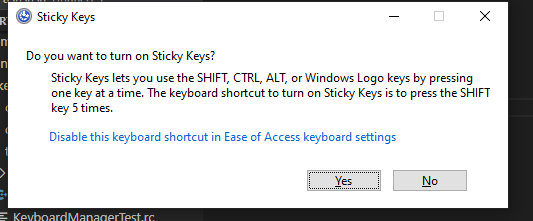
@arjunbalgovind I just press once, and there is no Sticky Keys dialog. About administrator mode, I've already run in administrator mode, and even restarted.
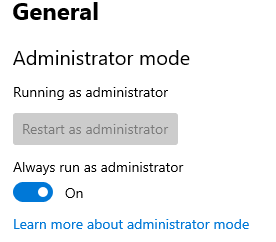
May be we are not in the same Windows version? I'm in Microsoft Windows [Version 10.0.19041.331] now.
Here is my settings:
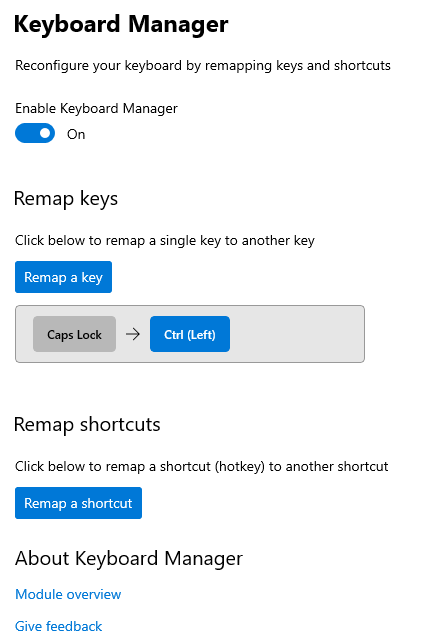
And I would like to explain again the step to procedure:
- In Keyboard Manager, map Caps Lock key to Ctrl (Left) key
- Changing keyboard IME from English (US) to Japanese
- Hold Caps Lock, which is Ctrl since I've mapped, then press Shift for combo Ctrl + Shift key.
- Press whatever keys, the Ctrl key is remained actively (press s will show Save dialog, press Esc will show Start Menu...)
- Need to press the real Ctrl key for releasing
Did some testing and found the exact repro scenario where this happens.
- Remap Caps Lock to Shift
- Press Caps Lock, then Shift, but release Caps Lock before releasing Shift.
Also the Shift+CapsLock shortcut in the IME editor for switching IME's gets triggered even if Caps Lock is remapped.
I tried using a similar approach to how we solved the main part of this issue by releasing Caps Lock before Shift is pressed, but it doesn't work. It seems like after you press Caps Lock and then Shift, the IME editor suppresses the Caps Lock up event unless Shift is released and this is done before hooks so it cannot be prevented. The only way to prevent this would be to detect if Shift/Alt/Ctrl is pressed after a CapsLock remap, and in that case that modifier will have to be released in a similar way as done in the previous logic. And the issue with Shift+CapsLock, Ctrl+Caps, Alt+Caps shortcuts for IME editor working even if Caps Lock is remapped cannot be avoided since the low level hooks don't even receive a Caps Lock key message.
It is sad when seeing this issue is skipped version by version, taken down priority, and now turned to Help Wanted. There are many related keyboard manager issues in this repo, and I can see their future.
I have switched back to SharpKeys for a long. Hope this issue can be fixed someday.
Thank you for your kind support and hard work.
@quyleanh, that is exactly why we put that label on to see if a community member may be able to help correct the behavior. Crashing stability issues are taking priority as is localization. Remapping is hard. @arjunbalgovind tried a few things but we shifted to other work currently.
To me, even the first issue still exists. Meaning to say this reproducing process leads to the stuck ctrl state.
- In Keyboard Manager, map Caps Lock key to Ctrl (Left) key
- Changing keyboard IME from English (US) to Japanese
- Enter some Japanese characters
- Copy some text by using Caps Lock + C key
- Press whatever keys, the Caps Lock key is remained actively
- Need to go back to English IME and press Caps Lock key again to release
I think this is because CapsLock button in a Japanese keyboard (I'm talking about hardware) is VK_OEM_ATTN, not VK_CAPITAL. I believe people here have been testing with an English keyboard.
I tried to add VK_OEM_ATTN to the condition below but it did not work. I checked it goes into the if statement when pressing "Japanese" CapsLock by adding VK_OEM_ATTN.
https://github.com/microsoft/PowerToys/blob/2c44cc9cd21554fd7695924b97f01fc830fe8466/src/modules/keyboardmanager/KeyboardManagerEngineLibrary/KeyboardEventHandlers.cpp#L837-L843
I'm not familiar with anything around here so I could not make a further research. Hope this helps improve the environment of PowerToys for Japanese users.

Caps Lock in Japanese Keyboard behaves differently than normal keys.
Caps Lock: SendVK_OEM_ATTNkey down. Key up event does not fire.Shift + Caps Lock: SendVK_CAPITALkey down and key up.
Due to these specifications, it seems very difficult to get it to work as expected. 😞

I have mapped Alt+PrintScreen (get screenshot of active window to clipboard) to VK242 in PowerToys 0.58.0. If you actually press a key on VK242 (called the Kana key, etc.), the Alt key will remain pressed and almost all operations using the keyboard will be disabled.
This problem seems to occur when I set the mapping source to a physical key specific to JIS keyboards such as VK242.
By the way, When this is achieved with AutoHotKey, I have set the following.
vkF2::Send, {Alt Down}{PrintScreen}{Alt Up}.

In conclusion, when the os logical keyboard is in the jis environment, it is impossible to remap the alphanumeric/capslock key to the left of the "a" key to ctrl to work as expected with the current powertoys.
The problem is not the bug but the behavior of Japanese ime. powertoys are working fine.
The easiest solution is to edit the registry.
Occurs only when the logical keyboard on the os side is jis. (mainly kbd106.dll)
This issue is reported regularly, but it's known and no one has fixed it. Over 2 years ago. I once tried to fix it, but gave up because of the complicated behavior of the Japanese ime module.
I think kbd106.dll is the default for Japanese windows, not the physical keyboard, but the logical keyboard driver specified on the os side. To check, press the key to the right of the "p" key to output "@".
In this case, the engraving says capslock, but this key does not generate capslock's vk. Alphanumeric keys. The alphanumeric key is vk that exists in the Japanese jis driver, and the keyboard scan code is the same, but the interpretation on the os side is different and it is understood as vk240.
If you want to generate the same vk as capslock on the jis keyboard, you can generate capslock's vk with shift + alphanumeric keys.
~ @BlastBeated, https://github.com/microsoft/PowerToys/issues/19787#issuecomment-1211500621

