

 microsoft
Mouse Jump fails to start
Microsoft PowerToys version
0.68.1
Installation method
Scoop
Running as admin
No
Area(s) with issue?
Mouse Utilities
Steps to reproduce
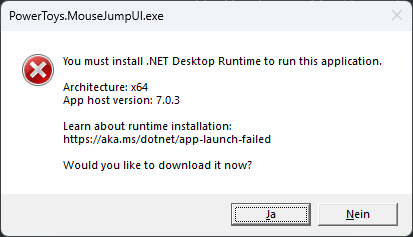
Pressing the hotkey associated with mouse jump leads to a .net error message claiming the runtime isn't installed. I've run the repair function on the installer package, still same issue. All other parts of Powertoys run fine as far as I can see.
Note: This is on Windows 11 and I have the issue on two separate PCs.
✔️ Expected Behavior
Mouse jump activates
❌ Actual Behavior
Other Software
No response


Hi there!
We need a bit more information to really debug this issue. Can you add a "Report Bug" zip file here? You right click on our system tray icon and just go to report bug. Then drag the zipfile from your desktop onto the GitHub comment box in this issue. Thanks! 
![microsoft-github-policy-service[bot] avatar](https://avatars.githubusercontent.com/in/95686?v=4 "Published by a pub.dev verified publisher")
I only see now that you're using Scoop to install Powertoys. As this is a new feature, some changes are needed in the PowerToys manifest on Scoop side. That should happen some time soon. I'll update this issue when it's done
Opened a PR on Scoop to fix this: https://github.com/ScoopInstaller/Extras/pull/10700

Hi @tminich , The changes have been accepted on Scoop. Not sure how the process to reinstall with Scoop is supposed to happen on your end now, though 🤷
Thanks for the quick resolve! Update can be done with
scoop update -f powertoys
