

 microsoft
[Settings Flyout] border missing on Windows 10
Description of the new feature / enhancement
In windows 11 the flyout window have a border colored with accent color. In windows 10 the border is missing.
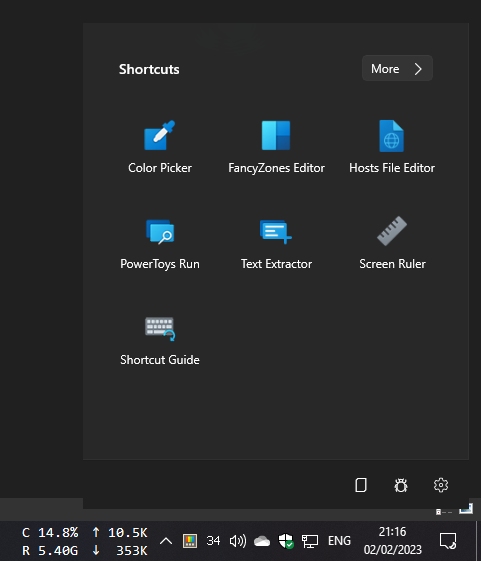
Proposal is to add a gray border like the OneDrive does. Or should we use accent color instead?
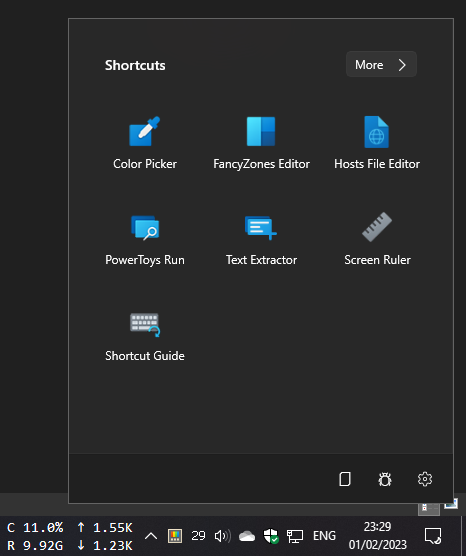
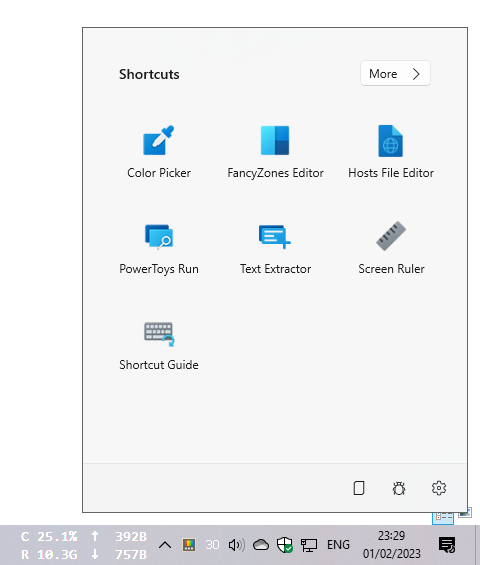
CC @niels9001
Scenario when this would be used?
Better looking/contrast with another black/white (based on theme) window in background.
Supporting information
No response

Hmm weird.. would be good to use a WinUI brush that is supposed to be used for window borders. Bit only on W10 since it's rendering fine on W11?

Investigated a bit on what's happening.
The problem is caused by the WinUIEx extension IsTitleBarVisible="False" that's is calling a method of OverlappedPresenter.
public bool IsTitleBarVisible
{
   get { return _IsTitleBarVisible; }
   set
       {
           _IsTitleBarVisible = value;
           overlappedPresenter.SetBorderAndTitleBar(true, value);
       }
}
Looks like that border parameter passed true isn't working on Windows 10. Probably a bug that should be addressed to WinAppSDK.
Should be fine to add a border of the WinUI brush on W10 only.
I have found an existing issue https://github.com/microsoft/microsoft-ui-xaml/issues/7629
Not 100% sure on what color is used for border: I suspected SystemAccentColorDark1 but it isn't.
May be a bit different due to acrylic? Any idea?
I have created a PR. Tested again on Windows 11 and verified that the colored borded is missing too but a grey one is visible. I have added a grey border on Windows 10 only that should be enough until an offical fix to the issue above.
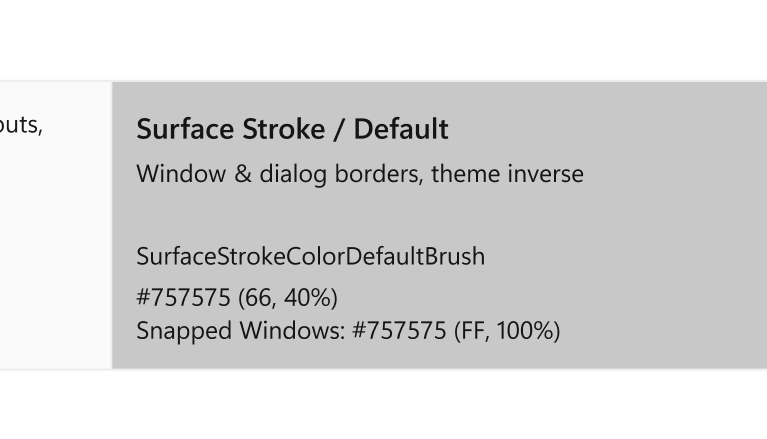
@davidegiacometti We should be using {ThemeResource SurfaceStrokeColorDefaultBrush} according to the design spec:
@davidegiacometti @niels9001 Don't forget the (missing) shadow too... Isn't there a (better?) WS_STYLE we could be using?

Probably a bug that should be addressed to WinAppSDK.
I bet Niels has the right connections :)
@davidegiacometti @niels9001 Don't forget the (missing) shadow too... Isn't there a (better?) WS_STYLE we could be using?
I think the border should be enough to improve contrast with dark/light background until an official WinUI fix.
@Jay-o-Way Yeah this looks like a WinUI/WASDK bug... @davidegiacometti did you find an issue for this already by any chance? I wonder if it is OS specific (10 vs. 11) or something else..
@niels9001 should be this https://github.com/microsoft/microsoft-ui-xaml/issues/7629 Actually the bug is also hitting Windows 11 but in a different way since the colored border is removed in both OS:
- W11 grey border
- W10 no border at all
Make sense?
@niels9001 should be this https://github.com/microsoft/microsoft-ui-xaml/issues/7629 Actually the bug is also hitting Windows 11 but in a different way since the colored border is removed in both OS but with a different result:
- W11 grey border
- W10 no border at all
Make sense?
Thanks! Well, good that it's flagged in the WinUI repoa already :)!
Hey @niels9001, it would be much simpler to add
$WS_BORDER 0x00800000 "Creates a window that has a thin-line border."
to the Window Style.
(no need to fuss with manual things)
I have done a quick test and it's not working.
I suspect that the window already have the WS_BORDER style but something isn't working (see issue above).
Unfortunately due to the nature of WinUI3, utilities like Spy++ don't give the correct style so it's not easy to determine what styles the window has.
Feel free to investigate and open a PR.

I have created #24907 to revert the workaround. Thank you @Aaron-Junker