
PowerToys
 PowerToys copied to clipboard
 microsoft
Updater doesn't update to the latest, had to go from 0.65 to 0.66 to 0.67
Microsoft PowerToys version
0.65.0
Installation method
PowerToys auto-update
Running as admin
Yes
Area(s) with issue?
Installer
Steps to reproduce
I don't know if you can reproduce this or not - I can't because it is an issue with the updater.
I was on 0.65 - I saw on twitter that 0.67 was released, went to settings and it was offering an update to 0.66.
I would expect it to offer the latest, not make me update through each release.
When it finished updating, it showed the release notes for 0.67, but setting shows 0.66 and is now offering 0.67

✔️ Expected Behavior
Update should take me to the latest release, not the next release since my last update.
❌ Actual Behavior
Had to update twice to get to latest
Other Software
No response

I have a similar issue trying to update,
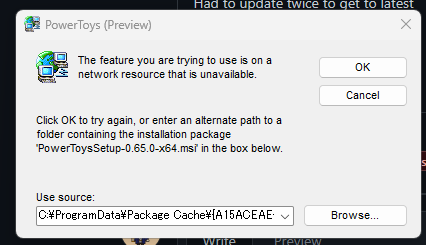
the location it has issues with is: C:\ProgramData\Package Cache{A15ACEAE-DA57-4B2D-9703-0F4903BD47E6}v0.65.0\
I tried to uninstall PowerToys but than I get a weird error, and it says I'm on v0.65.0 but when I run my current installed powertoys it shows v0.66.0
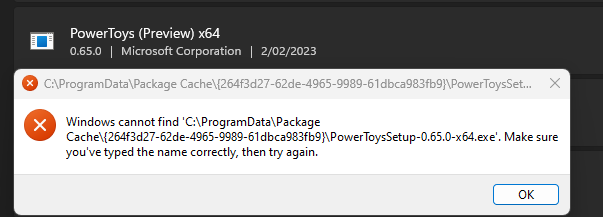

so I cant uninstall or update or anything - come probably run some CMD/powershell lines to remove it though

@LeafSenpai please look into these instructions to recover the installer you're missing: https://learn.microsoft.com/en-us/windows/powertoys/install#extracting-the-msi-from-the-bundle
Hope that helps.

@SQL-MisterMagoo , PowerToys is not constantly checking for updates. What I believe happened here is that when you've checked PowerToys had the previously downloaded 0.66 already present on your machine and still hadn't checked for updates again. There's a button to check for updates again, which one can click to update it to the latest. Hope this helps in understanding what happened.
/needinfo
@jaimecbernardo I've seen an issue like this before, but can't seem to find it right now :( Also related: #15990

@jaimecbernardo Thanks for the explanation - I don't understand why it showed me the 0.67 welcome screen though
I'm also pretty sure the update button could check for the latest release couldn't it?
@jaimecbernardo Thanks for the explanation - I don't understand why it showed me the 0.67 welcome screen though
The Welcome screen always shows the last 5 released versions. It always shows the same independent of released version, since it gets the info from the Internet.
I have this issue relatively frequently because I'm subscribed to releases on this repo. When I would like to upgrade to latest there's no option to do so. The Check for updates button is hidden (I'm fairly certain I didn't see it, but I wish I had taken a screenshot) when there's an update available, even though that update isn't actually the latest. So to try out a new feature it requires two subsequent updates to get to latest. I even tried restarting powertoys hoping it would do another update check on startup and it did not.
I don't think this issue should be closed as it has not been fixed. The problem here is that there's not a way to upgrade directly to the actual latest release. From what I can tell, PowerToys checks every 24 hours so this is only an issue if you're trying to grab an update that's less than a day old. It would be nice though if the there was one more update check when the settings menu is opened, or an additional check when the update button is clicked.
