

 microsoft
When recovering settings - layouts (FancyZones) not restored
Microsoft PowerToys version
0.64.1
Installation method
Microsoft Store
Running as admin
Yes
Area(s) with issue?
Settings
Steps to reproduce
- install powerToys on first pc
- do some setup of fancyZones - layout changes
- create backup file
- install powerToys on second pc
- copy backup file from first pc to another
- click "resstore" button
✔️ Expected Behavior
You should see configuration from first pc in second pc
❌ Actual Behavior
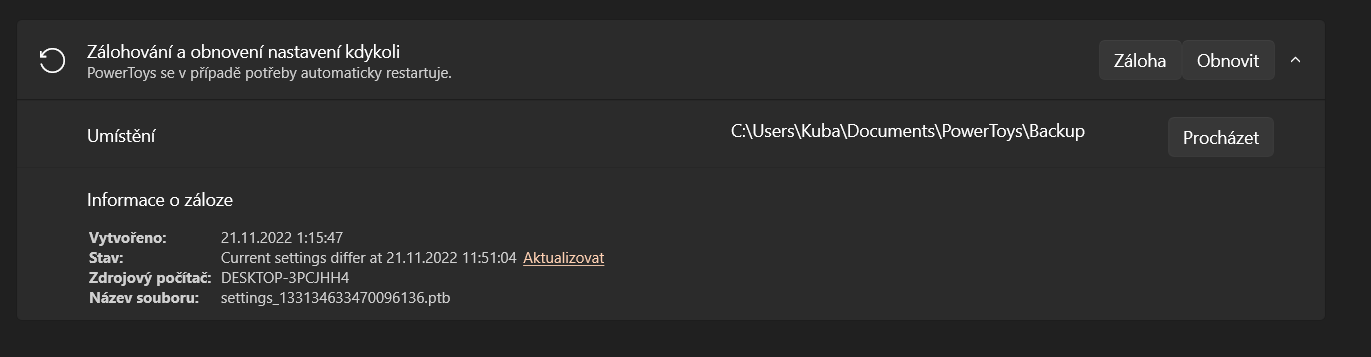 this image is after clicking "obnovit" - "restore" button.
And there is no custom layout imported in FancyZones - there was 4 in first pc
this image is after clicking "obnovit" - "restore" button.
And there is no custom layout imported in FancyZones - there was 4 in first pc

Other Software
No response

Hi @jefflord , any reason why the FancyZones layouts were not included in the backup? (I think those were included at some time) Any issue with us making a change to bring those in as well? Thank you! :)

@jaimecbernardo
The reason they were left out is because they are "problematic". The main issue with them, IIRC, is that they are not "portable", because the settings include things that are specific to a machine. For example:
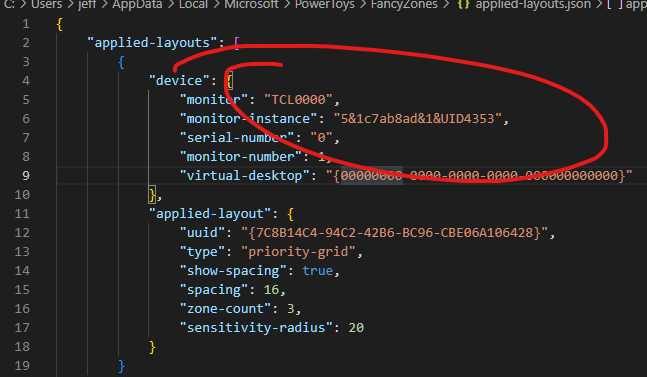
Because of this, it was not a simple thing to include. I know this is unfortunate because people that only backup/restore to the same machine will not notice such an issue since it's the same machine with the same displays. However, the primary goal (for me) was to backup settings and restore them to other machines. I see this seems to be the case for you also.
In order to fully support this some changes to how fancy zones works would be needed or some "interpretation/conversion" of the settings would be needed on import.
I hope that makes sense.

@jefflord Also related issue, after importing those settings and reconciling with no layout import I tried to create new layouts. And keyboard shortcuts were occupied by those imported but not visible layouts. So I needed to delete all Powertoy settings to use those blocked keyboard shortcuts.
@Truncovo, I think I understand. Fancy Zones uses a number of settings files which are:
...\AppData\Local\Microsoft\PowerToys\FancyZones\applied-layouts.json
...\AppData\Local\Microsoft\PowerToys\FancyZones\custom-layouts.json
...\AppData\Local\Microsoft\PowerToys\FancyZones\layout-hotkeys.json
...\AppData\Local\Microsoft\PowerToys\FancyZones\layout-templates.json
...\AppData\Local\Microsoft\PowerToys\FancyZones\editor-parameters.json
...\AppData\Local\Microsoft\PowerToys\FancyZones\settings.json
Of these we DO backup these:
...\AppData\Local\Microsoft\PowerToys\FancyZones\layout-hotkeys.json
...\AppData\Local\Microsoft\PowerToys\FancyZones\layout-templates.json
...\AppData\Local\Microsoft\PowerToys\FancyZones\settings.json
I think we will need to exclude "layout-templates.json" and "layout-hotkeys.json" since keeping them is also problematic. We can do this with a configuration change if you want to test this. We can update a config file that tells the backup/restore process to NOT include these other settings files.
If we don't include the extra settings files, I think it will resolve the issue. If you are willing, would you mind performing a test? If so, follow these steps:
- Find this file on your machines (both in which are you transferring the settings). ->
...\Program Files\PowerToys\Settings\backup_restore_settings.json - Backup and then edit this file by changing the "IncludeFiles" property from this:
  "IncludeFiles": [
    "*Keyboard Manager\\default.json",
    "*settings.json",
    "*FancyZones\\layout-hotkeys.json",
    "*FancyZones\\layout-templates.json"
  ]
This:
   "IncludeFiles": [
    "*Keyboard Manager\\default.json",
    "*settings.json"
  ]
- Change some settings and do a backup/restore and see if the process works better and does include settings that are causing an issue.
@jaimecbernardo @SeraphimaZykova Do we think there is a possibility to "migrate" the settings to be more "portable"? As it stands, since the Fancy Zones settings machine specific, we cannot backup a lot of them.
I understand if we can't really transfer settings, but perhaps if we could put the settings that are machine specific under a node in the settings files for machine. For instance, in "layout-hotkeys.json" (and similar for the other files....)
Change this:
{
  "layout-hotkeys": [
    {
      "key": 0,
      "layout-id": "{C058C2B3-B453-44C1-8EE4-A5D059966A5B}"
    }
  ]
}
To this:
{
  "Machine_Name_A": {
    "layout-hotkeys": [
      {
        "key": 0,
        "layout-id": "{C058C2B3-B453-44C1-8EE4-A5D059966A5B}"
      }
    ]
  },
  "Machine_Name_B": {
    "layout-hotkeys": [
      {
        "key": 0,
        "layout-id": "{DC0C1F4E-51E9-49D7-B3DA-72BC1369BF5D}"
      }
    ]
  }
}
This would not allow sharing FancyZones between machines but WOULD allow backing up FancyZones settings so they can be used on the same machine.
@SeraphimaZykova , PTAL. By the way, wouldn't backing up/ restoring custom-layouts.json as well solve most of the issues here? Even if we can't export applied due to different monitors, the custom layouts could likely still be moved around, or am I reading this wrong?
I want to reiterate that I don't know the correct thing to do outside of just omitting Fancy Zone settings since I know they don't work "as expected" on other machines as is.
Ideally @SeraphimaZykova or someone with Fancy Zone can help here. If we don't hear anything soon I will create a PR where we just update the backup_restore_settings.json config file so that it omits these other settings files (I have stated to @Truncovo above).
Hi @jefflord. It's ok to migrate to another machine custom-layouts.json along with layout-hotkeys.json, and also layout-templates.json. There is no machine specific data in those.
I agree with @jaimecbernardo that in most cases custom layouts (with hotkeys) would be enough to migrate.
It doesn't make sense to migrate applied-layouts.json and app-zone-history.json, because they contain only machine-specific data, but they can be restored on the same machine as you proposed.
editor-parameters.json is not needed for backup at all.

@SeraphimaZykova OK, I will change to what we backup and restore. To be clear, we were including:
FancyZones\layout-hotkeys.json
FancyZones\layout-templates.json
FancyZones\settings.json
And you think we should be OK to add "custom-layouts.json", so these:
FancyZones\custom-layouts.json
FancyZones\layout-hotkeys.json
FancyZones\layout-templates.json
FancyZones\settings.json
What I'd like to get verified is that if we move these files to another machine, FancyZones will still work (can be used normally and zones setup and used normally) and will not need to be reset like the issue poster @Truncovo said.
Can you confirm?
@SeraphimaZykova OK, I will change to what we backup and restore. To be clear, we were including:
FancyZones\layout-hotkeys.json
FancyZones\layout-templates.json
FancyZones\settings.json
And you think we should be OK to add "custom-layouts.json", so these:
FancyZones\custom-layouts.json
FancyZones\layout-hotkeys.json
FancyZones\layout-templates.json
FancyZones\settings.json
What I'd like to get verified is that if we move these files to another machine, FancyZones will still work (can be used normally and zones setup and used normally) and will not need to be reset like the issue poster @Truncovo said.
Can you confirm?
Yes, I confirm that these files can be moved to another machine and FancyZones will work. Users would be able to use their custom and predefined layouts, they'll just need to assign them to the new configuration. Thank you!
The code for this issue has been released in 0.65. Please update PowerToys to the latest version: https://github.com/microsoft/PowerToys/releases