

 microsoft
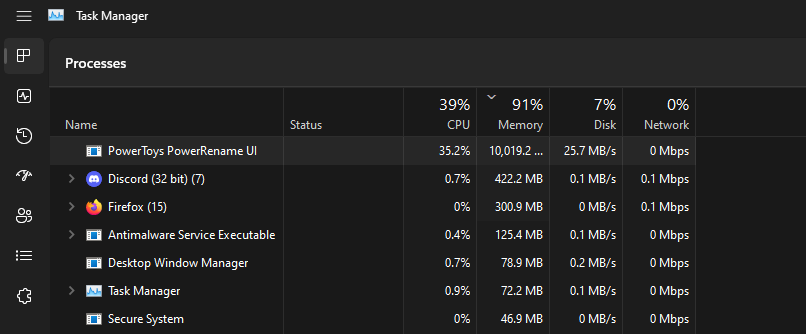
PowerToys PowerRename UI causing a huge memory leak.
Microsoft PowerToys version
0.64.0
Installation method
Microsoft Store
Running as admin
No
Area(s) with issue?
PowerRename
Steps to reproduce
- Rename a group of files utilizing PowerRename
- Close the PowerRename UI
✔️ Expected Behavior
PowerRename UI should be closed.
❌ Actual Behavior
PowerRename UI appears to be closed, but keeps running in the background, and is causing a memory leak.
It used upwards of 10 GB of RAM.
Other Software
No response

@jaimecbernardo Sounds like the bug I have on my dev machine with Hosts and FLS. 🤔

@BlackFrankFTM2 Can you post /bugreport?
Also, do you close PowerRename by pressing X button, or you do "Apply and close" operation? Does this happen every time and for both ways of closing PowerRename?
/needinfo

Hi there!
We need a bit more information to really debug this issue. Can you add a "Report Bug" zip file here? You right click on our system tray icon and just go to report bug. Then drag the zipfile from your desktop onto the GitHub comment box in this issue. Thanks! 

@jaimecbernardo Sounds like the bug I have on my dev machine with Hosts and FLS. 🤔
I suspect this might be something different, since it's Windows 11. Or might not be related 🤷 Still, similar behavior from a WinUI 3 app.

@BlackFrankFTM2 Can you post /bugreport?
Also, do you close PowerRename by pressing X button, or you do "Apply and close" operation? Does this happen every time and for both ways of closing PowerRename?
/needinfo PowerToysReport_2022-11-05-14-29-20.zip
@stefansjfw Hi there! Sorry, I didn't know the bugreport file was placed onto the desktop, since I tend to use it without showing the icons. Regardless, here you go! Let me know if you find anything.
@stefansjfw Hi there! Sorry, I didn't know the bugreport file was placed onto the desktop, since I tend to use it without showing the icons. Regardless, here you go! Let me know if you find anything.
Also to answer your question, it appears that it happens when I hit "Apply and close." This bugreport that I posted happened on the day the issue was occurring. I'll attempt to repro the issue today and attempt to close PowerRename both ways, and see if the issue happens again.
I have also encountered this bug when trying to invoke PowerRename but it eventually fails to start(UI not shown). I invoked from context menu for several times and each instance of PowerRename UI consumes 10+GB memory. Unable to reproduce now though...

@BlackFrankFTM2 If it happens on "Apply and close" and you were trying to rename many files, this is caused by the API that is actually renaming times (files/folders). IF it happens also on X, this is something caused by PowerRename. Please, let me know when you try it. /needinfo
@RoadToDream That is a different , known, issue tracked here https://github.com/microsoft/PowerToys/issues/17656
@BlackFrankFTM2 If it happens on "Apply and close" and you were trying to rename many files, this is caused by the API that is actually renaming times (files/folders). IF it happens also on X, this is something caused by PowerRename. Please, let me know when you try it. /needinfo
@RoadToDream That is a different , known, issue tracked here https://github.com/microsoft/PowerToys/issues/17656
Hi @stefansjfw, thank you for letting me know. I am not sure if my case is the same as that issue. I selected only two file which both smaller than 100kB. Maybe not related to "very large folder" case.
@RoadToDream Would you mind opening separate issue for that and attach bug report there? Thanks
@RoadToDream Would you mind opening separate issue for that and attach bug report there? Thanks
Sure. But unfortunately I may not reproduce this issue for now. I will create a issue when I have some useful debug info.
This issue has been automatically marked as stale because it has been marked as requiring author feedback but has not had any activity for 5 days. It will be closed if no further activity occurs within 5 days of this comment.
![microsoft-github-policy-service[bot] avatar](https://avatars.githubusercontent.com/in/95686?v=4 "Published by a pub.dev verified publisher")
This issue has been automatically marked as stale because it has been marked as requiring author feedback but has not had any activity for 5 days. It will be closed if no further activity occurs within 5 days of this comment.