

 microsoft
[WIP] Hosts file editor
Summary of the Pull Request
New utility for managing the hosts file.
PR Checklist
- [x] Closes: #20204
- [x] Communication: I've discussed this with core contributors already. If work hasn't been agreed, this work might be rejected
- [ ] Tests: Added/updated and all pass
- [ ] Localization: All end user facing strings can be localized
- [ ] Dev docs: Added/updated
- [ ] New binaries: Added on the required places
- [ ] JSON for signing for new binaries
- [ ] WXS for installer for new binaries and localization folder
- [ ] YML for CI pipeline for new test projects
- [ ] YML for signed pipeline
- [ ] Documentation updated: If checked, please file a pull request on our docs repo and link it here: #xxx
Detailed Description of the Pull Request / Additional comments
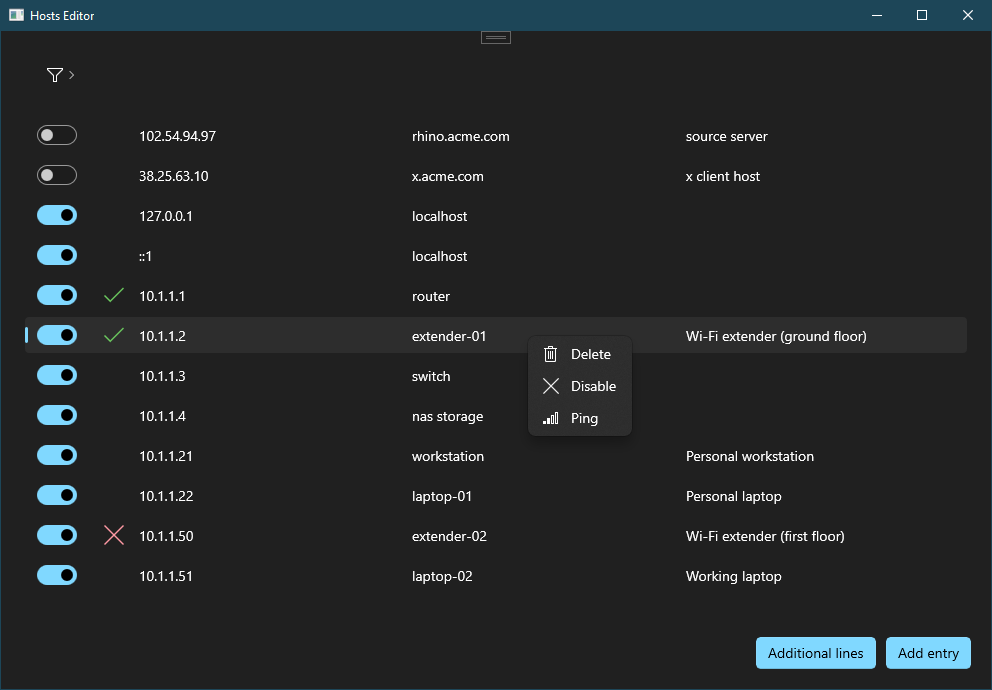
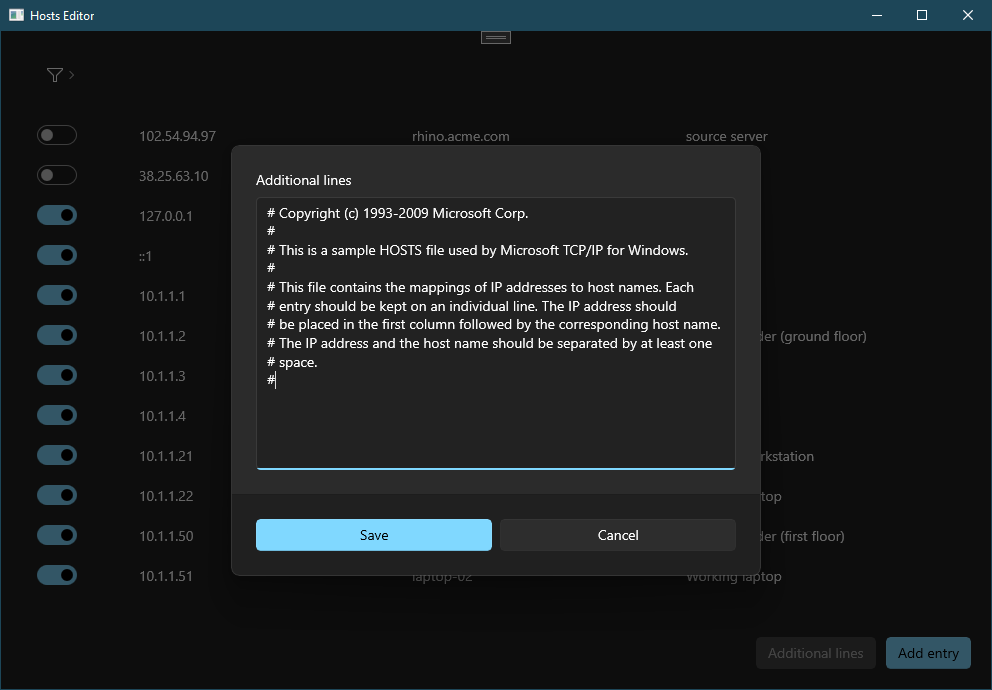
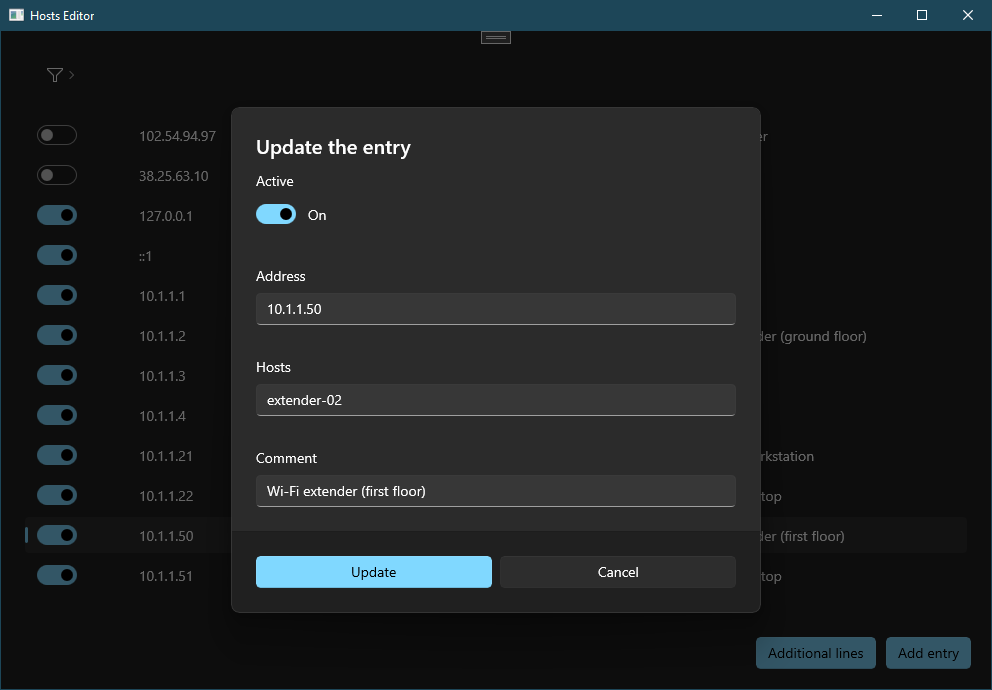
TODO
- [ ] UI/UX/Icon
- [ ] More tests coverage
- [ ] Module interface
- [ ] Settings page
- [ ] Settings:
- Startup warning
- Additional lines position: top/bottom
- [ ] OOBE page
- [ ] Logging
- [ ] Telemetry
- [ ] Pipelines
- [ ] Setup
- [ ] Bug report tool
- [ ] User docs
Known issues
- [ ] Crash on drag&drop when running elevated: https://github.com/microsoft/microsoft-ui-xaml/issues/7690
- [ ] Not opened in foreground when launched from the settings page
Validation Steps Performed

@niels9001 do you have time to help with UI/UX and icon? Not urgent at all 😃
A few questions for the core team:
- An utility like this doesn't have a strong dependency with the runner and also the concept of enable/disable but do we still want to have the module interface? I guess we need it for the settings.
- What do you have in mind for the environment variables editor?
- Can we early decide for the name of the utility?
CC @crutkas @jaimecbernardo @stefansjfw
I know it is a draft. But I like to give some ux ideas:
- Moving sort button between info bars and list.
- Adding table headers.
- Adding a "open settings" button.
- What about having a "view hosts file" button?
What are the symbols on the second column for?
We can add a setting where to add comments (above the entry or behind).
Does it save imidiatly? I don't like souch apps. Maybe a save changes feature would be good to have.
We can add a start menu shortcut to make opening easy. This makes the utility available using start menu, start menu's search and PT Run.

I know it is a draft. But I like to give some ux ideas:
- Moving sort button between info bars and list.
- Adding table headers.
- Adding a "open settings" button.
Thank you. UI still needs a lot of improvements.
- What about having a "view hosts file" button?
Do you mean a button that opens the hosts file in the default editor? I think the goal of this tool is to not edit the hosts file manually anymore.
What are the symbols on the second column for?
Ping result.
We can add a setting where to add comments (above the entry or behind).
Comments are in line.
Does it save imidiatly? I don't like souch apps. Maybe a save changes feature would be good to have.
Yes, this is really a nice experience and aligned with PT settings.
We can add a start menu shortcut to make opening easy. This makes the utility available using start menu, start menu's search and PT Run.
Don't think this will be possible if we make the app running under PT runner and PT module interface. Asked the core team in my previous message what's the ideal solution for this kind of utilities.
- What about having a "view hosts file" button?
Do you mean a button that opens the hosts file in the default editor? I think the goal of this tool is to not edit the hosts file manually anymore.
I don't want to have editing capabilities. But maybe a raw file view is a good addition. Maybe someone has to view the raw content for some reasons. It can be open in the default editor or a second page in the tool that shows the whole file content in a read only edit. (Then you don't have to navigate through the file system.)
@niels9001 do you have time to help with UI/UX and icon? Not urgent at all 😃
Loving this 😁👍. I can definitely help out on the UI, will pick this up next week. Mind if I push directly to this branch?

Suggestion. Have a big warning at the top that can be a setting to turn off? “Warning! altering this file has direct real world impact of how this computer resolves URLs”
On by default.

@niels9001 do you have time to help with UI/UX and icon? Not urgent at all 😃
Loving this 😁👍. I can definitely help out on the UI, will pick this up next week. Mind if I push directly to this branch?
Yeah, feel free to push directly. Thank you! 😃
@niels9001 do you have time to help with UI/UX and icon? Not urgent at all 😃
Loving this 😁👍. I can definitely help out on the UI, will pick this up next week. Mind if I push directly to this branch?
Yeah, feel free to push directly. Thank you! 😃

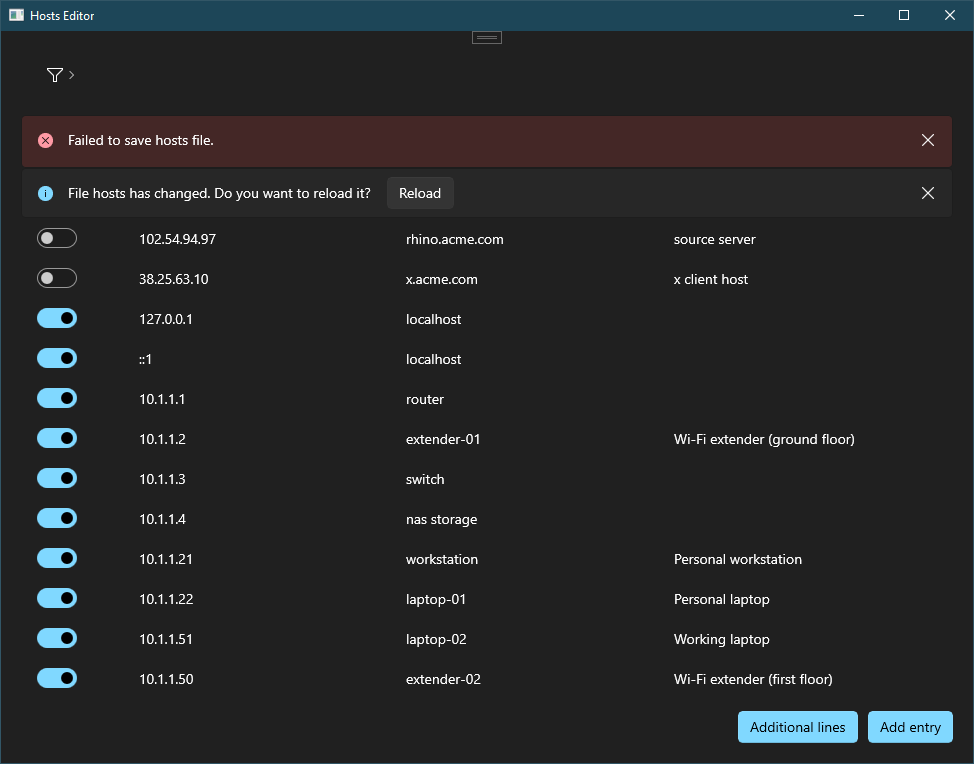
With error:

@davidegiacometti I had something like this in mind - thoughts?
Some questions:
- Do we need the enable/disable context menu entries if we have the ToggleSwitch?
- Do we need a loading indicator for when the ping is happening?
@niels9001 do you have time to help with UI/UX and icon? Not urgent at all 😃
Loving this 😁👍. I can definitely help out on the UI, will pick this up next week. Mind if I push directly to this branch?
Yeah, feel free to push directly. Thank you! 😃
@davidegiacometti I had something like this in mind - thoughts?
Some questions:
- Do we need the enable/disable context menu entries if we have the ToggleSwitch?
- Do we need a loading indicator for when the ping is happening?
@niels9001
- Loading indicator for ping sounds good.
- What does the file icon do? Open file or duplicate entry? (Maybe duplicate entry feature makes sense.)
- The icon for ping should have at least a tool tip to describe it's function.
- Does a infobar about running in non admin mode makes sense. Maybe some people want to open only for viewing.
- Do you saw the ask of @crutkas for the warning that changes are saved immediately.
- Let's have a separate column for description and make hist name bold too.
@niels9001 looks awesome!
- The enable/disable entry is redundant and can be removed.
- A pinging indicator would be nice: should also be easy to implement.
@htcfreek
- What does the file icon do? Open file or duplicate entry? (Maybe duplicate entry feature makes sense.)
It opens a popup that allows to add extra lines (including editing unparsed ones). Will add duplicate feature to original issue. Let's add it after v1 release.
- Does a infobar about running in non admin mode makes sense. Maybe some people want to open only for viewing.
Still wondering how this app will interact with PT runner. Not really sure if will have a start menu shortcut. Maybe we can add a normal launch and launch elevated button in PT settings.
- Do you saw the ask of @crutkas for the warning that changes are saved immediately.
I have already added a startup warning.
- What does the file icon do? Open file or duplicate entry? (Maybe duplicate entry feature makes sense.) It opens a popup that allows to add extra lines (including editing unparsed ones). Will add duplicate feature to original issue. Let's add it after v1 release.
@davidegiacometti , @niels9001 To not have misunderstandings: I mean a feature for duplicate an entry and not for duplicate the hosts file. And I don't think that we need an extra PR for this.
Maybe we should use an other icon. The current one is not really descriptive to indicate what you can do. I think about something with letters.
- Do you saw the ask of @crutkas for the warning that changes are saved immediately.
I have already added a startup warning.
@davidegiacometti I am not sure if @crutkas not meant an infobar that is always visible.
@niels9001 very nice! Unfortunately title bar doesn't work anymore after a clean build.
I am on Windows 10 21H2.
The error in System.NullReferenceException: 'Object reference not set to an instance of an object.' since window.TitleBar is null.
Is this supposed to work in Windows 10?
@htcfreek
- I suppose duplicate entry will be a context menu action but not sure if really needed since you don't expect to have multiple lines with same address or host.
- At the moment is a dialog displayed at startup but we can switch to an always visible message.
@niels9001 very nice! Unfortunately title bar doesn't work anymore after a clean build. I am on Windows 10 21H2. The error in
System.NullReferenceException: 'Object reference not set to an instance of an object.'sincewindow.TitleBarisnull. Is this supposed to work in Windows 10?
I thought it did.. But I just checked, and the WASDK 1.2-preview supports this - not 1.1 stable. I'll add a check and we can fallback to the default titlebar on W10.
Strange thing is that I have been able to see it before the clean build. Also the WinUI 3 Gallery have a custom title bar (must be on preview).
What do you have in mind for the environment variables editor?
what I initially had in mind there was to have Settings page with these tools, i.e. buttons to start the tools. I think having those in settings page is accessible enough, just 2,3 clicks away
Can we early decide for the name of the utility?
Just Hosts ? :P

Just a small annotation:
We definitely should provide a good description of what it is for the localisation team. Not that we get some weird translations.


@crutkas
- The user experience is really nice without a save button but we may consider to add save button or made this behavior a setting if file save is a concern.
- I am using
Hostsas internal name andPowerToys.Hosts.exefor executable but I would goHosts File Editorfor the end user. - For the warning are we fine with a dialog at starup do you prefer an always visible message?
- Yes: continue
- No: exit
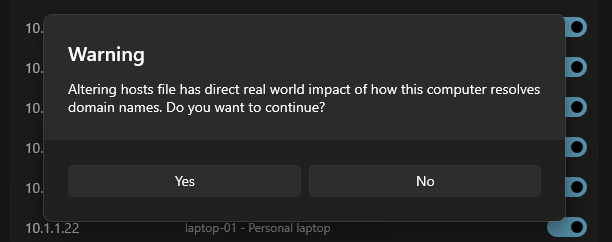
- Sounds good, lets get some user feedback.
- I'm fine with exe being that and external name being fuller. We do that all over :)
- drop "Do you wish to continue", change buttons to be "Accept" "Quit" which then infers to continue.
@davidegiacometti
(A small reminder:) Please don't forget bugreport tool and adding the new settings page to the enum in App.xaml.cs of settings project.
@niels9001 do you have other things to do?
I have added fallback to title bar. I'll add progress to ping and remove enable/disable from context menu.
- I have found a bug: text isn't wrapping (may be related to the text inside a stackpanel). Can you take a look?
- Can you also create the icon?
Thanks!
EDIT: users can also have IPv6 addresses
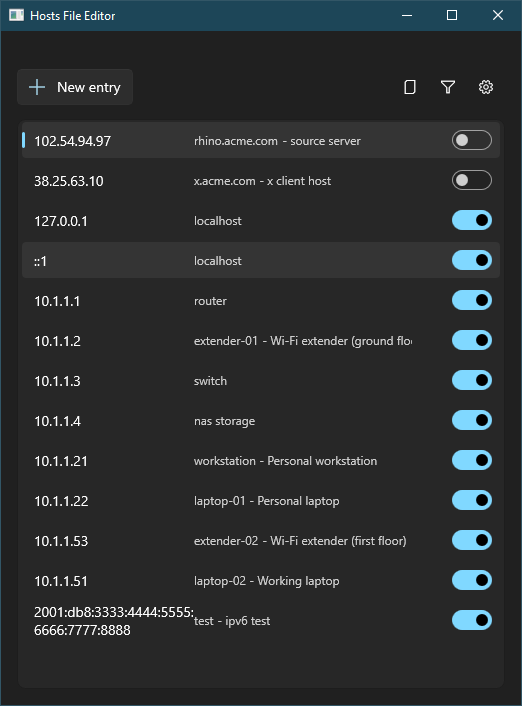
@davidegiacometti Is the text in the eight row (10.1.1.4) the description or an invalid host name? Wondering about the space between "nas" and "storage". [Maybe we can add a validation check for existing entries in a second step. This makes sense imo as you can edit the file externally.]
@davidegiacometti Is the text in the eight row (10.1.1.4) the description or an invalid host name? Wondering about the space between "nas" and "storage". [Maybe we can add a validation check for existing entries in a second step. This makes sense imo as you can edit the file externally.]
nas and storage are both valid hosts since you can specify more than one host for a single address. Validation is already implemented and invalid entries are not displayed as entries in the list.
@davidegiacometti Is the text in the eight row (10.1.1.4) the description or an invalid host name? Wondering about the space between "nas" and "storage". [Maybe we can add a validation check for existing entries in a second step. This makes sense imo as you can edit the file externally.]
nas and storage are both valid hosts since you can specify more than one host for a single address.
Don't know this.
Validation is already implemented and invalid entries are not displayed as entries in the list.
👍
Does it make sense to format it in the list like this: nas, storage
I don't like that the comment is in the same column. I think we should have a separate one for the comment.
Does it make sense to format it in the list like this:
nas, storage
I don't really know.. ATM hosts is a string and they are parsed as they are in the file. An enhancement could be parse hosts into a list and display them comma separated but how do you expect to display them in add/edit dialog? Do we really need this or can we keep it simple?
I don't like that the comment is in the same column. I think we should have a separate one for the comment.
I find this solution more compact and not space-wasting. What you are suggesting makes me wondering about a DataGrid behaviour: https://github.com/microsoft/PowerToys/issues/20204#issuecomment-1238326961 I am up to @niels9001 if he have more suggestions/improvements.
Does it make sense to format it in the list like this:
nas, storageI don't really know.. ATM hosts is a string and they are parsed as they are in the file. An enhancement could be parse hosts into a list and display them comma separated but how do you expect to display them in add/edit dialog? Do we really need this or can we keep it simple?
We can keep it simple. Was only an idea.
I don't like that the comment is in the same column. I think we should have a separate one for the comment.
I find this solution more compact and not space-wasting. What you are suggesting makes me wondering about a DataGrid behaviour: https://github.com/microsoft/PowerToys/issues/20204#issuecomment-1238326961 I am up to @niels9001 if he have more suggestions/improvements.
I see the problem with our current solution that you have to know that the text after the minus is the comment. Not sure if we can expect that users come to this fact by itself.