

 microsoft
Using TextExtractor to extract Chinese always contains spaces
Microsoft PowerToys version
"0.62.0"
Running as admin
- [X] Yes
Area(s) with issue?
TextExtractor
Steps to reproduce
- click
win+shift+t - select a Chinese text
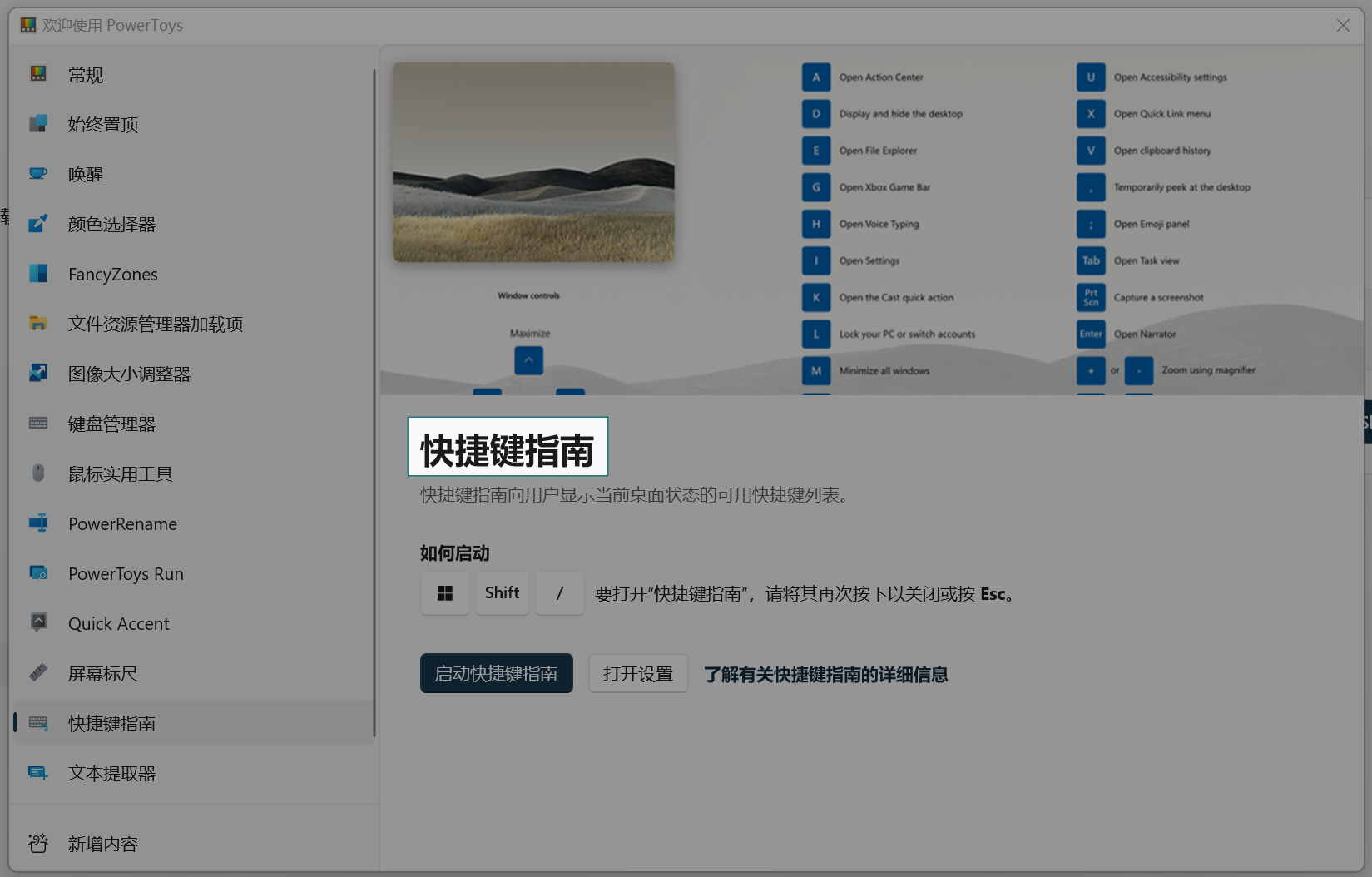
✔️ Expected Behavior
Returned 快捷键指南
❌ Actual Behavior
Returned 快 捷 键 指 南
Other Software
No response

你中文怎么提取出来的,我试了试只能提取英文 How did you extract Chinese? I tried, but I could only extract English

你中文怎么提取出来的,我试了试只能提取英文 How did you extract Chinese? I tried, but I could only extract English
你 中 文 怎 么 提 取 出 爪 的 , 我 i 式 了 i 式 只 提 取 英 文 H OW did yo u extra ct Chinese? 丨 tried, but 1 could only extract English
可以提取中文啊——不太准就是了。
你中文怎么提取出来的,我试了试只能提取英文 How did you extract Chinese? I tried, but I could only extract English
Same here. Only English and numbers can be extracted. And, not all applications are eligible to extract the text.

你中文怎么提取出来的,我试了试只能提取英文 How did you extract Chinese? I tried, but I could only extract English
通过Win+ Space 切换输入法语言来提取不同语言的文字? 我在微软拼音切换为中文输入时能够识别到中文,在这个情况下依然可以提取英文,但有的单词会被空格隔开。

目前看來他只會針對系統的輸入語言做識別。 要辨識中文要切到中文輸入法、要辨識日文要切換到日文輸入法。
在英文輸入法只能辨識英文。
It looks Text Extractor use the language for OCR depend on current input method. You need to switch to Chinese IME for extract Chinese.
If system is running English IME, Text Extractor can only extract English.

我猜这不仅与输入法有关,也与系统的语言有关。因为我换成中文IME后还是不行,不管是MS拼音,还是QQ拼音。我猜这是因为系统语言是英语。
I guess it's not only related to the input method, but also the language of the system. Because it still doesn't work when I change to Chinese IME, whether it's MS Pinyin or QQ Pinyin. I guess this is because the system language is English.

個人的測試: 繁體中文版的 Windows 10 / Windows 11,在系統安裝日文語系後,只要切換到日文輸入法就可以辨識日文。
Personal experience: In zh-TW version Windows 10 / 11, after install Japanese language pack, Text Extractor can extract Japanese from images.

I tested this on Windows 11 22H2 Keyboard language: Chinese Simplified, Microsoft Pinyin
Result using Text Extractor: 快 捷 键 指 南
Result using Text Grab: 快捷腱指南
I think I have a fix in Text Grab and I'll bring it over to Text Extractor.

0.62.1同时存在此问题 目前仅尝试过中文读取 字符之间含有空格 日韩文字未尝试过 目测与输入法无关 无论是英语输入法还是微软拼音 亦或是第三方输入法(如搜狗)都可以识别且存在此问题。

@Mr-Python-in-China please test again with 0.63.0 and let me know if you still experience the same issue.
It does depends on the input method used. When using Chinese IME on mixed text, with both English and Chinese, spaces between english words will be missing
Maybe we could use regex to match chinese characters and remove the spaces between it
The following is a example text
例如 for example 在使用中文輸入法 when using Chinese input method
@TheJoeFin

@SodaWithoutSparkles That is an excellent point, and it is what some users of Text Grab have pointed out. I am testing solutions on that repository and I will bring the changes over here once they are tested.
See this issue for specific discussion: https://github.com/TheJoeFin/Text-Grab/issues/191
