

 microsoft
Powertoys run cuts off input or uses previous input (19157)
Summary of the Pull Request
Updated code to disable using the enter key to activate the selected item in the results if new PT run search has started. This prevents the enter key from activating stales results.
PR Checklist
- [X] Closes: #19157
- [ ] Communication: I've discussed this with core contributors already. If work hasn't been agreed, this work might be rejected
- [ ] Tests: Added/updated and all pass
- [ ] Localization: All end user facing strings can be localized
- [ ] Dev docs: Added/updated
- [ ] New binaries: Added on the required places
- [ ] JSON for signing for new binaries
- [ ] WXS for installer for new binaries and localization folder
- [ ] YML for CI pipeline for new test projects
- [ ] YML for signed pipeline
- [ ] Documentation updated: If checked, please file a pull request on our docs repo and link it here: #xxx
Detailed Description of the Pull Request / Additional comments
IsTemporaryDisabled is set to true when new search starts.
IsTemporaryDisabled is set to false (enable
Validation Steps Performed
You can test this by exacerbating the issue, by increasing the "search delay" to a very high number.

I think this is a reasonable solution for now. I am fine with this because it solves the issue and I hope to make other changes here!
I am converting this to draft for a little more discussion.
I think the issue is pretty clear, but way to address has a few possible solutions.
The real issue seems to be due to the non-uniform nature of the results. The types of results are:
- Real-time and deterministic (like Calculator, Web Search)
- Real-time and nondeterministic (like Time and Date)
- Non-real-time, nondeterministic (all the others that do a real search, and results)
People that use the "Real-time" results are getting tripped up by the "search delay", because
Clearly "Real-time" plugins and "delay search" don't play well together, and that makes sense.
So, the main choice is what to do with existing results, at the moment AFTER the user starts typing, and BEFORE the new results have been generated. (Of course only applies when Delay Search is enabled).
- Leave the results 100% as they are. This is what we do now. The issue this causes is... a user can start a search, and hit enter before the new results are in, and it can/will activate an "irrelevant" item, because it won't be in the results for the current query.
- Hide the last results when typing starts.
- Leave the results, but deselect all, so
<enter>cannot activate a stale result.
#3 feels the pretty good to me.
@jaimecbernardo, @htcfreek ?
Hi @jefflord Thanks for contributing this fix. I think that after the users starts typing, the current results get deselected already with your PR, right? So I think the question here is what to do when there's results for the current query but we're still waiting on delayed execution results. I think in that case leaving the current behavior as it is should work fine, since it's not like pressing Enter will trigger an "old results" from a previous query. Does this make sense or did I understand the question wrong?

I think you understand but it's quite nuanced because of a few settings that exists.
To break it down further, even if you disable Delay search it can still be that stale results can be in the list for a moment because we don't clear the old results until after the non-delayed execution results re returned. This should be instant but it's possible it's not. Also, these are not done in parallel.
This means there is always a chance there are "stale" results because we leave the results in the pane until new results are returned.
Perhaps another issue is that the "Delay search" should only affect the "delayed execution results"? Because if the "non-delayed execution results" are instant and ostensibly with no load on the system, we don't need to delay them.
@jaimecbernardo
I think I have a better solution. I think it solved most of the issues in a simpler way.
Basically, we just don't delay the fast queries. So in the end:
- We don't need to make any change in how or what we do to the "old" results when a new search starts. This is because...
- When "delay search" is on... a) Don't delay the "non delayed execution", they should be fast, and little to no harm in running right away. b) Run even the fast, non-delayed execution queries in parallel.
Notes:
- I added this as settings that a debugger could change for testing, or we can expose.
- I think the default Search delay (ms) should be 50, not 150.
@check-spelling-bot Report
:red_circle: Please review
See the :open_file_folder: files view or the :scroll:action log for details.
Unrecognized words (2)
anththing deleyed
Previously acknowledged words that are now absent
ICONWARNING IStorage IWork messageboxes OSVERSIONINFOW PRTL REMOTEDISPLAY REMOTESESSION serializationexception SYSLIBTo accept :heavy_check_mark: these unrecognized words as correct (and remove the previously acknowledged and now absent words), run the following commands
... in a clone of the [email protected]:jefflord/PowerToys.git repository
on the Powertoys-Run-cuts-off-input-or-uses-previous-input-19157 branch (:information_source: how do I use this?):
update_files() {
perl -e '
my @expect_files=qw('".github/actions/spell-check/expect.txt"');
@ARGV=@expect_files;
my @stale=qw('"$patch_remove"');
my $re=join "|", @stale;
my $suffix=".".time();
my $previous="";
sub maybe_unlink { unlink($_[0]) if $_[0]; }
while (<>) {
if ($ARGV ne $old_argv) { maybe_unlink($previous); $previous="$ARGV$suffix"; rename($ARGV, $previous); open(ARGV_OUT, ">$ARGV"); select(ARGV_OUT); $old_argv = $ARGV; }
next if /^(?:$re)(?:(?:\r|\n)*$| .*)/; print;
}; maybe_unlink($previous);'
perl -e '
my $new_expect_file=".github/actions/spell-check/expect.txt";
use File::Path qw(make_path);
use File::Basename qw(dirname);
make_path (dirname($new_expect_file));
open FILE, q{<}, $new_expect_file; chomp(my @words = <FILE>); close FILE;
my @add=qw('"$patch_add"');
my %items; @items{@words} = @words x (1); @items{@add} = @add x (1);
@words = sort {lc($a)."-".$a cmp lc($b)."-".$b} keys %items;
open FILE, q{>}, $new_expect_file; for my $word (@words) { print FILE "$word\n" if $word =~ /\w/; };
close FILE;
system("git", "add", $new_expect_file);
'
}

comment_json=$(mktemp)
curl -L -s -S \
-H "Content-Type: application/json" \
"https://api.github.com/repos/microsoft/PowerToys/issues/comments/1185924963" > "$comment_json"
comment_body=$(mktemp)
jq -r ".body // empty" "$comment_json" | tr -d "\\r" > $comment_body
rm $comment_json

patch_remove=$(perl -ne 'next unless s{^</summary>(.*)</details>$}{$1}; print' < "$comment_body")

patch_add=$(perl -e '$/=undef; $_=<>; if (m{Unrecognized words[^<]*</summary>\n*```\n*([^<]*)```\n*</details>$}m) { print "$1" } elsif (m{Unrecognized words[^<]*\n\n((?:\w.*\n)+)\n}m) { print "$1" };' < "$comment_body")

update_files
rm $comment_body
git add -u
If the flagged items do not appear to be text
If items relate to a ...
-
well-formed pattern.
If you can write a pattern that would match it, try adding it to the
patterns.txtfile.Patterns are Perl 5 Regular Expressions - you can test yours before committing to verify it will match your lines.
Note that patterns can't match multiline strings.
-
binary file.
Please add a file path to the
excludes.txtfile matching the containing file.File paths are Perl 5 Regular Expressions - you can test yours before committing to verify it will match your files.
^refers to the file's path from the root of the repository, so^README\.md$would exclude README.md (on whichever branch you're using).
![github-actions[bot] avatar](https://avatars.githubusercontent.com/in/15368?v=4 "Published by a pub.dev verified publisher")
Overall experience with this change is better. However, I feel like Delay search option becomes obsolete with delaying only delayed plugins
I don't know that I agree, and some chosen class names might be making this more unclear. It almost makes sense... only delay the delayed search plugs, right? Though I am sure you could make the case that some non-IDelayedExecutionPlugin need to be throttled, well, if that's the case, convert them to IDelayedExecutionPlugin(s).
Please correct me if I am wrong on these.
- The "delay search" really is throttle. This means it's job is to prevent the user's blast typing from producing unnecessary load on the system. Some plugins (like calc, web search, url hander, etc...) don't need this and is bad for them.
- IDelayedExecutionPlugin really means "I am a potentially show/heavy plugin, please be aware". And so in this case, a throttle is important.
If the above are correct, that means we should only apply the throttle to IDelayedExecutionPlugin(s). which is what I tried to do.
@jefflord https://github.com/microsoft/PowerToys/blob/main/doc/devdocs/modules/launcher/architecture.md

@jefflord https://github.com/microsoft/PowerToys/blob/main/doc/devdocs/modules/launcher/architecture.md
Awesome, ~~I will read~~... I read that and it makes total sense. However, I think that document will need some updates shortly based on some of these changes.
I wish I saw this earlier IPublicAPI Thank you. Was this built as interface for mocking/testing? Seems like this doc should say to use "PublicAPIInstance" and not "IPublicAPI", right?
Overall experience with this change is better. However, I feel like Delay search option becomes obsolete with delaying only delayed plugins
I don't know that I agree, and some chosen class names might be making this more unclear. It almost makes sense... only delay the delayed search plugs, right? Though I am sure you could make the case that some non-IDelayedExecutionPlugin need to be throttled, well, if that's the case, convert them to IDelayedExecutionPlugin(s).
Please correct me if I am wrong on these.
The "delay search" really is throttle. This means it's job is to prevent the user's blast typing from producing unnecessary load on the system. Some plugins (like calc, web search, url hander, etc...) don't need this and is bad for them. IDelayedExecutionPlugin really means "I am a potentially show/heavy plugin, please be aware". And so in this case, a throttle is important. If the above are correct, that means we should only apply the throttle to IDelayedExecutionPlugin(s). which is what I tried to do.
Ok, Delay search option makes sense to stay I guess, as it makes PTRun less CPU consuming when needed. However, let's rephrase the description of the option as with as it is now users might expect that it'll delay everything


let's rephrase the description of the option as with as it is now users might expect that it'll delay everything
100% agree, something needs to be updated.
Here's my question, why is it called "IDelayedExecutionPlugin" if it's not always (but instead optionally) delayed? It seems like this should always be on, and we just need a settings for the value. A value of zero would effectively disable it.
If I had a time machine (or we can do this now).
- Kill PowerLauncher_SearchQueryResultsWithDelay. It's should always be on.
- Set the default for PowerLauncher_SearchInputDelayMs to be 50ms
If we don't get to "make it right, right now", a suggestion would be this:
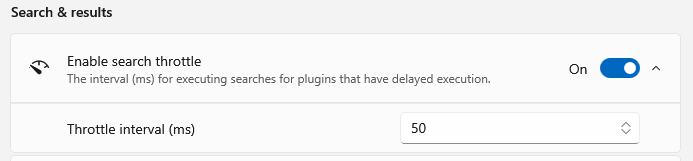
In any case @stefansjfw should this change be a new issue/PR, linked to this?
Actually, search throttle is supposed to throttle the search for every plugin. It acts like a "wait for more input" before searching. Does this PR change that?
Actually, search throttle is supposed to throttle the search for every plugin. It acts like a "wait for more input" before searching. Does this PR change that
Yes exactly, that's how it was designed and, in my opinion, incorrect. Yes, this PR does change that. This is because there is no reason to throttle plugins like "calculator" or "web search". Throttling these "fast" plugins is exactly what is the root of this exact issue. When the throttle is in effect, PTRun will "uses previous input" (as noted by the issue author).
To be clear the "search delay" should have only applied to the IDelayedExecutionPlugin(s).
An example, the author of this issue is using the calculator plugin. There is no reason to wait 150ms to before showing the result of 2+2.
So, this PR is really just a is a fine tuning of the "delay search" code, so that it applies only to code that requires the delay (IDelayedExecutionPlugin).
The result is fast plugs are fast, and an IDelayedExecutionPlugin(s) are properly throttled.
The actual need for search throttle is also thought of for slower computers that get choppy when they need to update the UI, leaving a unpleasant and jumpy experience when inserting input, so I think it should still affect every plugin. For some context: https://github.com/microsoft/PowerToys/issues/11176 and https://github.com/microsoft/PowerToys/pull/18290
I understand. But if we delay both we are left with the fact that the delay causes this current issue, which seems like somewhat bad side effect.
So, if we need the delay, and also the delay causes an issue, we need a solution.
I don't have proof, but my guess is that issue #11176 is caused by firing the delayed/slower plugins too fast. I would like to know if anyone can reproduce the choppy/laggy experience with this PR, as it stands.
As such, I think the ultimate goal would be to have a very short throttle on the normal plugs (<=50ms), and the longer delay/throttle on the delayed plugins (>=100). I know there is always the risk that there are "fast non-delayed" plugins that are in fact not fast.
I don't think having a different throttle for each plugin type is crazy. I think having a maximum 30-50 ms throttle on the fast plugins would alleviate this "stale results" issue and also provide protection from spamming the KB and causing the lag mentioned in the issues/pr you mentioned.
What are your thoughts?
I did a quick test using a fixed 20% ratio (instead of a new setting). So, at the default 150ms for the delay, that would be 150ms throttle for the delayed plugins and 30ms throttle for non-delayed plugins.
It feels like a really good middle ground.
Even with a monster 250ms throttle, that's just 50ms for the fast plugins, feels almost instant.
Took another look at this :) I think this is shaping up very nicely. Thanks for your work here and all the testing. I guess it might make sense to set two values from settings, then. Something like leave the current field for the "non-delayed" execution plugins and adding a new one for the "delayed" execution plugins. I think it's OK with having default values with 30ms to 150ms or 50ms to 150ms. How do you feel about this @jefflord
Yes @jaimecbernardo, I agree a setting for each would be best, even though there is more to document/understand.
However, I feel like it's a good time to bite the bullet here and relabel these more accurately. I say this because if we're have to make it more complicated right now, we should take the opportunity to make it clearer.
What do you think about this version?
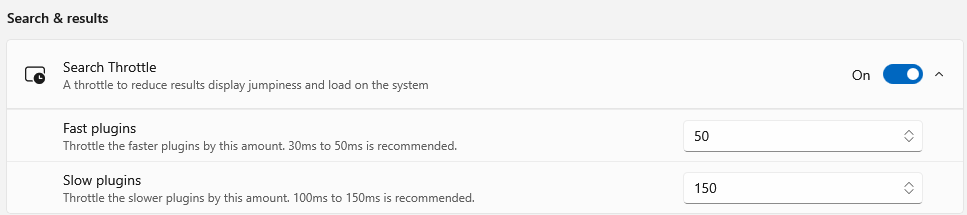
The word "throttle" jives with the icon more than the word "delay".
@jefflord This is more of a "debounce" than a "throttle", but I think users will understand "throttle" better. I'm OK with it. Regarding fast and slow plugins, I feel like that's not exactly what they are. Here's what I'm thinking better describes them. What do you think?
Search throttle Wait for more input before searching. This reduces interface jumpiness and system load.
Immediate plugins Throttle the plugins that make the UI wait for their results by this amount. Recommended: 30-50 ms
Background execution plugin Throttle the plugins that execute in the background by this amount. Recommended: 100-150 ms
@jaimecbernardo
I think you nailed it. Yes, debounce is more correct. (We can take that up with the System.Reactive team LOL). We could avoid it all by calling it something whacky/made up like "Input Smoothing". The rest is also perfect. Immediate/Background is good. I like it because it makes a lot of sense for "Immediate" plugins like calculator/date/etc...
I think we're there and would be happy with what you sent, but if you don't mind one more review pass on this? Whatever you comeback with will be good with me I am sure.
Input Smoothing
Wait for more input before searching. This reduces interface jumpiness and system load.

Immediate plugins
Effects the plugins that make the UI wait for their results by this amount. Recommended: 30-50 ms

Background execution plugin
Effects the plugins that execute in the background by this amount. Recommended: 100-150 ms
@jefflord , "Effects" should be replaced with "Affects" (effects is a noun while affects is a verb) Other than that, it looks good to me. Thank you! ;)