

 microsoft
Custom commanding for explorer style integrations for per interaction customization
Description of the new feature / enhancement
Currently, the containing folder of a file/an app or the folder itself that's been found in the PT Run list can only be opened in the standard system file explorer. One should also be able to open the file/folder in a third-party file manager such as double commander. In other words, this button's behavior can be customized:

Scenario when this would be used?
This is helpful for users who use double commander/total commander to manage files.
Supporting information
No response

I remember this getting brought up a while back. I tried searching for it but couldn’t seem to find it.
Do you have it set as your default file manager? I can poke around the code tomorrow.

I also searched the existing issues and couldn't find a relevant issue, so filed this one.
I am using double commander and didn't set it as my default file manager. First, I don't know how to do that properly (a quick google reveals that it involves registry modification etc). Second, I don't really want to override the system default file explorer so that Win+E will still open the Windows File Explorer.
I am also using Everything to search local files and in Everything, the user can use his/her preferred file explorer to open file locations and folders, something like this:
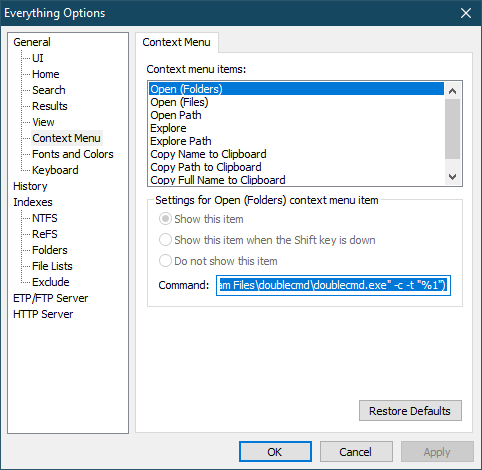
I hope such functionality would be available in PT Run.
Just verified with Files. We do directly work with what is the default file explorer so what is listed above is supported to be clear.
While i think this could be powerful, this adds a ton of permutations and support matrix for helping users when stuff changes or is misconfigure.
+1 on this feature. I use OneCommander, and I have set up it as my main file explorer (patched the registry): Double clicking a folder on my desktop for example opens OneCommander instead of windows explorer) Also ctrl+clicking on the windows taskbar explorer icon opens OneCommander. But hitting ctrl+shift+e after a search here still opens windows explorer. Which is far from ideal if you want to stick to an alternative file manager. Hope than this can be bypassed somehow.

