
MixedRealityToolkit-Unity
 MixedRealityToolkit-Unity copied to clipboard
 microsoft
TooltipConnector uses ConnectorFollowType flag. It does not handle multiple flag values being set well.
Describe the bug
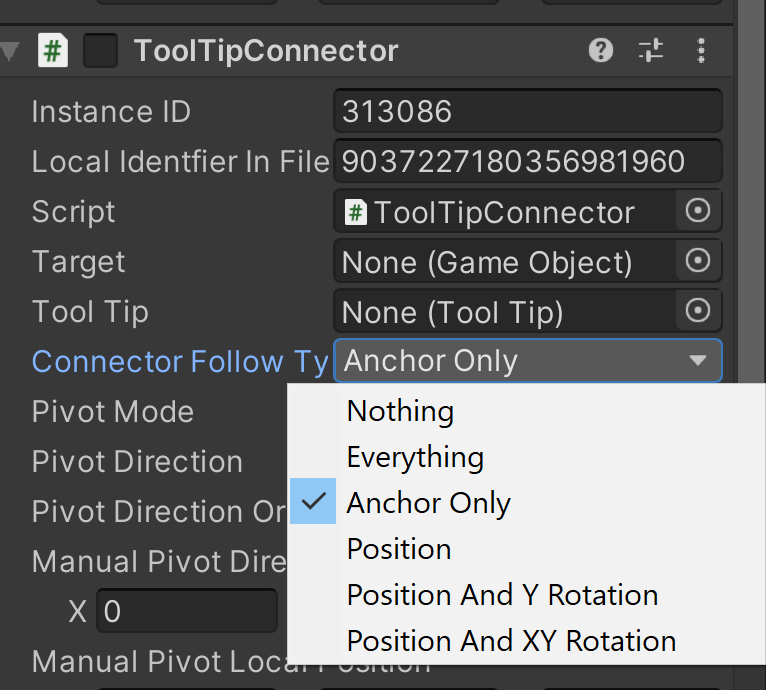
TooltipConnector also uses a ConnectorFollowType, which is marked as a flag. However the code has an early default. This means if the user checks multiple boxes, or worse, has it defaulted to Everything because Unity serialization, it will behave as if it is AnchorOnly.

It won't provide an error that multiple values were marked. It'd be like the teacher taking your incorrect homework and just marking it as a C. You wouldn't fix the problem. You'd likely be confused why it isn't doing what you expect.
This problem is likely a 'feature going stale' as a result of Unity improving it's default serialization flag support where Everything.
To reproduce
Use a TooltipConnector. Set the ConnectorType to everything. It won't behave differently from AnchorOnly. It won't provide an error to the user that they (or rather Unity) provided bad data.
Expected behavior
When Everything, Nothing or multiple incompatible flags are set, it will provide errors and either default to no behavior, or default to the first performable behavior.
Screenshots
Your setup (please complete the following information)
- Unity Version 2019.3.13f1
- MRTK Version 2.4
Target platform (please complete the following information)
- HoloLens
- HoloLens 2
- WMR immersive
- OpenVR
Additional context
Thanks to @Railboy for helping me figure out why it wasn't working. This issue is a small individual bug issue with SpeechConfirmationTooltips, which are very unintuitive and complex. This was a needle in the haystack sort of bug.

This issue has been marked as stale by an automated process because it has not had any recent activity. It will be automatically closed in 30 days if no further activity occurs. If this is still an issue please add a new comment with more recent details and repro steps.
![stale[bot] avatar](https://avatars.githubusercontent.com/in/1724?v=4 "Published by a pub.dev verified publisher")
We appreciate your feedback and thank you for reporting this issue.
Microsoft Mixed Reality Toolkit version 2 (MRTK2) is currently in limited support. This means that Microsoft is only fixing high priority security issues. Unfortunately, this issue does not meet the necessary priority and will be closed. If you strongly feel that this issue deserves more attention, please open a new issue and explain why it is important.
Microsoft recommends that all new HoloLens 2 Unity applications use MRTK3 instead of MRTK2.
Please note that MRTK3 was released in August 2023. It features an all new architecture for developing rich mixed reality experiences and has a minimum requirement of Unity 2021.3 LTS. For more information about MRTK3, please visithttps://www.mixedrealitytoolkit.org.
Thank you for your continued support of the Mixed Reality Toolkit!
