
MixedRealityToolkit-Unity
 MixedRealityToolkit-Unity copied to clipboard
 microsoft
Hand mesh is not visible in MRTK 2.8.3 and unity 2021.3.16f1 in Hololens2
Describe the bug
Hand mesh is not visible in MRTK 2.8.3 and unity 2021.3.16f1 in Hololens2
To reproduce
Steps to reproduce the behavior:
Hand mesh is not visible in MRTK 2.8.3 and unity 2021.3.16f1 in Hololens2
Expected behavior
Hand mesh should be visible in MRTK 2.8.3 and unity 2021.3.16f1 in Hololens2
Your setup (please complete the following information)
- Unity Version [e.g. 2021.3.16f1 ]
- MRTK Version [e.g. v2.8.3]
Target platform (please complete the following information)
- HoloLens 2
- OpenXR
Configured the Articulated hand tracking profiles as shown below


Hi @hemasree99s, have you tried our HandInteractionExamples scene? In that scene there is a GameObject called "ToggleFeaturesPanel", which contains a button for toggling the hand mesh.

@keveleigh @MaxWang-MS . In HandInteractionExamples, on toggling the hand mesh, hand mesh isn't visible.
@hemasree99s , you need to check Render motion Controller under MRTK/Input/Controllers/
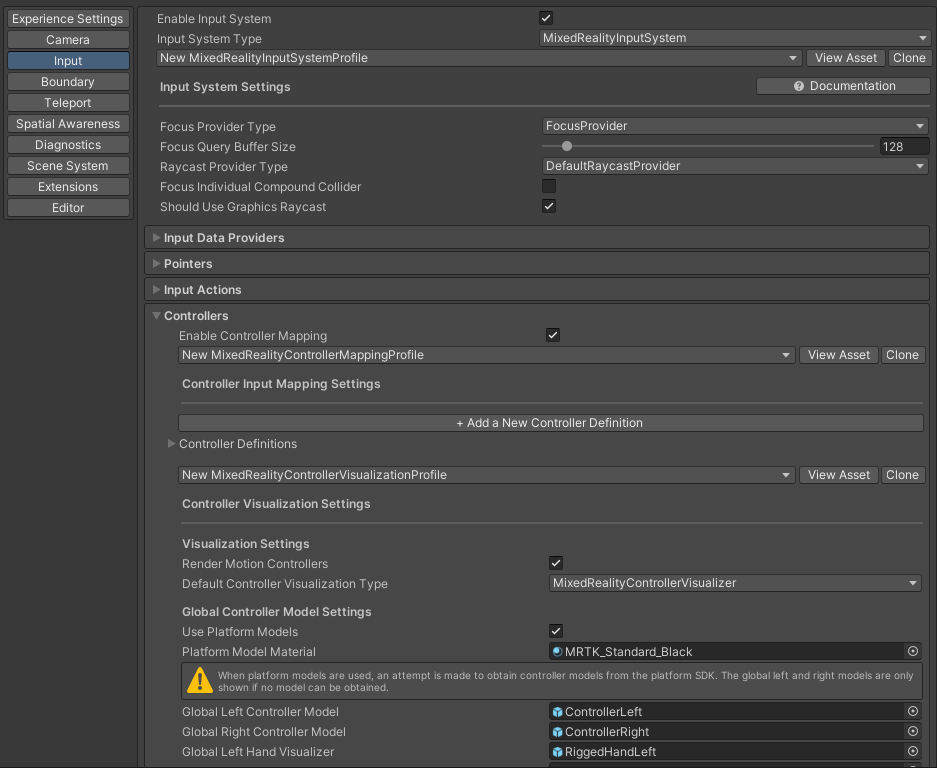


Hi @hemasree99s,
We appreciate your feedback and thank you for reporting this issue.
Microsoft Mixed Reality Toolkit version 2 (MRTK2) is currently in limited support. This means that Microsoft is only fixing high priority security issues. Unfortunately, this issue does not meet the necessary priority and will be closed. If you strongly feel that this issue deserves more attention, please open a new issue and explain why it is important.
Microsoft recommends that all new HoloLens 2 Unity applications use MRTK3 instead of MRTK2.
Please note that MRTK3 was released in August 2023. It features an all new architecture for developing rich mixed reality experiences and has a minimum requirement of Unity 2021.3 LTS. For more information about MRTK3, please visithttps://www.mixedrealitytoolkit.org.
Thank you for your continued support of the Mixed Reality Toolkit!
