

 microsoft
[2021 + URP Perf] Facing Performance issue after upgrading MRTK sdk to 2.8.2 with unity openXR
Overview
Expected behavior
Expecting good fps after updating MRTK with openXR unity in 2021.3.9f1
Actual behavior
We are getting good fps when we are using MRTK(2.4.0) unity version 2019.4.26f1 but after updating MRTK 2.8.2 with openXR 1.5.3 we are getting lower fps while checking on the Windows mixed reality Device. Even sample project gives 30 fps .we have not added microsoft openXR plugin as we are using unity openXR plugin.
Steps to reproduce
Download MRTK 2.8.2 sdk and unity openXR plugin.check on any sample scene with unity version 2021.3.9f1
Unity editor version : 2021.3.9f1
Mixed Reality Toolkit release version : 2.8.2


Running into a similar problem myself, even on completely empty scenes. Everything seems to be running at sub 30fps on the Hololens 2. Looks like that blocking bug based on the URP version.
Upon running the profiler and doing some in-depth investigation, I found out that Graphics.DrawProcedural is taking up a massive 11ms on the GPU, even when the scene is empty. This leads to a Semaphore block on the CPU, as it awaits the GPU being free.
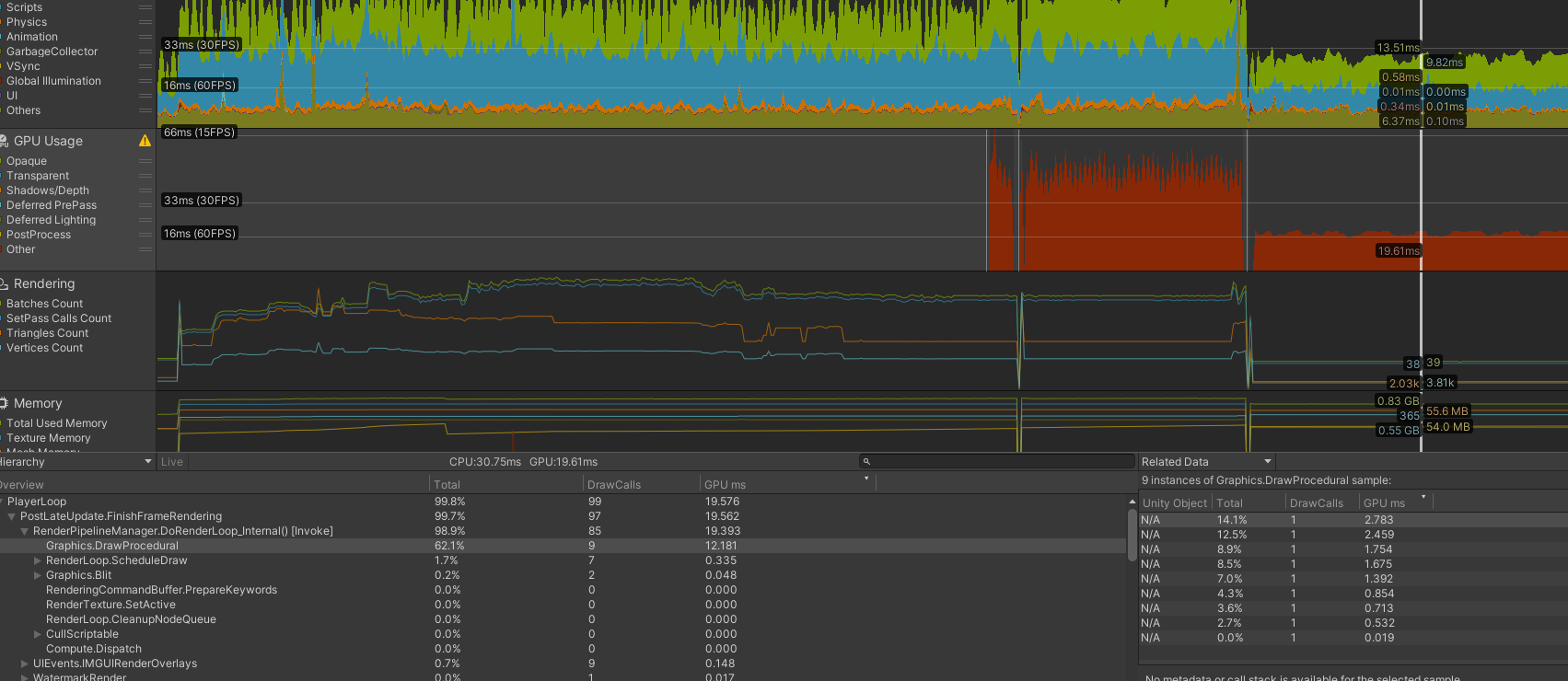
Hope this helps find the problem and get it solved!

Small Update: I downgraded my Unity OpenXR plugin to 1.4.2 for debugging. While I lost considerable hologram stability, something interesting happened to the framerate:
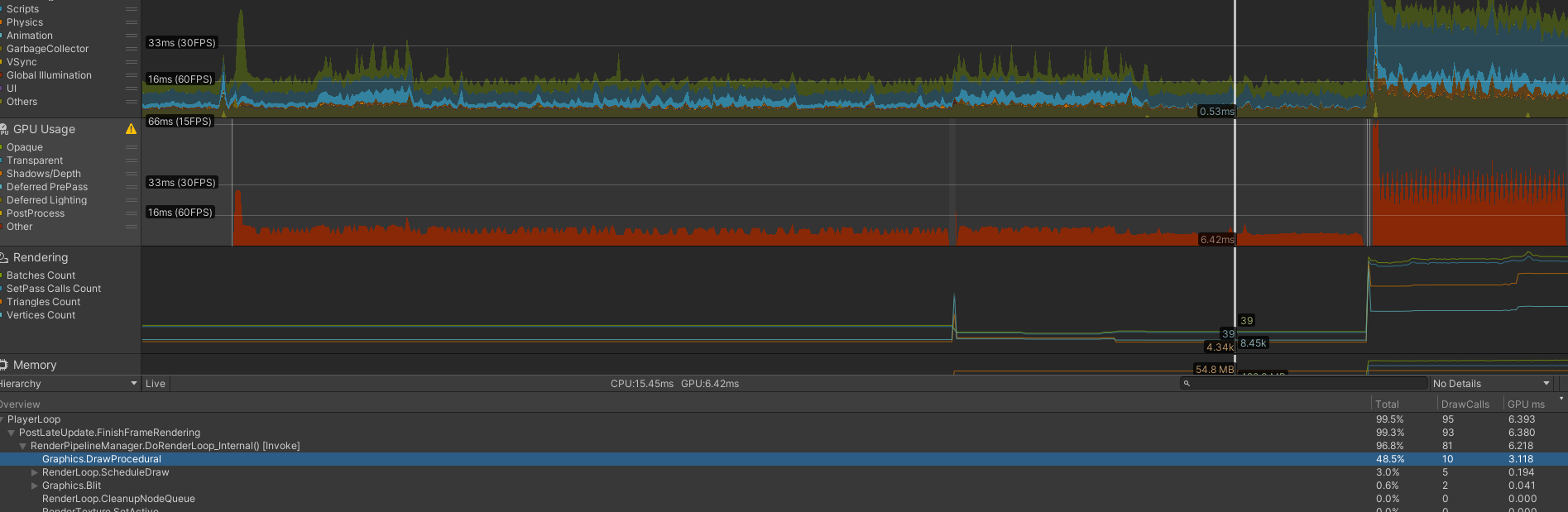
Once again, in this blank scene, you can see some unusual activity on the GPU. However, that Graphics.DrawProcedural slowdown has almost vanished (10ms to 3ms). Nothing else was changed, aside from downgrading my Unity OpenXR Plugin. Other problems showed up when I transitioned to a test scene with content (like the OpenXR hand mesh's taking up 10ms to render? I have no idea why).
Hopefully this will help diagnose and pinpoint the issue. My company is kinda dead in the water until this problem is solved. We've moved to remote rendering for the mean time, but that isnt a viable solution to sell to customers.
I very much want this issue solved, so please feel free to reach out if I can help in any way
[Edit] I converted the project to the standard RP, changed all the materials to be comparable, and loaded the same scene. Heres the profiling data in the same state as the above examples:
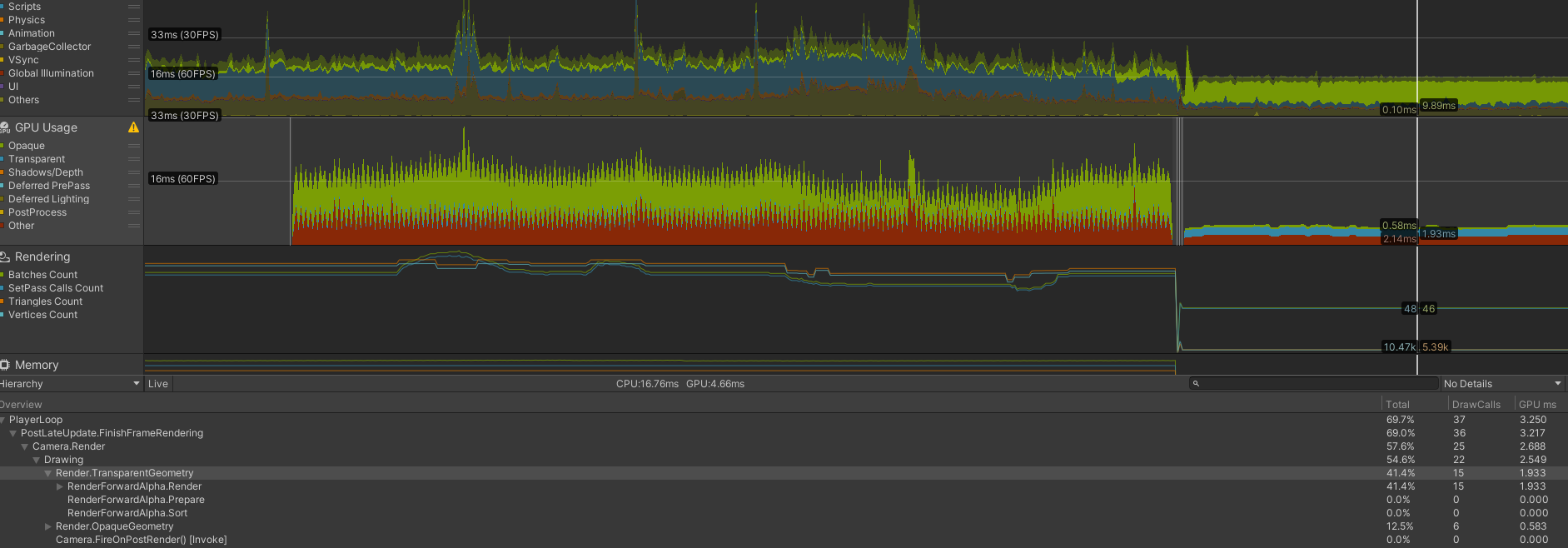
Tagging MRTK3 here because we really want to go to 2021 ASAP but this perf issue is blocking.

@Reag Is this Unity performance or device performance?
I recently upgraded a project from Unity 2019.4/Windows MR to Unity 2020.3/OpenXR 1.5.3. Everything is smooth when running in Unity but when I build and sideload to HL2 I'm seeing a similar performance dip.

We had some updates recently (this week) that should try to check for performance improvement for original post with Unity 2021: https://learn.microsoft.com/en-us/windows/mixed-reality/develop/unity/known-issues#resolved-blocking-issues

@srinjoym Can you help with determining if this will block completing the work to move to 2021

I have test Unity 2021.3.21f with MRTK3.Pre13 use URP 12.1.10 has bad render performance,even empty scene only 10 fps on Hololens2.

We appreciate your feedback and thank you for reporting this issue.
Microsoft Mixed Reality Toolkit version 2 (MRTK2) is currently in limited support. This means that Microsoft is only fixing high priority issues. Unfortunately, this issue does not meet the necessary priority and will be closed. If you strongly feel that this issue deserves more attention, please open a new issue and explain why it is important.
Microsoft recommends that all new HoloLens 2 Unity applications use MRTK3 instead of MRTK2.
Please note that MRTK3 was released in August 2023. It features an all-new architecture for developing rich mixed reality experiences and has a minimum requirement of Unity 2021.3 LTS. For more information about MRTK3, please visit https://www.mixedrealitytoolkit.org.
Thank you for your continued support of the Mixed Reality Toolkit!
