
MixedRealityToolkit-Unity
 MixedRealityToolkit-Unity copied to clipboard
 microsoft
[MRTK3] Controller/Hand Visualization for Vive/SteamVR
Describe the issue
I saw implementations for ControllerVisualizer/Loader and the default "MRTK XR Rig" prefab fails to load controller models (HTCViveControllerOpenXR didn't provide a key for a controller model from the platform). Should MRTK load controller models by default or is there anything I have to set up manually?
Also, visualization of hands is different on different devices: I noticed that with the SteamVR runtime, hands are visible for controllers (HTC Vive, Valve Index and Vive Focus 3 controllers), but they are not visible through Oculus runtime (Quest 1) and in standalone builds (Quest 1 and Focus 3). These were just my observations, but I assume that the poses are not available on some platforms or is there another reason?
MRTK Version 3.0.0-pre.12 Unity 2021.3.11f1

Thanks for submitting this issue. We're still gathering some information, does the controller model fail to load only when using the SteamVR runtime? Are you able to see the controllers when using other runtimes by any chance? The error message seems to suggest that the HTCViveControllerOpenXR doesn't have a loadable controller model, but we're not quite clear if that's expected or not.
@keveleigh for visibility

Thanks for reporting this! The controller model loader should be functioning on SteamVR, I believe, but @RogPodge is DRI on that.
For the second point, you're absolutely right that some platforms provide hand joints when using controllers and some platforms do not. That's pretty normal, so, no worries there. That shouldn't affect interaction or input; let us know if it does.

Currently, I'm only aware of controller model extensions on the WMR and Oculus runtimes, so those are the only extensions the Mixed Reality OpenXR Plugin (which we use for controller model loading) supports. If SteamVR has one that I missed, please let me know! The controller model loading in MRTK3 should at least fall back to the generic controller model we ship, but @RogPodge this looks like the example for where the "hand joints && no mruneim controller model == hands" assumption falls apart 😬
I noticed that with the SteamVR runtime, hands are visible for controllers (HTC Vive, Valve Index and Vive Focus 3 controllers), but they are not visible through Oculus runtime (Quest 1) and in standalone builds (Quest 1 and Focus 3).
Yeah, that's runtime dependent. The SteamVR and WMR runtimes will provide hand joints from controllers, but the Oculus runtime doesn't.

I working with the Oculus Quest 2, there the controller models are correctly loaded. However the controller models loaded are not the models that look like the Oculus Quest 2 controllers. I've found the fbx files for the correct controllers, but I can't find where to change the model. On the MRTK XR Rig are the MRTK RightHand Controller en MRTK LeftHand Controller with the Articulated Hand Controller script, but there you can only add the models for the hands, not for the controllers.
Where can I change the model for the controller to be used for the Oculus Quest 2?
Unity 2021.3.11f1 MRTK Version 3.0.0-pre.12

Thank you everyone for the answers! Before I tested with a custom player rig which only supported handtracking but no controllers. So I checked it again with the default MRTK rig:
- Focus 3 (standalone): controller: nothing visible handtracking: hands visible
- Quest 1 (standalone): controller: controller visible handtracking: hands visible, but I think there are two overlapping hand models simultaneously, resulting in visual glitches
- Quest 1 (Oculus runtime via cable link): controller: nothing visible handtracking: hands visible
- SteamVR runtime: controller: hands visible
- WMR runtime, tested with device simulator: both, controller and hand models visible at the same time
I have never seen a generic controller model as a fallback in any of the cases.
It is really disappointing that SteamVR does not provide controller models through OpenXR since the old SteamVR package for Unity, which was based on OpenVR, already supported that and the controller models are even included somewhere in the SteamVR installation path.
For devices that support different forms of visualization (which will hopefully be more in the future): Would be nice to have a list where you can prioritize how controllers are visualized, for example: 1.controller + hands, 2. fallback controller or 1.hands, 2. controller, 3. fallback controller
@ElisaPijnAvanade
I working with the Oculus Quest 2, there the controller models are correctly loaded. However the controller models loaded are not the models that look like the Oculus Quest 2 controllers. I've found the fbx files for the correct controllers, but I can't find where to change the model. On the MRTK XR Rig are the MRTK RightHand Controller en MRTK LeftHand Controller with the Articulated Hand Controller script, but there you can only add the models for the hands, not for the controllers.
Where can I change the model for the controller to be used for the Oculus Quest 2?
Hi Elisa, you should not be manually changing or specifying controller models on any platform; if the platform supports controller models, they should be automatically loaded without specifying them.
If you are on Quest Link, I don't believe platform-specific controller models are supported there. If you deploy your app to device, you should see the correct controller models automatically. If you're not seeing them when deployed, please let me know.
In addition, you'll need this OpenXR feature group checked:
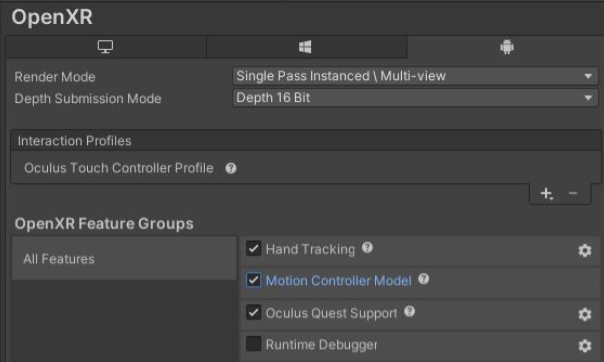
@Zee2 the setting in the feature group was the trick. Now the correct controllers are loaded, thank you!
@Daniel4144 's issue shown in his testing grid has not been resolved, reopening
Hey @Daniel4144 , are you still seeing the issue you reported earlier?
@RogPodge pinging for visibility
Hi @Zee2, The generic controller model is now visible, if there is no other model or handtracking. I think the problem was a wrong version of glTFast in the project. Still, having the correct models for every platform/device would be nice, but as I understood that is not possible.