
MixedRealityToolkit-Unity
 MixedRealityToolkit-Unity copied to clipboard
 microsoft
World Locking Samples package throws SSL error in MRFT 1.0.2206.1-Preview and crashes the application
Describe the bug
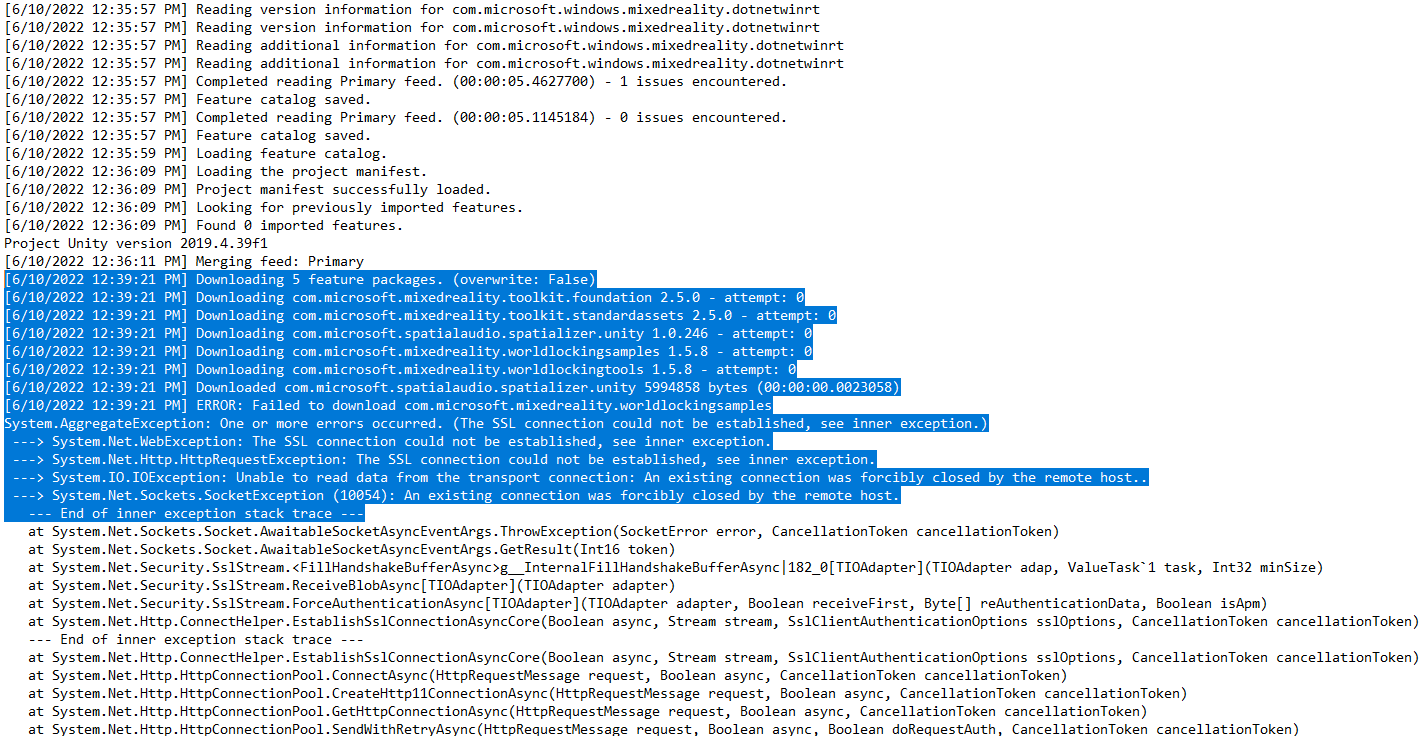
On selecting the World Locking Samples package for download and clicking on "Get Features," the application crashes.
To reproduce
Steps to reproduce the behavior:
- Open MRFT 1.0.2206.1-Preview.
- Select "Start."
- Select a Unity project path, and select "Discover Features."
- Select the World Locking Samples as one of the desired packages to install, and select "Get Features."
- MRFT goes away, and the logs (screenshotted) seem to show that the remote server is forcibly closing the connection, causing an unhandled System.AggregateException which crashes the application.
Expected behavior
MRFT installs the required packages, or gracefully handles the exception and tells you via the UI that it failed to do so.
Screenshots
Your setup (please complete the following information)
- Unity Version 2019.4.39f1
- MRFT Version 1.0.2206.1-Preview
Target platform (please complete the following information)
- HoloLens 2

@psunavy03, does the error always occur when you attempt to download the World Locking Samples? Do you receive the same error with any other packages?
Thanks!

@davidkline-ms since filing the bug, I've also noticed the same behavior with the WLT-ASA package as well.

this is very strange. all of the packages hosted by the Mixed Reality Feature Tool are on the same server. are there specific versions of the WLT packages that fail? are you able to acquire them when retrying?
i have attempted to repro this with 1.0.2206.1 and am unable to generate the SSL error / crash. I cleared my package download cache (%userroot%\AppData\Local\MixedRealityFeatureTool\PackageCache) and downloaded versions 1.58 and 1.59 of the WLT packages without fail.
can you confirm that, so far, the only packages impacted are in the World Locking Tools category?
I will try clearing my cache and see if that helps. Last log dump was as follows:
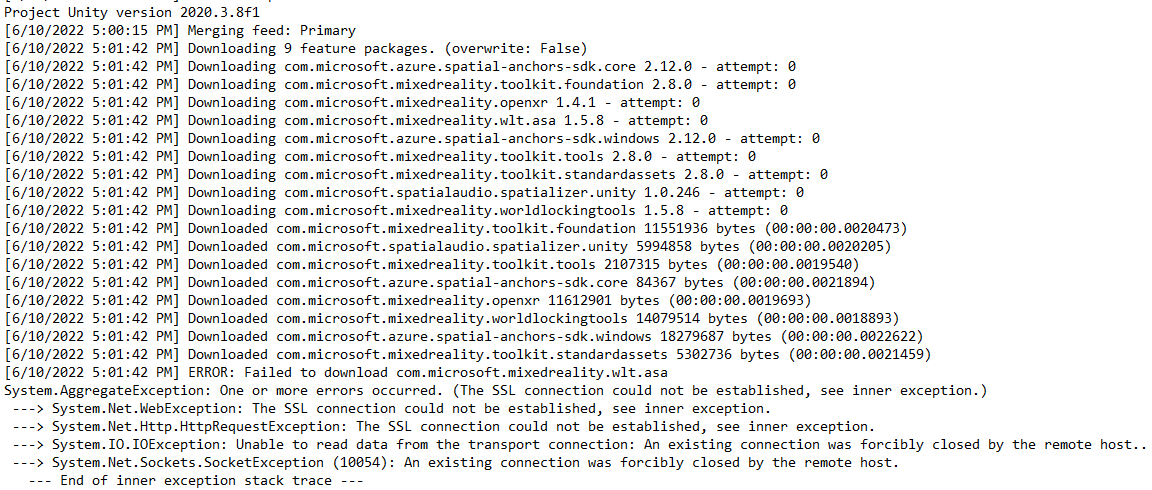
So it does appear to be downloading some of the packages, then hits WLT-ASA, doesn't like something, and drops the connection. Is there a chance there might be anything on my local network causing the hiccup?
It does not appear to be limited to the WLT packages. I cleared the cache, and tried again. This time, it blew up on four packages, and the first was the Azure Spatial Anchors SDK
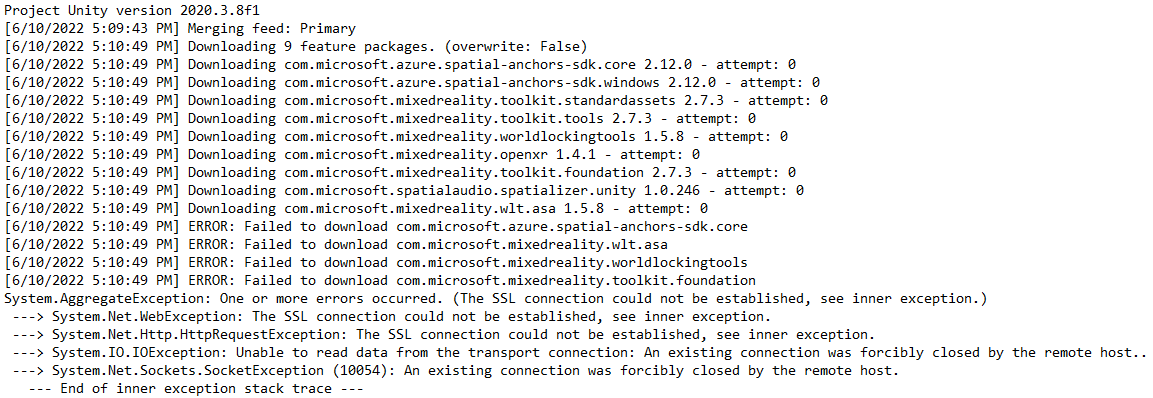
So it appears by loading the packages in chunks, I can get some of them to load. I installed MRTK fine. Then, I went back and installed the ASA packages fine. Then, I did the OpenXR Plugin and Spatializer. All of those behaved properly.
Then, I selected WLT Core and WLT-ASA 1.5.8. MRFT blew up. Then, I got WLT-Core to install by itself. Then, I tried WLT-ASA, and it blew up. I tried it a second time and it worked, but it prompted me to downgrade the ASA SDK from 2.12.0 to 2.11.0. I went ¯\(ツ)/¯ and let it downgrade, and it appears to have worked.
Is it possible that the downgrade is causing funny behavior, or that multiple simultaneous connections trying to download many packages makes the download server cranky?
We appreciate your feedback and thank you for reporting this issue.
Microsoft Mixed Reality Toolkit version 2 (MRTK2) is currently in limited support. This means that Microsoft is only fixing high priority security issues. Unfortunately, this issue does not meet the necessary priority and will be closed. If you strongly feel that this issue deserves more attention, please open a new issue and explain why it is important.
Microsoft recommends that all new HoloLens 2 Unity applications use MRTK3 instead of MRTK2.
Please note that MRTK3 was released in August 2023. It features an all new architecture for developing rich mixed reality experiences and has a minimum requirement of Unity 2021.3 LTS. For more information about MRTK3, please visithttps://www.mixedrealitytoolkit.org.
Thank you for your continued support of the Mixed Reality Toolkit!
