
MixedRealityToolkit-Unity
 MixedRealityToolkit-Unity copied to clipboard
 microsoft
Changes to IMixedRealitySpatialAwarenessMeshObserver are not applied
Overview
Hi, I am extracting the spatial mesh via an observer and publishing it as a point cloud to ROS. However, the changes I make to the observer are not applied. I tried changes separately from each other in 2 parts. Once via the editor and once directly in the script. I get an observer itself, but I can't change it.
Expected behavior
For testing, I set the LevelofDetail to custom and tried it with a triangle per cubic meter value of 5, 50, 500, 5000. I expected the visible mesh to change as well as the density of the point cloud I receive in ROS. Originally I wanted to change the custom value for Triangles per cubic meter at runtime. In the documentation I also found the methods Reset() and Update(). However, this did not work for me and no data was recorded at all. Then I also tried Resume(), but that didn't work either. To be honest, I don't know in which order and at which position I have to call the functions, so that it works.
Actual behavior
At the bottom of the picture, however, I have shown the comparison of the different triangles per cubic meter. Once with view out of the HoloLens and once the resulting point cloud in ROS.
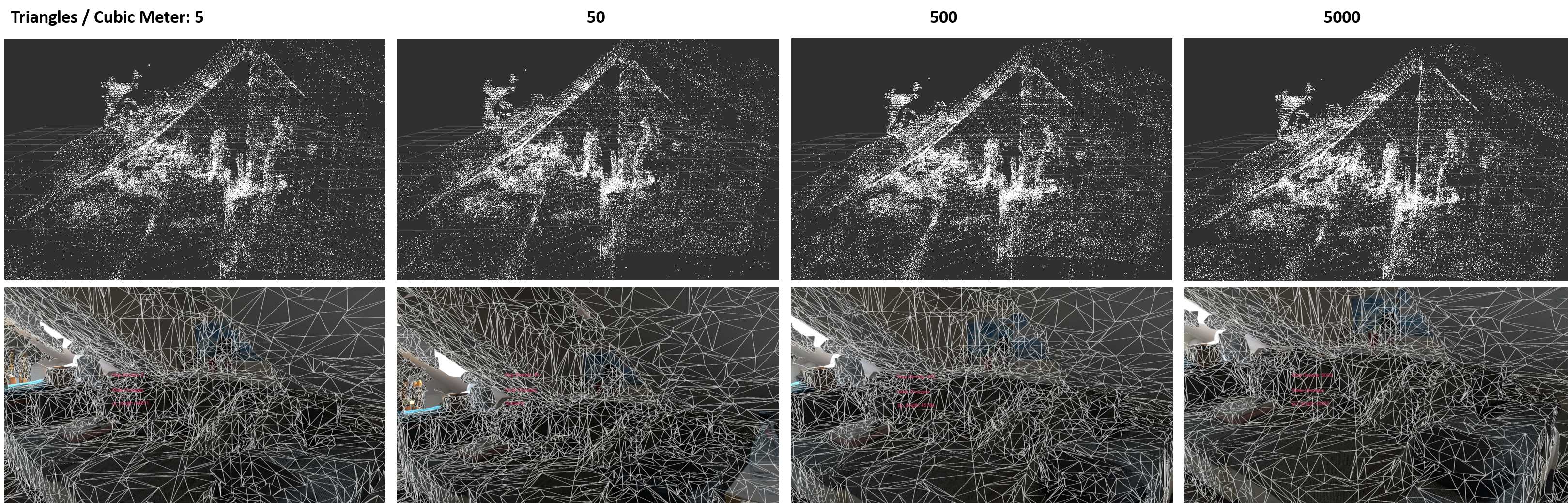 It always looks the same to me.
Steps to reproduce
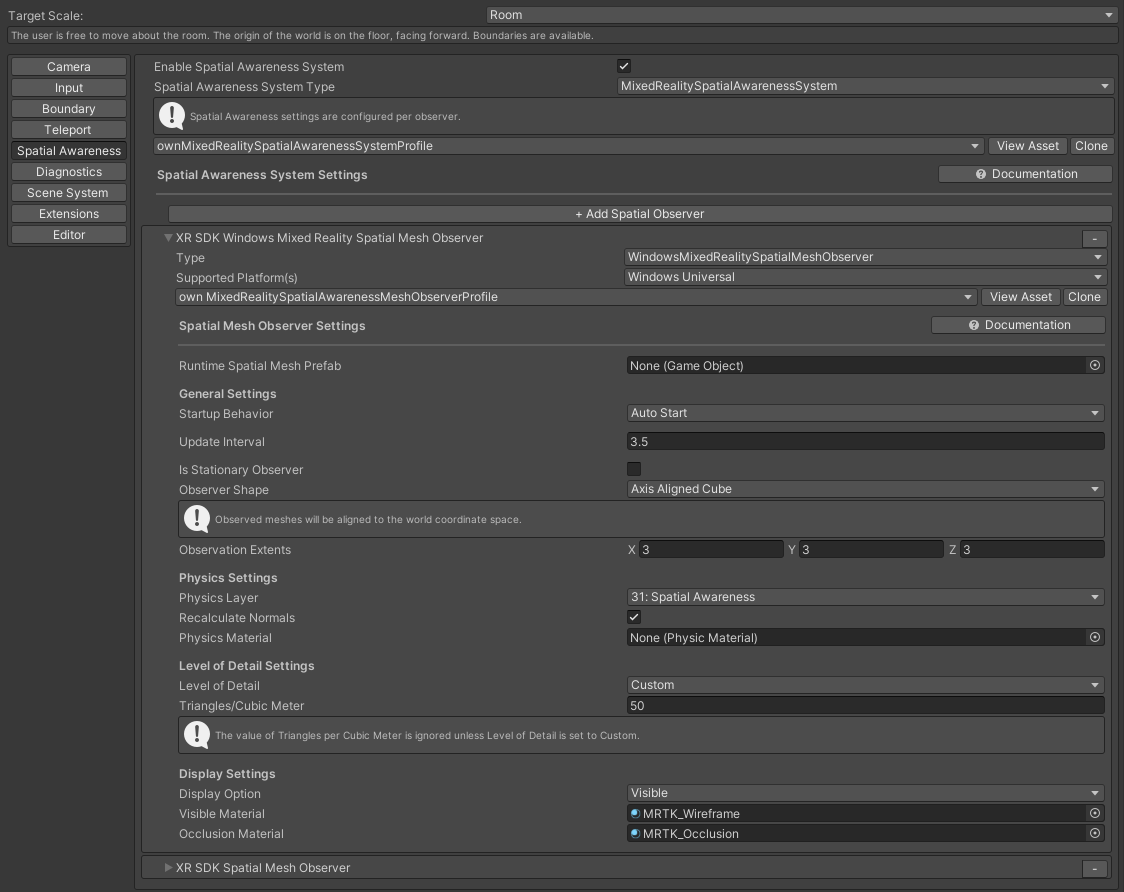
I use Windows Mixed Reality as an XR. The profile settings for spatial awareness within the Unity editor are as follows:
The script I use to access the Observer is simplified like this:
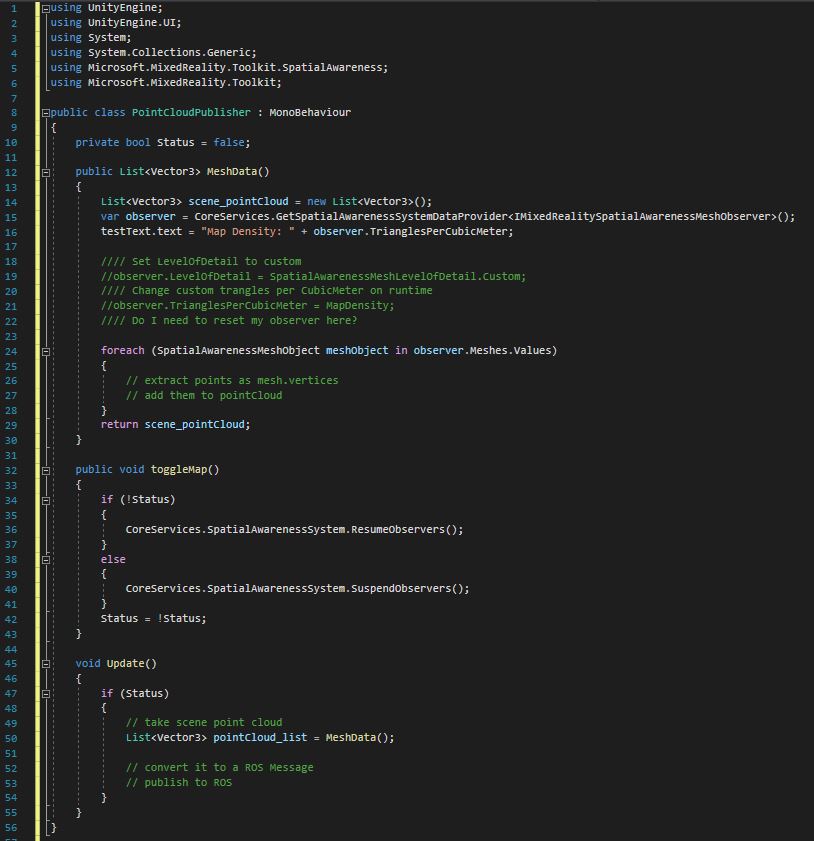 The "ToggleMap" function is called, whenever I switch a graphical toggle within the application. The code where I want to change the settings at runtime are commented out in MeshData()
The setup for this is based on Configuring mesh observers via code and IMixedRealitySpatialAwarenessMeshObserver. After making the changes in the editor, I built the application on the HoloLens and launched it again.
I'm sure I'm just missing something and appreciate any help!
Unity editor version
2020.3.16f1
Mixed Reality Toolkit release version
Mixed Reality Feature Tool: v1.0.2104.4 Beta, with Foundation 2.6.1 and Standard Assets 2.6.1,

Hi @Gescheld Thank you for bringing this issue to our attention. I noticed that you are using MRTK 2.6.1, are you able to upgrade to the latest MRTK version?
I will investigate this issue and assign it to the appropriate person when I am done.

Hi @elbuhofantasma, Thanks for answering! I have now updated both (Foundation and Standard Assets) to 2.7.2 (the latest available), but nothing has changed. Could it help to try directly the latest version of MixedRealityFeatureTool (1.0.2111.0-Preview)?
- when I set the profile settings for the observer to visible in the inspector, I see the mesh at the beginning. However, in the script I set the visibility to none and this also changes as soon as I start the observer by an action at runtime. So in some way at least the visibility updates.
- I can now change the level of detail in my menu at runtime. When I switch to custom and change the density, a large pink mesh appears at one corner.... This does not happen with the other LoD. And with custom also only as soon as I change the density.
Any news on this one? I get no changes in the actual mesh detail either, regardless of level of detail set.

Hi @Jversen, from my side unfortunately not. I'm happy about any suggestions.
We appreciate your feedback and thank you for reporting this issue.
Microsoft Mixed Reality Toolkit version 2 (MRTK2) is currently in limited support. This means that Microsoft is only fixing high priority security issues. Unfortunately, this issue does not meet the necessary priority and will be closed. If you strongly feel that this issue deserves more attention, please open a new issue and explain why it is important.
Microsoft recommends that all new HoloLens 2 Unity applications use MRTK3 instead of MRTK2.
Please note that MRTK3 was released in August 2023. It features an all-new architecture for developing rich mixed reality experiences and has a minimum requirement of Unity 2021.3 LTS. For more information about MRTK3, please visit https://www.mixedrealitytoolkit.org.
Thank you for your continued support of the Mixed Reality Toolkit!
