

 microsoft
change load local ./ hf parquet dataset
add load downloaded huggingface dataset, in case of machines cannot connect to huggingface.co

@kindaQ HF datasets has caching (https://huggingface.co/docs/datasets/cache) so that if you copy the downloaded data into a machine and properly set HF_DATASETS_CACHE, that machine can directly load the datasets without downloading. If you agree caching will solve your issue, we would prefer not to merge this PR and add another layer of complexity. If caching does not solve your case, please explain. Thank you.

@kindaQ HF datasets has caching (https://huggingface.co/docs/datasets/cache) so that if you copy the downloaded data into a machine and properly set HF_DATASETS_CACHE, that machine can directly load the datasets without downloading. If you agree caching will solve your issue, we would prefer not to merge this PR and add another layer of complexity. If caching does not solve your case, please explain. Thank you.
I have tried " export HF_DATASETS_CACHE="/path/to/another/directory"" and "dataset = load_dataset('LOADING_SCRIPT', cache_dir="PATH/TO/MY/CACHE/DIR")",
but still got "ConnectionError: Couldn't reach 'Dahoas/rm-static' on the Hub (ConnectionError)"
here is my environment:
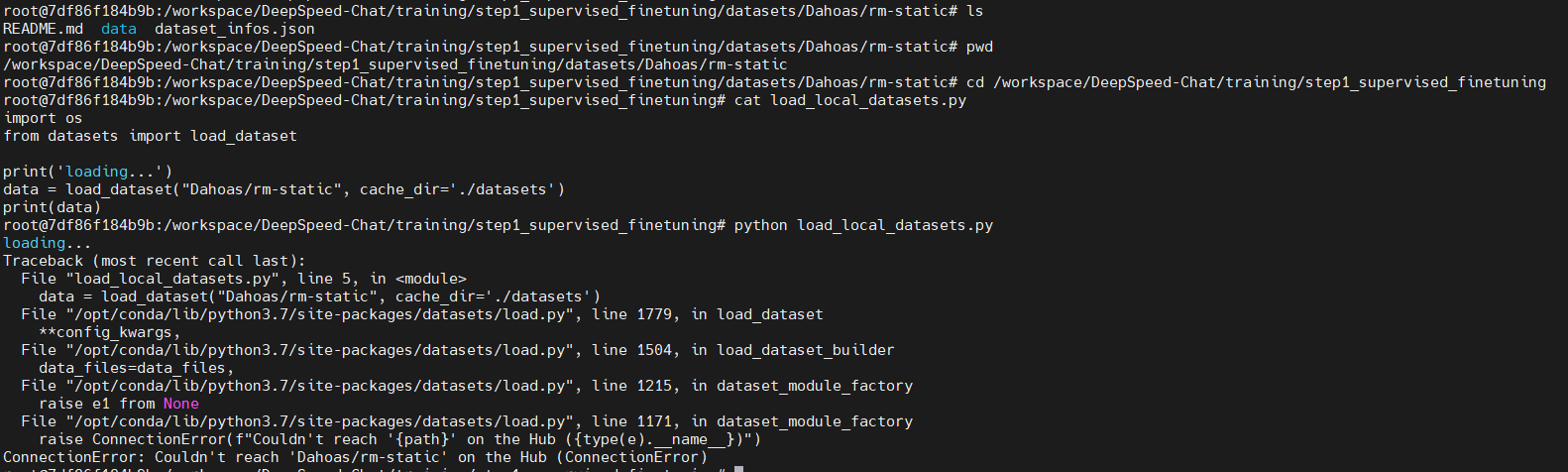

would you please try it in your machine which cannot connect to huggingface.co
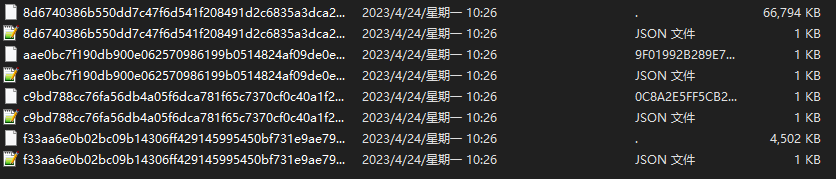
The cache_dir only change the directory that saves the downloaded cache files, but won't change the downloading step.
follow are the hugggingface cached files and user download files, they are not in same type.

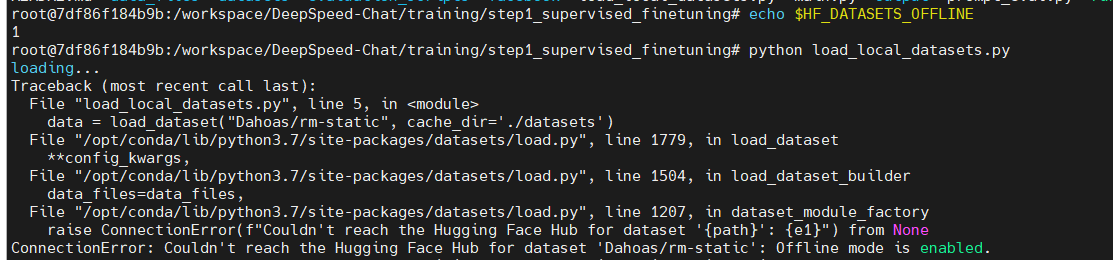
Based on HF's doc https://huggingface.co/docs/datasets/loading#offline, could you try to set HF_DATASETS_OFFLINE to 1 to enable full offline mode?
Based on HF's doc https://huggingface.co/docs/datasets/loading#offline, could you try to set HF_DATASETS_OFFLINE to 1 to enable full offline mode?
it does not work
I have reviewed the code of "load_dataset", the first param only support
"_PACKAGED_DATASETS_MODULES = {
"csv": (csv.name, _hash_python_lines(inspect.getsource(csv).splitlines())),
"json": (json.name, _hash_python_lines(inspect.getsource(json).splitlines())),
"pandas": (pandas.name, _hash_python_lines(inspect.getsource(pandas).splitlines())),
"parquet": (parquet.name, _hash_python_lines(inspect.getsource(parquet).splitlines())),
"text": (text.name, _hash_python_lines(inspect.getsource(text).splitlines())),
"imagefolder": (imagefolder.name, _hash_python_lines(inspect.getsource(imagefolder).splitlines())),
"audiofolder": (audiofolder.name, _hash_python_lines(inspect.getsource(audiofolder).splitlines())),
}"
or xxx.py
or directory path
otherwise it will connect to hub, "load_dataset("Dahoas/rm-static")" will go into this branch
so changing cache_dir could not solve my issue
@kindaQ Thanks for the clarifications. Now I agree that this PR is needed. I finished my review and left some comments that need your fix. Please also write a short paragraph of documentation about this feature at https://github.com/microsoft/DeepSpeedExamples/blob/master/applications/DeepSpeed-Chat/README.md#-adding-and-using-your-own-datasets-in-deepspeed-chat, in order for other users to actually understand how to use your contribution. One other thing is that the formatting test failed, please follow https://www.deepspeed.ai/contributing/ to fix it with pre-commit.
@kindaQ this PR was having formatting issues. I helped to fix it this time, but next time please make sure to use pre-commit to resolve them: "pre-commit install" then "pre-commit run --files files_you_modified"
@kindaQ this PR was having formatting issues. I helped to fix it this time, but next time please make sure to use pre-commit to resolve them: "pre-commit install" then "pre-commit run --files files_you_modified"
thx a lot.
I have tried "pre-commit run" in terminal, but got failing conneted to github.