

 microsoft
13B model training OOM with 8x48G machine and limited CPU RAM
Describe the bug This is not a bug but a request for help with reducing memory requirements. @stas00 Many thanks in advance!!!
I need to train a 13B model (mt0-xxl-mt) which is known to work only with fp32. I have a machine with 8x48GB GPUs and ~150G CPU RAM. It doesn't support bf16, and offloading to CPU is impossible due to low RAM.
what I have tried:
- set gradient_checkpointing to True
- set per_device_batch_size to 1
- experimented with different optimizers adamw, bitsandbytes adamw_bnb_8bit, adafactor
- reduce alltogether_bucket_size to 2e8
- set gradient_accumulation_step to 1
- initialize with zero.init (by defining training arguments before model loading)
Expected behavior I wonder if there are any other things I can do to squeeze out a few GBs of GPU memory and get the program running.
ds_report output
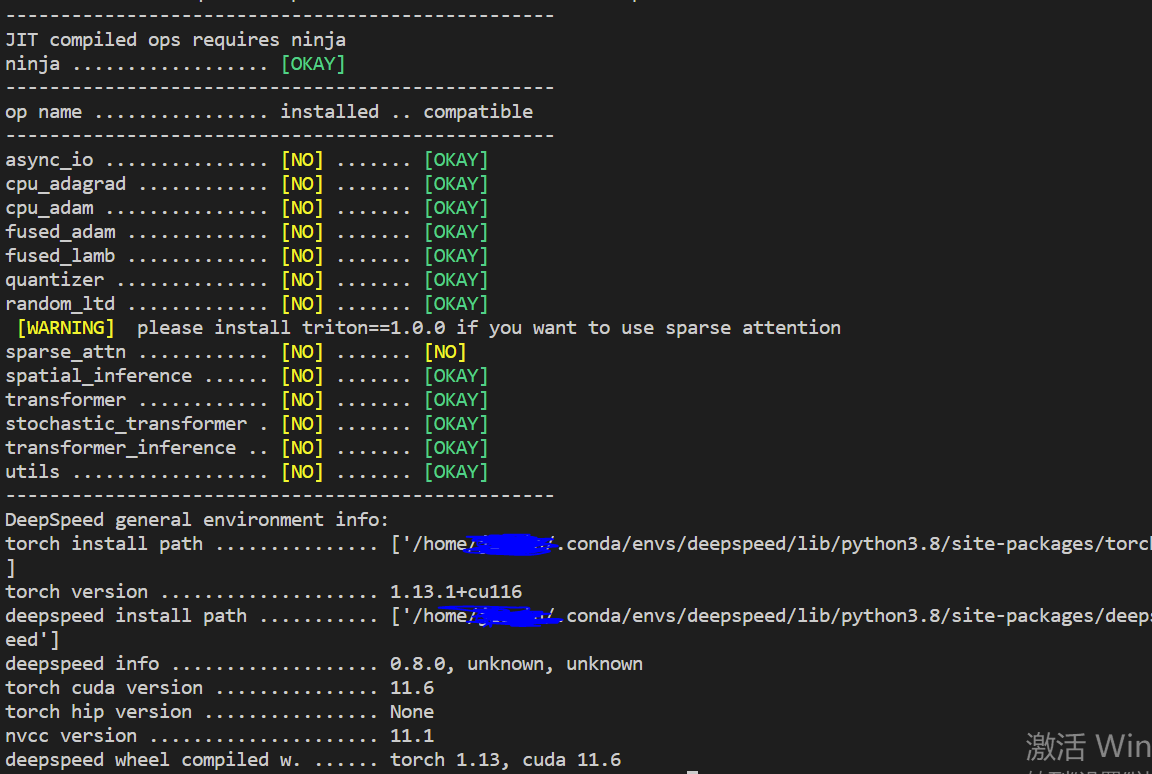
Screenshots
Still OOM error
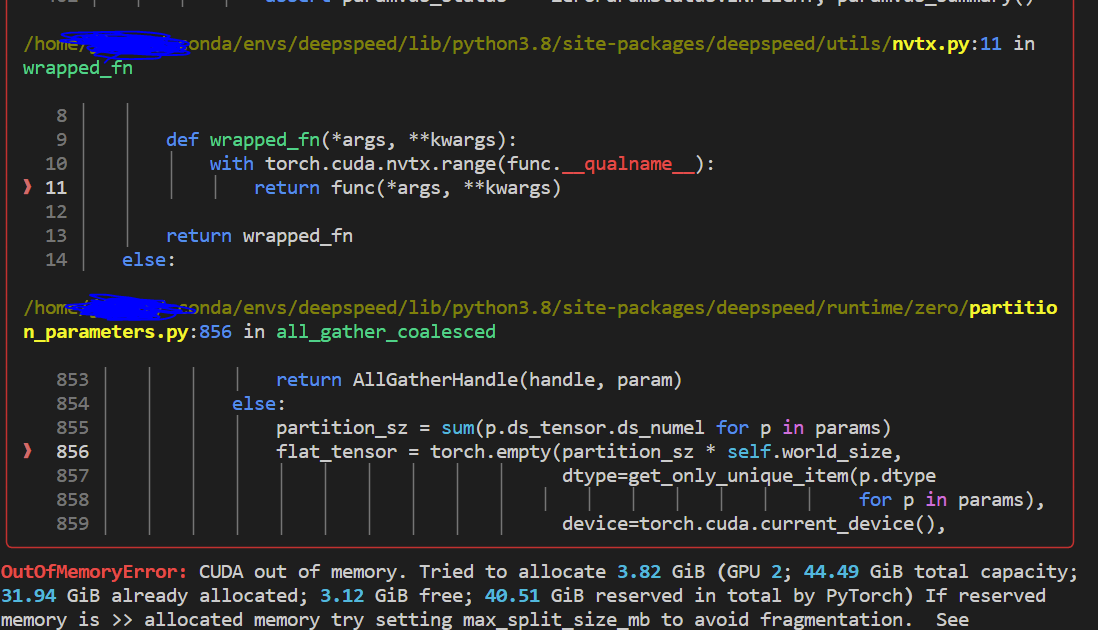 Although there could be some activation memory consumption, I think there's still plenty of space left as measured from the deepspeed estimate_zero3_model_states_mem_needs_all_live()
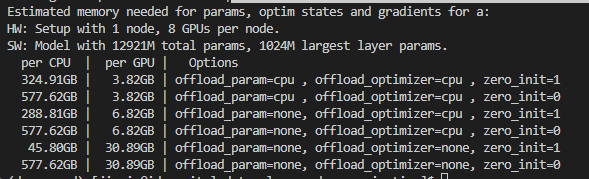
Launch command
deepspeed run_deepspeed.py
--model_id bigscience/mt0-xxl-mt
--dataset_path data/nlpcc_mt0
--epochs 5
--per_device_train_batch_size 1
--per_device_eval_batch_size 1
--generation_max_length 513
--lr 2e-5
--deepspeed configs/ds_config_zero3.json
--gradient_checkpointing True
ds config { "bf16": { "enabled": "auto" }, "scheduler": { "type": "WarmupLR", "params": { "warmup_min_lr": "auto", "warmup_max_lr": "auto", "warmup_num_steps": "auto" } }, "zero_optimization": { "stage": 3, "overlap_comm": true, "contiguous_gradients": true, "sub_group_size": 1e9, "reduce_bucket_size": "auto", "stage3_prefetch_bucket_size": "auto", "stage3_param_persistence_threshold": "auto", "stage3_max_live_parameters": 1e9, "stage3_max_reuse_distance": 1e9, "stage3_gather_16bit_weights_on_model_save": false, "allgather_bucket_size": 1e8 }, "gradient_accumulation_steps": "auto", "gradient_clipping": "auto", "steps_per_print": 2000, "train_batch_size": "auto", "train_micro_batch_size_per_gpu": "auto", "wall_clock_breakdown": false }
training script run.txt

@lavaaa7, try disabling prefetching and caching of layers by setting the following configuration knobs to 0
"stage3_prefetch_bucket_size": 0,
"stage3_max_live_parameters": 0,
"stage3_max_reuse_distance": 0,

@lavaaa7, try disabling prefetching and caching of layers by setting the following configuration knobs to 0
"stage3_prefetch_bucket_size": 0,
"stage3_max_live_parameters": 0,
"stage3_max_reuse_distance": 0,
Thanks for your suggestion. I just tried those settings in the ds config file but still get OOM. When I keep everything else the same, the error appears at the same line and it seems in both settings, there are of same amount of memory consumption, something like below
"zero_optimization": {
    "stage": 3,
    "overlap_comm": true,
    "contiguous_gradients": true,
    "sub_group_size": 1.000000e+09,
    "reduce_bucket_size": 1.677722e+07,
    "stage3_prefetch_bucket_size": 0,
    "stage3_param_persistence_threshold": 4.096000e+04,
    "stage3_max_live_parameters": 0,
    "stage3_max_reuse_distance": 0,
    "stage3_gather_16bit_weights_on_model_save": false,
    "allgather_bucket_size": 1.000000e+08
},

@lavaaa7, try disabling prefetching and caching of layers by setting the following configuration knobs to 0
"stage3_prefetch_bucket_size": 0,
"stage3_max_live_parameters": 0,
"stage3_max_reuse_distance": 0,
update: I combined your suggestion with previous tricks, e.g. adamw -> adafactor, gradient checkpointing, zero.init and finally got the program running. Thanks!! @tjruwase
The only issue is that the training becomes extremely slow. I wonder among those tricks, which factors affect training efficiency the most. Is there already some empirical findings or I need to experiment with every possible setting? many thanks for help. @tjruwase @stas00
- prefetch_bucket_size: Maximum number of parameter elements to fetch ahead of use.
- max_live_parameter: The maximum number of parameters resident per GPU before releasing. Smaller values use less memory but perform more communication.
- max_reuse_distance: Do not release a parameter if it will be reused within this threshold of parameters. Smaller values use less memory but perform more communication.
- per_batch_train_size: impossible to set to 2, so out of discussion
- zero.init: I believe this only affects the initialization stage
- choice of optimizer: adam -> adafactor might be even faster
- allgather_bucket_size: Number of elements allgathered at a time. Limits the memory required for the allgather for large model sizes
I see Tunji has already helped you here a lot, and I will let him follow up on the DS config questions.
Just a quick note that DS will be slower if you don't use Adam.
Thank you for opening a new issue, @lavaaa7 and providing all the details.
So the other/additional path to take is to explore the new model.compile which both speeds up the model and often makes it use less gpu memory. The thing is - I haven't tried it with DS. I think it should work, but it needs to be tried.
This requires pytorch-nightly, but I have just tested it and it seems to be broken - so I will get back to you once I figure out why it doesn't work
The HF integration is here: https://github.com/huggingface/transformers/blob/b90fbc7e0ba41dfd6b343e7e2274443f19087f36/src/transformers/training_args.py#L570-L582
so you'd add something like this --torch_compile --torch_compile_backend nvfuser --torch_compile_mode default to your trainer args.
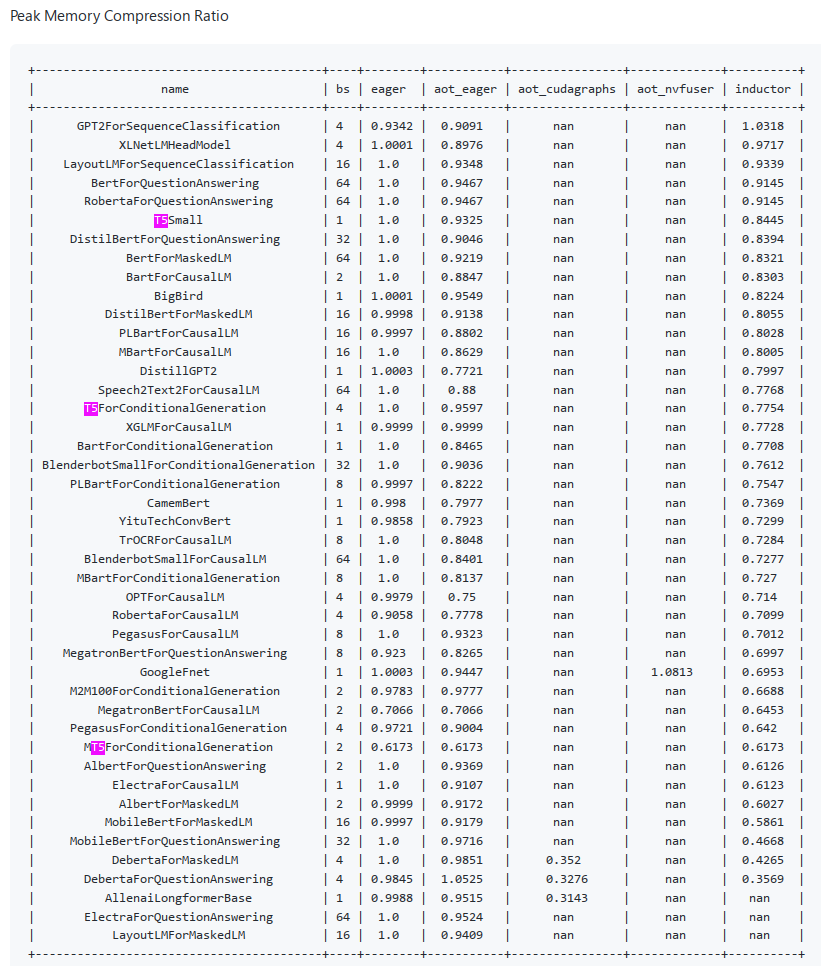
You can see benchmarks here:
https://github.com/pytorch/pytorch/issues/93794#issuecomment-1411303135
At the very end of it you can see peak memory and you can see that T5 entries (same arch as your model) use less memory, so this is encouraging.

Thanks for the reply. So it seems the change of the optimizer (adam->adafactor) might be the root cause for slowing down in training. Looking forward to the progress in model.compile.
@lavaaa7, thanks for the updates.
To help investigate the efficiency issues, can you please enable wall_clock_breakdown: https://www.deepspeed.ai/docs/config-json/#logging
well, I was very hopeful but so far no luck. But perhaps it'd work better for you. Basically just add --torch_compile to your Trainer arguments after installing pytorch-2.0 (which should be released tomorrow) - or use the pytorch-nightly release.
I tried a t5 model and had multiple issues with it. I reported the issues back to the pytorch devs but so far haven't had any resolutions :(
I will update here if and when I find a working solution.
ok a small update, apparently it breaks on dynamic shapes. Can you make all your inputs of a fixed length, @lavaaa7 - if you can then I am told it should work.
pt-2.0 is out so you should be able to install it normally.
If you try please report if you have a success? Again you just need to add --torch_compile
ok a small update, apparently it breaks on dynamic shapes. Can you make all your inputs of a fixed length, @lavaaa7 - if you can then I am told it should work.
pt-2.0 is out so you should be able to install it normally.
If you try please report if you have a success? Again you just need to add
--torch_compile
Thanks for the notice, I will try it out this week and let you know once I get results
@stas00 @tjruwase Thanks for the suggestions. I've just tried with torch_compile of pytorch 2.0, and it seems both GPU memory and training speed have improved.
With all other factors fixed
GPU memory with torch.cuda.max_memory_allocated() previous pytorch: 42304207872 pytorch 2.0: 38762399232
a step in training just sampled a step log previous pytorch: [2023-03-17 21:42:04,846] [INFO] [logging.py:68:log_dist] [Rank 0] rank=0 time (ms) | forward: 44740.87 | backward: 114108.02 | backward_inner: 111506.64 | backward_allreduce: 2601.01 | step: 614.25 pytorch 2.0: [2023-03-17 21:32:13,698] [INFO] [logging.py:77:log_dist] [Rank 0] rank=0 time (ms) | forward: 43243.62 | backward: 98717.13 | backward_inner: 96393.67 | backward_allreduce: 2323.13 | step: 1277.77
excellent. Glad to hear it worked for your case. So some saved memory there.
So do you have now some breathing space to remove some of the settings Tunji suggested and still not OOM? so that you get fast training that is
closing the issue since the original problem is solved. A million thanks to the community