

 microsoft
Bot does not rename file with duplicate name and different content, when uploading to sharepoint/ondrive
Github issues for C# /JS / Java/ Python should be used for bugs and feature requests. Use Stack Overflow for general "how-to" questions.
Sample information
samples/csharp_dotnetcore/56.teams-file-upload/
Describe the bug
Using a slightly modified version of the sample code for uploading a file, I've noticed that although the UploadInfo.UploadUrl contains a query param to rename files, no rename takes place.
This means that once a file is uploaded, there can not be a different file with the same name uploaded, but the upload reports success.
I am creating the file consent cards from a Notify controller:
using System.Collections.Concurrent;
using System.Collections.Generic;
using System.Linq;
using System.Net.Http;
using System.Threading.Tasks;
using Microsoft.AspNetCore.Mvc;
using Microsoft.Bot.Builder;
using Microsoft.Bot.Builder.Integration.AspNet.Core;
using Microsoft.Bot.Schema;
using Microsoft.Bot.Schema.Teams;
using Microsoft.Extensions.Configuration;

namespace TeamsFileUpload.Controllers
{
    public class TestRequest
    {
        public string FileName { get; set; }
        public string FileType { get; set; }
        public string DownloadUrl { get; set; }
    }

    [Route("api/notify")]
    [ApiController]
    public class NotifyController : ControllerBase
    {
        private readonly IBotFrameworkHttpAdapter _adapter;
        private readonly ConcurrentDictionary<string, ConversationReference> _conversationReferences;
        private readonly string _appId;

        public NotifyController(
            IBotFrameworkHttpAdapter adapter,
            IConfiguration configuration,
            ConcurrentDictionary<string, ConversationReference> conversationReferences)
        {
            _adapter = adapter;
            _conversationReferences = conversationReferences;
            _appId = configuration["MicrosoftAppId"] ?? string.Empty;
        }

        [Route("test")]
        public async Task<IActionResult> Post([FromBody] TestRequest request)
        {

            var conversationReference = _conversationReferences.Values.FirstOrDefault();

            if (conversationReference == null)
            {
                return NotFound();
            }

            await SendContractToTeamsUser(request, conversationReference).ConfigureAwait(false);

            return Ok();
        }

         private async Task SendContractToTeamsUser(TestRequest createContractRequest, ConversationReference conversationReference)
        {

                using var request = new HttpRequestMessage(HttpMethod.Get, createContractRequest.DownloadUrl);
                using var client = new HttpClient();

                var download = await client.SendAsync(request).ConfigureAwait(false);

                var downloadContent = await download.Content.ReadAsByteArrayAsync().ConfigureAwait(false);

                var card = CreateFileConsentCard(
                    createContractRequest.FileName,
                    createContractRequest.DownloadUrl,
                    "Created file",
                    createContractRequest.FileType,
                    downloadContent.Length);

                var asAttachment = new Attachment
                {
                    Content = card,
                    ContentType = FileConsentCard.ContentType,
                    Name = createContractRequest.FileName
                };

                await ((BotAdapter) _adapter).ContinueConversationAsync(_appId, conversationReference,
                    async (tc, ct) =>
                    {
                        var response = Activity.CreateMessageActivity();

                        response.Attachments = new List<Attachment> {asAttachment};

                        await tc.SendActivityAsync(response, ct).ConfigureAwait(false);
                    },
                    default);


        }

         public static FileConsentCard CreateFileConsentCard(string fileName, string downloadUrl, string description, string filetype, long fileSize)
         {
             var consentContext = new Dictionary<string, string>
             {
                 {"filename", fileName},
                 {"downloadUrl", downloadUrl},
                 {"fileType", filetype}
             };

             var fileCard = new FileConsentCard
             {
                 Description = description,
                 AcceptContext = consentContext,
                 DeclineContext = consentContext,
                 SizeInBytes = fileSize

             };

             return fileCard;
         }
    }
}
I have modified the OnTeamsFileConsentAcceptAsync to do the following:
protected override async Task OnTeamsFileConsentAcceptAsync(ITurnContext<IInvokeActivity> turnContext, FileConsentCardResponse fileConsentCardResponse, CancellationToken cancellationToken)
        {
            try
            {
                JToken context = JObject.FromObject(fileConsentCardResponse.Context);

                var downloadUrl = context["downloadUrl"].ToString();

                var client = _clientFactory.CreateClient();
                var download = await client.GetAsync(downloadUrl, cancellationToken).ConfigureAwait(false);

                if (!download.IsSuccessStatusCode)
                {
                    await FileUploadFailedAsync(turnContext, download.ReasonPhrase, cancellationToken);
                }
                else
                {

                    var bArray = await download.Content.ReadAsStreamAsync().ConfigureAwait(false);

                    var fileSize = bArray.Length;
                    var fileContent = new StreamContent(bArray);
                    fileContent.Headers.ContentLength = bArray.Length;
                    fileContent.Headers.ContentRange = new ContentRangeHeaderValue(0, fileSize - 1, fileSize);

                    var putClient = _clientFactory.CreateClient();
                    var response = await putClient.PutAsync(fileConsentCardResponse.UploadInfo.UploadUrl, fileContent, cancellationToken);

                    if (!response.IsSuccessStatusCode)
                    {
                        await FileUploadFailedAsync(turnContext, response.ReasonPhrase, cancellationToken);

                    }
                    else
                    {

                        await FileUploadCompletedAsync(turnContext, fileConsentCardResponse, cancellationToken);
                    }

                }
            }
            catch (Exception e)
            {
                await FileUploadFailedAsync(turnContext, e.ToString(), cancellationToken);
            }
        }
First request that saves the correct image
  {
	  "fileName": "Image.png",
	  "fileType": "png",
	  "downloadUrl": "https://cdn.pixabay.com/photo/2013/07/12/17/47/test-pattern-152459_960_720.png",
  }
Second request which is also reported as successful. but never saved:
{
	"fileName": "Image.png",
	"fileType": "png",
	"downloadUrl": "https://cdn.pixabay.com/photo/2022/01/10/18/34/service-6929022_960_720.png"
}
To Reproduce
Steps to reproduce the behavior:
- Add in the NotifyController to the sample project
- Change the OnTeamsFileConsentAcceptAsync to the above
- Add any deps, private vars etc
- Add memory storage
- Run the sample up
- Decline the first file consent card
- Send a request to the notify controller
- See the first file is saved and is correct
- Send a second request, with a different file url, but the same name
- The upload reports success and attaches the file to chat, but it is the first file
Expected behavior
The first image should be saved as Image.png The second image should be saved as Image 1.png or Image 2.png Both files should be attached into the chat with the respective content
Screenshots
Additional context


Hi @davidgerrard
Update: I'm able to reproduce this issue.
Current behavior of sample /56.teams-file-upload/ after uploading to OneDrive:
- Does NOT rename the file with an existing duplicate name
- Does NOT overwrite existing duplicate name file with the original file
Attempted to change the "UploadInfo.UploadUrl" query param &overwrite=False to &overwrite=True and got Unauthorized error in teams.
Example:
fileConsentCardResponse.UploadInfo.UploadUrl = fileConsentCardResponse.UploadInfo.UploadUrl.Replace("&overwrite=False", "&overwrite=True");
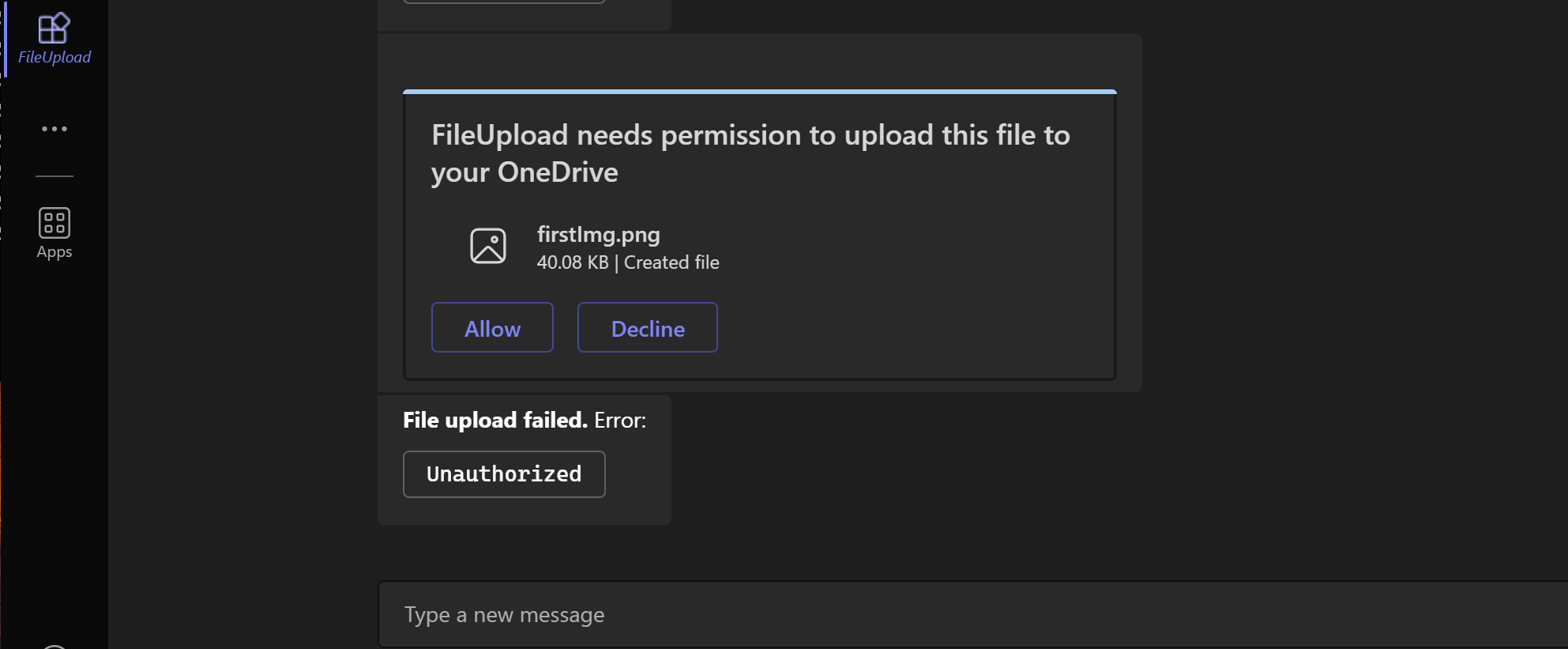
Attached is minimal reproducible sample: 56.teams-file-upload.zip
@davidgerrard - We are able to repro this issue and we have raised a bug for it.
We will let you know once we get updates on it.

