
Azure_Kinect_ROS_Driver
 Azure_Kinect_ROS_Driver copied to clipboard
 microsoft
Camera info on topic not in line with retrieved camera info from SDK
Describe the bug When launching the Azure Kinect ROS node, the camera calibration is printed (see screenshot 2). However, the data published on the camera_info doesn't seem to match with these values. The published camera info also doesn't change when the resolution is changed which is the case for the printed values during launch.
Expected behavior I guess there must be some inconsistency in the data before publishing it to the camera info topic A clear and concise description of what you expected to happen.
Screenshots
Printed values during launch
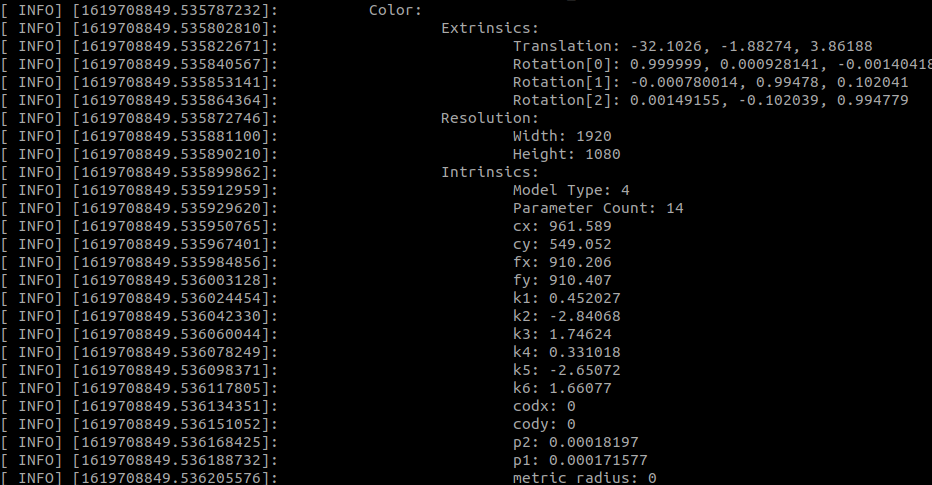
Camera info on the camera_info topic:


I can not verify this behaviour:
Printout from the driver:
K4A Calibration Blob:
     Depth:
         Extrinsics:
             Translation: 0, 0, 0
             Rotation[0]: 1, 0, 0
             Rotation[1]: 0, 1, 0
             Rotation[2]: 0, 0, 1
         Resolution:
             Width: 1024
             Height: 1024
         Intrinsics:
             Model Type: 4
             Parameter Count: 14
             cx: 506.687
             cy: 516.342
             fx: 504.026
             fy: 504.105
             k1: 4.15635
             k2: 2.75859
             k3: 0.139204
             k4: 4.48553
             k5: 4.13281
             k6: 0.747478
             codx: 0
             cody: 0
             p2: 4.25588e-05
             p1: -0.000171427
             metric_radius: 0
     Color:
         Extrinsics:
             Translation: -32.0527, -2.40845, 3.82875
             Rotation[0]: 0.99999, 0.00345786, -0.00299719
             Rotation[1]: -0.00321167, 0.996903, 0.078578
             Rotation[2]: 0.00325962, -0.0785675, 0.996903
         Resolution:
             Width: 2048
             Height: 1536
         Intrinsics:
             Model Type: 4
             Parameter Count: 14
             cx: 1022.92
             cy: 776.882
             fx: 981.486
             fy: 981.434
             k1: 0.645745
             k2: -2.53493
             k3: 1.35801
             k4: 0.525175
             k5: -2.37791
             k6: 1.30022
             codx: 0
             cody: 0
             p2: -0.000384387
             p1: 0.000411342
             metric_radius: 0
And the camera_info topics:
$ rostopic echo -n 1 /depth/camera_info
header:
  seq: 0
  stamp:
    secs: 1626261409
    nsecs: 922112322
  frame_id: "depth_camera_link"
height: 1024
width: 1024
distortion_model: "rational_polynomial"
D: [4.156350612640381, 2.7585909366607666, -0.00017142730939667672, 4.2558782297419384e-05, 0.13920409977436066, 4.48553466796875, 4.13280725479126, 0.7474777698516846]
K: [504.0259704589844, 0.0, 506.6871337890625, 0.0, 504.1046447753906, 516.3424682617188, 0.0, 0.0, 1.0]
R: [1.0, 0.0, 0.0, 0.0, 1.0, 0.0, 0.0, 0.0, 1.0]
P: [504.0259704589844, 0.0, 506.6871337890625, 0.0, 0.0, 504.1046447753906, 516.3424682617188, 0.0, 0.0, 0.0, 1.0, 0.0]
binning_x: 0
binning_y: 0
roi:
  x_offset: 0
  y_offset: 0
  height: 0
  width: 0
  do_rectify: False
---
$ rostopic echo -n 1 /rgb/camera_info
header:
  seq: 0
  stamp:
    secs: 1626261404
    nsecs: 522307224
  frame_id: "rgb_camera_link"
height: 1536
width: 2048
distortion_model: "rational_polynomial"
D: [0.6457452774047852, -2.53493070602417, 0.00041134204366244376, -0.0003843868325930089, 1.3580050468444824, 0.5251745581626892, -2.377906560897827, 1.300218939781189]
K: [981.48583984375, 0.0, 1022.91943359375, 0.0, 981.4337158203125, 776.881591796875, 0.0, 0.0, 1.0]
R: [1.0, 0.0, 0.0, 0.0, 1.0, 0.0, 0.0, 0.0, 1.0]
P: [981.48583984375, 0.0, 1022.91943359375, 0.0, 0.0, 981.4337158203125, 776.881591796875, 0.0, 0.0, 0.0, 1.0, 0.0]
binning_x: 0
binning_y: 0
roi:
  x_offset: 0
  y_offset: 0
  height: 0
  width: 0
  do_rectify: False
---


How to align a depth image with a color image
Do you mean how to register images between colour and depth frames? There are the "depth_to_rgb" and "rgb_to_depth" (or similarly named) topics that publish the registered colour and depth images.