

 microsoft
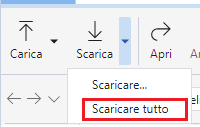
There is no '...' next to the action 'Download All' for ADLS Gen2/regular blob containers on the languages Italian/Polish
Storage Explorer Version: 1.27.0-dev Build Number: 20221027.6 Branch: main Platform/OS: Windows 10/Linux Ubuntu 22.04/MacOS Monterey 12.6 (Apple M1 Pro) Reproduce Languages: Italian/Polish Architecture: ia32/x64 How Found: From running test cases Regression From: Not a regression
Steps to Reproduce
- Launch Storage Explorer -> Open 'Settings' -> 'Application -> Regional Settings'.
- Select 'Italiano' -> Restart Storage Explorer.
- Expand one storage account -> Blob Containers.
- Open one blob container which contains items.
- Click the download arrow.
- Check whether there is a '...' next to the action 'Download All'.
Expected Experience
There is a '...' next to the action 'Download All'.
Actual Experience
There is no '...' next to the action 'Download All'.
Additional Context
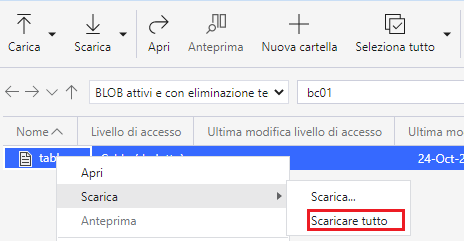
This issue also reproduces for the actions on the context menu.


As suggested by the loc team, added comments to provide guidance on translation.
@JasonYeMSFT This is still not resolved. Can you please provide a link to loc ticket or create a new one to get them on this?

I created a new work item: https://ceapex.visualstudio.com/CEINTL/_workitems/edit/969146