AzureStorageExplorer
 AzureStorageExplorer copied to clipboard
 microsoft
Properties dialog fail to show certain properties when using system proxy
Preflight Checklist
- [X] I have installed the latest version of Storage Explorer.
- [X] I have checked existing resources, including the troubleshooting guide and the release notes.
- [X] I have searched for similar issues.
Storage Explorer Version
1.25.0
Regression From
1.23.1
Architecture
i86
Storage Explorer Build Number
No response
Platform
All
OS Version
No response
Bug Description
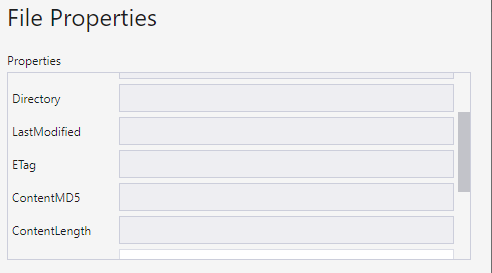
Enable "use system proxy" and open the properties dialog of a blob. In the dialog, some properties will be missing (e.g. ContentLength, LastModified, etc.). Besides, editable properties such as ContentType won't show their values. It is still possible to enter new values and set them.
Steps to Reproduce
Same as bug description
Actual Experience
The values will be displayed as blank no matter what the actual values are. Entering new values and save will still be able to set the new property values.
Expected Experience
No response
Additional Context
The cause of the bug is that when using system proxy, we preserve the casing of headers' key. However, the blob SDK uses a header map with only lowercase keys. As a result, all the headers whose original keys have uppercase letters won't be parsed properly into the result.

Opened a bug against Azure SDK to try and hash out a solution: https://github.com/Azure/azure-sdk-for-js/issues/22881

Merged a temp workaround that filters our header name casing respecting to just headers starting with x-ms-meta.
@MRayermannMSFT Verified this issue on the build main 20220817.4.
- This issue doesn't reproduce for blobs.
- This issue reproduces for files.