

 microsoft
error when trying to establish connection
Preflight Checklist
- [X] I have installed the latest version of Storage Explorer.
- [X] I have checked existing resources, including the troubleshooting guide and the release notes.
- [X] I have searched for similar issues.
Storage Explorer Version
1.24.3
Regression From
No response
Architecture
x64
Storage Explorer Build Number
20220617.2
Platform
Windows
OS Version
Windows 10
Bug Description
{ "message": ""{\n \"name\": \"Error\",\n \"message\": \"self signed certificate in certificate chain\",\n \"stack\": \"Error: self signed certificate in certificate chain\\n at TLSSocket.onConnectSecure (node:_tls_wrap:1530:34)\\n at TLSSocket.emit (node:events:390:28)\\n at TLSSocket._finishInit (node:_tls_wrap:944:8)\\n at TLSWrap.ssl.onhandshakedone (node:_tls_wrap:725:12)\",\n \"code\": \"SELF_SIGNED_CERT_IN_CHAIN\"\n}"" }
Steps to Reproduce
- Launch Explorer
- Reauthenticate now
Actual Experience
ususally can see the CSD subscriptions that I need to save file too
Expected Experience
No response
Additional Context
No response

@kokanogl Are you behind a proxy when using Storage Explorer? Certain proxy servers use self-signed certificates that we cannot verify with the public CAs. We have sections in our troubleshooting guide describing how to find and import the certificates https://docs.microsoft.com/azure/storage/common/storage-explorer-troubleshooting?tabs=Windows%2C2004#import-ssl-certificates. If you cannot resolve the problem following the steps, please contact your network administrator to find out what might be intercepting your internet connection.

@kokanogl Are you behind a proxy when using Storage Explorer? Certain proxy servers use self-signed certificates that we cannot verify with the public CAs. We have sections in our troubleshooting guide describing how to find and import the certificates https://docs.microsoft.com/azure/storage/common/storage-explorer-troubleshooting?tabs=Windows%2C2004#import-ssl-certificates. If you cannot resolve the problem following the steps, please contact your network administrator to find out what might be intercepting your internet connection.
@JasonYeMSFT, I too am having this issue. Just installed Az Storage Explorer today (8/16/22) and tried to authenticate. I'm receiving the same SELF_SIGNED_CERT_IN_CHAIN error that @kokanogl was receiving. I checked the Proxy settings under "Configure Proxy" in the Edit menu and it is set to "Do not use proxy". I am not behind a proxy at work.
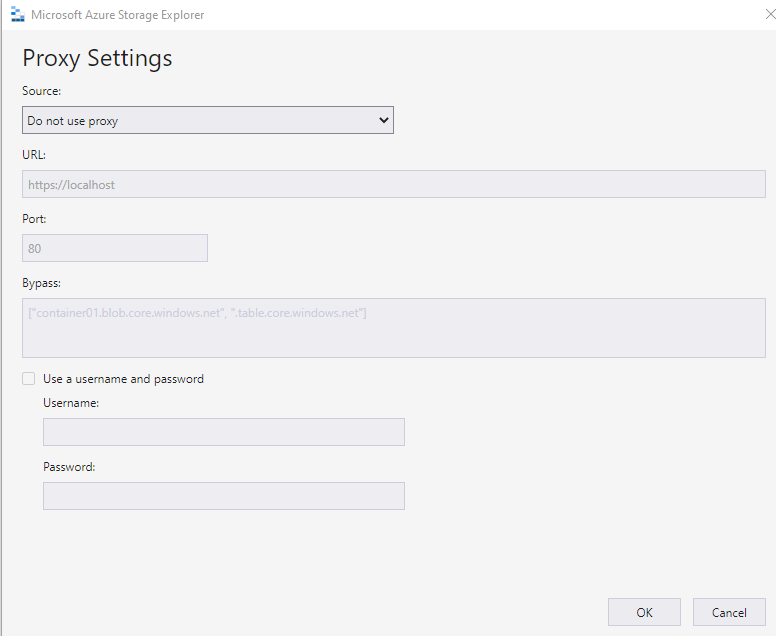

Here is my error details:
{ "message": "\"{\\n \\\"name\\\": \\\"Error\\\",\\n \\\"message\\\": \\\"self signed certificate in certificate chain\\\",\\n \\\"stack\\\": \\\"Error: self signed certificate in certificate chain\\\\n at TLSSocket.onConnectSecure (node:_tls_wrap:1530:34)\\\\n at TLSSocket.emit (node:events:526:28)\\\\n at TLSSocket._finishInit (node:_tls_wrap:944:8)\\\\n at ssl.onhandshakedone (node:_tls_wrap:725:12)\\\",\\n \\\"code\\\": \\\"SELF_SIGNED_CERT_IN_CHAIN\\\"\\n}\"" }
@guruizzy please try enabling system proxy as @JasonYeMSFT suggested. Thanks.

Closing due to lack of response. If you still have problem after taking our recommended action, please open a new issue.