

 microsoft
This request is not authorized to perform this operation.
Preflight Checklist
- [X] I have installed the latest version of Storage Explorer.
- [X] I have checked existing resources, including the troubleshooting guide and the release notes.
- [X] I have searched for similar issues.
Storage Explorer Version
1.24.3
Regression From
No response
Architecture
x64
Storage Explorer Build Number
20220617.2
Platform
Windows
OS Version
Windows 10
Bug Description
Cannot open any of the dild folders. Receiving the following issue even though I am not using firewalls and am an owner. Uninstalled and reinstalled Storage Explorer and the message changed from "Unable to open child container" to "This request is not authorized to perform this operation."
(I can send the entire length if needed.) Details: { "name": "RestError", "message": "This request is not authorized to perform this operation.\nRequestId:6d87c8ad-801a-003d-3c8d-a21ce5000000\nTime:2022-07-28T14:20:16.7537456Z", "stack": "RestError: This request is not authorized to perform this operation.\nRequestId:6d87c8ad-801a-003d-3c8d-a21ce5000000\nTime:2022-07-28T14:20:16.7537456Z\n at handleErrorResponse (C:\Program Files (x86)\Microsoft Azure Storage Explorer\resources\app\node_modules\se-file-extension\dist\src\index.js:2:123979)\n at C:\Program Files (x86)\Microsoft Azure Storage Explorer\resources\app\node_modules\se-file-extension\dist\src\index.js:2:124667\n at processTicksAndRejections (node:internal/process/task_queues:96:5)\n at async StorageRetryPolicy.attemptSendRequest (C:\Program Files (x86)\Microsoft Azure Storage Explorer\resources\app\node_modules\se-file-extension\dist\src\index.js:2:338409)\n at async StorageClientContext.sendOperationRequest (C:\Program Files (x86)\Microsoft Azure Storage Explorer\resources\app\node_modules\se-file-extension\dist\src\index.js:2:162691)\n at async ShareServiceClient.listSharesSegment (C:\Program Files (x86)\Microsoft Azure Storage Explorer\resources\app\node_modules\se-file-extension\dist\src\index.js:2:405605)", "code": "AuthorizationFailure", "statusCode": 403, "request": { "streamResponseStatusCodes": {}, "url": "https://lrsstandard1.file.core.windows.net/?comp=list", "method": "GET", "headers": { "_headersMap": { "x-ms-version": { "name": "x-ms-version", "value": "2021-04-10" }, "accept": { "name": "Accept", "value": "application/xml"
Steps to Reproduce
- Launch the storage explorer
- Select the storage
- Open the child (BLOB, File, Tables, etc)
Actual Experience
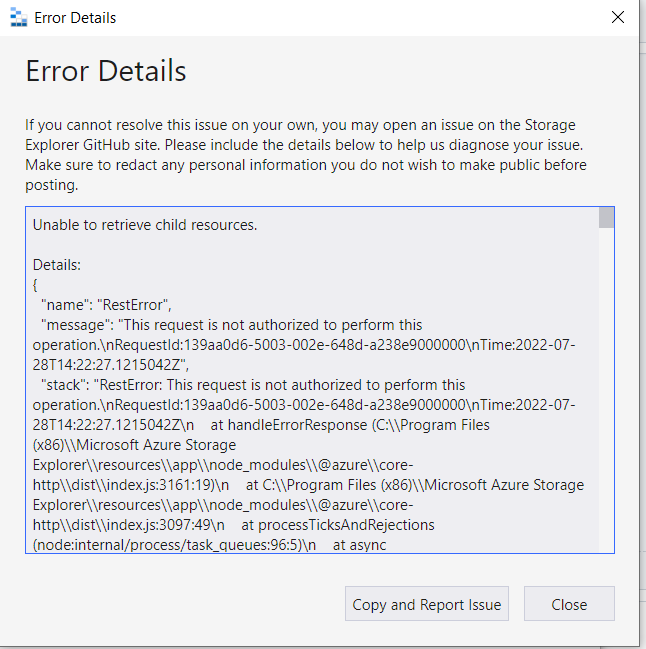
Expected Experience
I expect the child containers to open so that I can retrieve the files and path for the file container. I am able to open the other storage containers just not my main one.
Additional Context
This was working yesterday, and I have not made any changes to the storage containers

Having the "Owner" role on the resource only grants you the permissions to manage it (e.g. setting the access control) but does not grant you the permission to read/write data in it. You will need to add yourself a "Storage Blob/File/Queue/Table Contributor" or some other role like that to grant you the permission to read/write data. Could you also check if you have "Allow storage account key access" disabled on your storage account? It prevents you from using the keys to authenticate your requests and that might explain why all of a sudden things stop working.

Closing due to lack of response. If you still have issue, please open a new issue with the additional information.