

 microsoft
[BUG] ApplicationInsights on an Aurelia Framework
Using the aurelia framework on our application deployed on Azure AKS. I have incorporated Application Insights and I am getting an error when trying to display the page. See the error below
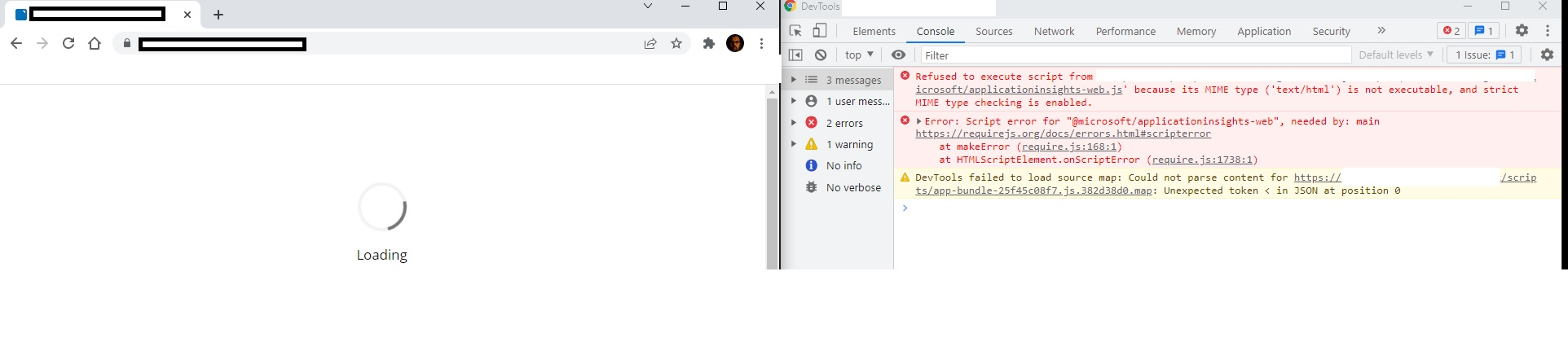
The libray I am using is
import { ApplicationInsights } from '@microsoft/applicationinsights-web'

const appInsights = new ApplicationInsights({
    config: {
      instrumentationKey: '<INSTR-KEY>'
    }
  });

Based on the error message it looks like you are fetching the script applicationinsights-web.js from your own CDN and as part of that the mimetype (Content-Type) being returned for the script is text/html which the browser is blocking.
The CDN service / script should be returning text/javascript so that the browser will actually execute the script.

@MSNev - thank you for your response, do you know how I can do this? or is it the application server that needs to register the script as text/javascript?
It will be the server (or storage) that is serving up the files / CDN. So it will depend on what/how the files are stored and servered up.
For example from the js.monitor.azure.com perspective this is the CDN endpoint which has the default set for files ending with .js to be text/javascript, but for the source location of the files they also have additional meta-data which includes the Content-Type set as text/javascript.
This Issue will be closed in 30 days. Please remove the "Stale" label or comment to avoid closure with no action.
![github-actions[bot] avatar](https://avatars.githubusercontent.com/in/15368?v=4 "Published by a pub.dev verified publisher")
This issue has been automatically locked since there has not been any recent activity after it was closed. Please open a new issue for related bugs.