

 microsoft
Point cloud from depth image
I've been trying to obtain a point cloud which I then want to use to obtain an occupancy map but I'm missing something in the reprojection stage. point_cloud seems to be what I want but I can't find the point_cloud.py file.
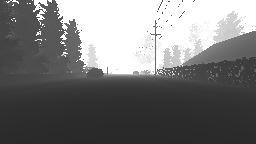
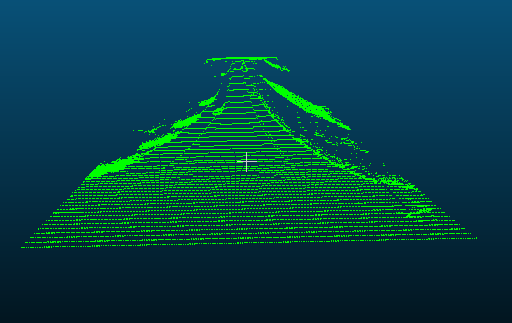
This depth map gives me the following point cloud using the projection matrix proposed here https://github.com/Microsoft/AirSim/issues/778:

| side view | top view |
|---|---|
 |
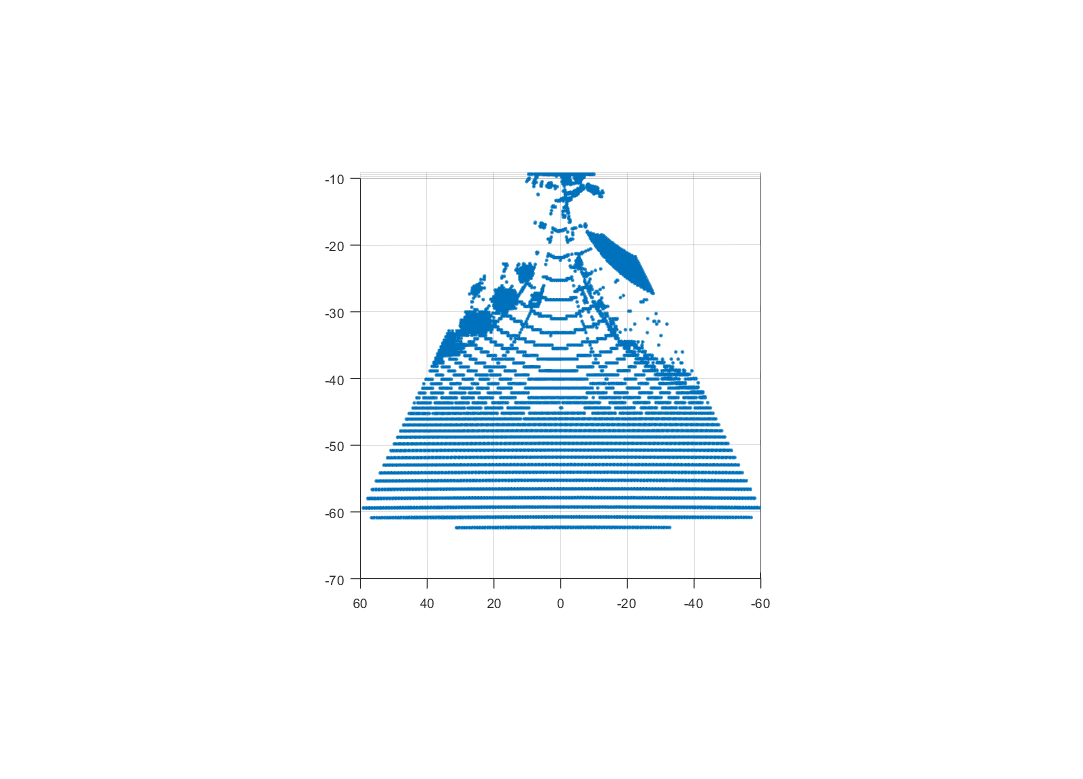 |
I understand the projection matrix mentioned above but I can't figure out how it should be to give me what I want. Especially the top-down view shows that the generated point cloud is very skewed. How does the projection matrix need to be such that the top-down view is spatially correct?
The goal would be to use the depth map to generate a point cloud similar to lidar which I can then use to generate an occupancy map. At this point I'm not even sure if this is possible?
Any help would be appreciated!

I have added a function to compute camera projection matrix (see code). This function is direct adaptation of BuildProjectionMatrix function being used inside the Unreal code that computes 4x4 matrix using FOV, width, height and near plan. However I'm just not sure if this is correct. One reason is that it never uses far plan. I'm also not sure if matrix is in the form that you need. You can help us review this code and test it out!
Sample usage of above function is here.

@sytelus I cannot access both the code links you mention in the earlier post. Can you re-locate them? Thank you.

@sytelus , The links to the code are broken, could you help re-locate them ? Thank You

@sytelus , The links to the code are broken, could you help re-locate them ? Thank You.

@orangelx, Check this out, if you have the camera intrinsics. https://codereview.stackexchange.com/questions/79032/generating-a-3d-point-cloud
@orangelx, Check this out, if you have the camera intrinsics. https://codereview.stackexchange.com/questions/79032/generating-a-3d-point-cloud
@v-prgmr How can i get the camera intrinsics in Airsim?
@orangelx,
I am not sure how the camera intrinsics can be obtained from AirSim, check other threads if someone has mentioned about intrinsic parameters.
Please try my post here : https://github.com/unrealcv/unrealcv/issues/14#issuecomment-487346581

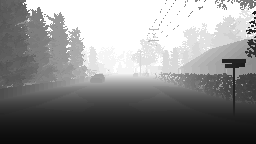
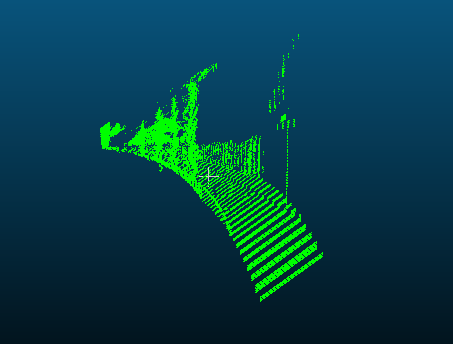
@stavBodik hi, I change the point_cloud.py to get the point cloud file. But I get the same wrong result. Is the depth Image is wrong? Or the matrix? thank you.
import airsim

import cv2
import time
import sys
import math
import numpy as np
from PIL import Image


############################################
########## This is work in progress! #######
############################################

outputFile = "cloud_01.asc"
color = (0, 255, 0)
rgb = "%d %d %d" % color

Width=256
Height=144
focal_length=Width/2
B=20

projectionMatrix =  np.array([
        [1, 0, 0, -Width/2],
        [0, 1, 0, -Height/2],
        [0, 0, 0, focal_length],
        [0, 0, -1/B, 0]
    ])


def printUsage():
    print("Usage: python point_cloud.py [cloud.txt]")


def savePointCloud(image, fileName):
    f = open(fileName, "w")
    for x in range(image.shape[0]):
        for y in range(image.shape[1]):
            pt = image[x, y]
            if (math.isinf(pt[0]) or math.isnan(pt[0])):
                # skip it
                None
            else:
                f.write("%f %f %f %s\n" % (pt[0], pt[1], pt[2] - 1, rgb))
    f.close()


for arg in sys.argv[1:]:
    cloud.txt = arg
client = airsim.MultirotorClient()
client.confirmConnection()
client.enableApiControl(True)
client.armDisarm(True)


responses = client.simGetImages([airsim.ImageRequest(0, airsim.ImageType.DepthPlanner, pixels_as_float=True)])
response = responses[0]
img1d = np.array(response.image_data_float, dtype=np.float)
img1d = img1d * 3.5 + 30
img1d[img1d > 255] = 255
img2d = np.reshape(img1d, (responses[0].height, responses[0].width))
depth = np.array(img2d, dtype=np.uint8)


Image3D = cv2.reprojectImageTo3D(depth, projectionMatrix)
savePointCloud(Image3D, outputFile)
print("saved " + outputFile)
airsim.wait_key("Press any key to exit")
sys.exit(0)
@stavBodik hi, I change the point_cloud.py to get the point cloud file. But I get the same wrong result. Is the depth Image is wrong? Or the matrix? thank you.
import airsim

import cv2
import time
import sys
import math
import numpy as np
from PIL import Image


############################################
########## This is work in progress! #######
############################################

outputFile = "cloud_01.asc"
color = (0, 255, 0)
rgb = "%d %d %d" % color

Width=256
Height=144
focal_length=Width/2
B=20

projectionMatrix =  np.array([
        [1, 0, 0, -Width/2],
        [0, 1, 0, -Height/2],
        [0, 0, 0, focal_length],
        [0, 0, -1/B, 0]
    ])


def printUsage():
    print("Usage: python point_cloud.py [cloud.txt]")


def savePointCloud(image, fileName):
    f = open(fileName, "w")
    for x in range(image.shape[0]):
        for y in range(image.shape[1]):
            pt = image[x, y]
            if (math.isinf(pt[0]) or math.isnan(pt[0])):
                # skip it
                None
            else:
                f.write("%f %f %f %s\n" % (pt[0], pt[1], pt[2] - 1, rgb))
    f.close()


for arg in sys.argv[1:]:
    cloud.txt = arg
client = airsim.MultirotorClient()
client.confirmConnection()
client.enableApiControl(True)
client.armDisarm(True)


responses = client.simGetImages([airsim.ImageRequest(0, airsim.ImageType.DepthPlanner, pixels_as_float=True)])
response = responses[0]
img1d = np.array(response.image_data_float, dtype=np.float)
img1d = img1d * 3.5 + 30
img1d[img1d > 255] = 255
img2d = np.reshape(img1d, (responses[0].height, responses[0].width))
depth = np.array(img2d, dtype=np.uint8)


Image3D = cv2.reprojectImageTo3D(depth, projectionMatrix)
savePointCloud(Image3D, outputFile)
print("saved " + outputFile)
airsim.wait_key("Press any key to exit")
sys.exit(0)
Hey were you ever able to solve the issue?

@stavBodik hi, I change the point_cloud.py to get the point cloud file. But I get the same wrong result. Is the depth Image is wrong? Or the matrix? thank you.
import airsim

import cv2
import time
import sys
import math
import numpy as np
from PIL import Image


############################################
########## This is work in progress! #######
############################################

outputFile = "cloud_01.asc"
color = (0, 255, 0)
rgb = "%d %d %d" % color

Width=256
Height=144
focal_length=Width/2
B=20

projectionMatrix =  np.array([
        [1, 0, 0, -Width/2],
        [0, 1, 0, -Height/2],
        [0, 0, 0, focal_length],
        [0, 0, -1/B, 0]
    ])


def printUsage():
    print("Usage: python point_cloud.py [cloud.txt]")


def savePointCloud(image, fileName):
    f = open(fileName, "w")
    for x in range(image.shape[0]):
        for y in range(image.shape[1]):
            pt = image[x, y]
            if (math.isinf(pt[0]) or math.isnan(pt[0])):
                # skip it
                None
            else:
                f.write("%f %f %f %s\n" % (pt[0], pt[1], pt[2] - 1, rgb))
    f.close()


for arg in sys.argv[1:]:
    cloud.txt = arg
client = airsim.MultirotorClient()
client.confirmConnection()
client.enableApiControl(True)
client.armDisarm(True)


responses = client.simGetImages([airsim.ImageRequest(0, airsim.ImageType.DepthPlanner, pixels_as_float=True)])
response = responses[0]
img1d = np.array(response.image_data_float, dtype=np.float)
img1d = img1d * 3.5 + 30
img1d[img1d > 255] = 255
img2d = np.reshape(img1d, (responses[0].height, responses[0].width))
depth = np.array(img2d, dtype=np.uint8)


Image3D = cv2.reprojectImageTo3D(depth, projectionMatrix)
savePointCloud(Image3D, outputFile)
print("saved " + outputFile)
airsim.wait_key("Press any key to exit")
sys.exit(0)
Hi,
did you solve it?

This issue has been automatically marked as stale because it has not had activity from the community in the last year. It will be closed if no further activity occurs within 20 days.
![stale[bot] avatar](https://avatars.githubusercontent.com/in/1724?v=4 "Published by a pub.dev verified publisher")
I had same issue using open3d with python, resolve it by adding constant (depth = depth+400) to my depth image.
From my understanding image values are from 0-1 and 0 values considered incorrect in depth images, so we need to move 'plane' somewhere else. that is from my really limited understanding.
Edit: Problem was that my images was just images (0-255) but the standard for proper depth images is 16-bit single channel image, the integer value represents the depth measurement in millimeters so the maximum value in your image will be not 255 but 2^16.

Project AirSim now features a GPU-accelerated LiDAR sensor with real-world sensor models. This means you can simulate LiDAR data at high speed while maintaining realistic physics and sensor behavior, closely matching actual hardware performance.
With GPU acceleration, you can run high-resolution scans in real time, making it ideal for testing:
Autonomous navigation and SLAM
Obstacle detection and avoidance
Multi-vehicle sensor fusion
By modeling real LiDAR devices, Project AirSim enables more accurate algorithm development and faster deployment from simulation to real-world robotics.
