

 microsoft
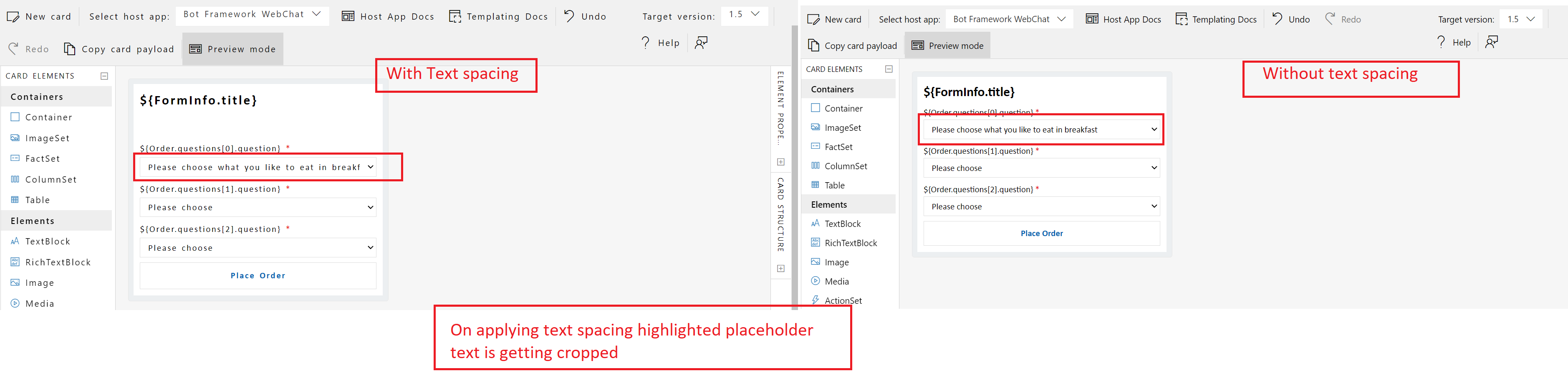
{Linked:Bug1389550}[Adaptive Cards> Designer]: 'Please choose ... to eat in breakfast' placeholder text is getting cropped on applying text spacing.
Target Platforms
Other
SDK Version
1.5
Application Name
Adaptive Cards
Problem Description
Test Environment: OS Version: 22H2 (Build 25145.1011) Browser: Edge Dev (106.0.1349.1) URL: https://adaptivecards.io/designer/ Tool: Stylus
Repro Steps:
- Open the above URL in edge dev browser.
- Attached the provided JSON in Designer tab of Card payload editor and in sample payload editor.
- Turn on the stylus tool.
- Navigate to the 'Please choose what you like ... to eat in breakfast' edit field.
- Observe the issue.
Actual Result: On applying text spacing, 'Please choose ... to eat in breakfast' placeholder text is getting cropped.
Expected Result: On applying text spacing, 'Please choose ... to eat in breakfast' placeholder text should not get cropped.
User Impact: Person with visual disability will get impacted if placeholder text is getting cropped due to which user will not be able to understand the purpose and will have difficulty in tracking the content.
MAS reference link: https://liquid.microsoft.com/Web/Object/Read/MS.Accessibility/Requirements/01.04.12
Screenshots
Card JSON
{
    "type": "AdaptiveCard",
    "$schema": "http://adaptivecards.io/schemas/adaptive-card.json",
    "version": "1.5",
    "body": [
        {
            "type": "TextBlock",
            "text": "${FormInfo.title}",
            "size": "Large",
            "wrap": true,
            "weight": "Bolder"
        },
        {
            "type": "Input.ChoiceSet",
            "id": "EntreeSelectVal",
            "label": "${Order.questions[0].question}",
            "style": "filtered",
            "isRequired": true,
            "errorMessage": "This is a required input",
            "placeholder": "Please choose what you like to eat in breakfast",
            "choices": [
                {
                    "$data": "${Order.questions[0].items}",
                    "title": "${choice}",
                    "value": "${value}"
                }
            ]
        },
        {
            "type": "Input.ChoiceSet",
            "id": "SideVal",
            "label": "${Order.questions[1].question}",
            "style": "filtered",
            "isRequired": true,
            "errorMessage": "This is a required input",
            "placeholder": "Please choose",
            "choices": [
                {
                    "$data": "${Order.questions[1].items}",
                    "title": "${choice}",
                    "value": "${value}"
                }
            ]
        },
        {
            "type": "Input.ChoiceSet",
            "id": "DrinkVal",
            "label": "${Order.questions[2].question}",
            "style": "filtered",
            "isRequired": true,
            "errorMessage": "This is a required input",
            "placeholder": "Please choose",
            "choices": [
                {
                    "$data": "${Order.questions[2].items}",
                    "title": "${choice}",
                    "value": "${value}"
                }
            ]
        }
    ],
    "actions": [
        {
            "type": "Action.Submit",
            "title": "Place Order"
        }
    ]
}
Sample Code Language
No response
Sample Code
No response


@anna-dingler Stylus is text spacing tool which is used to create spaces between the text and the characters.
@vaishali1397 Thanks for getting back to me! Can you share a link to install Stylus?
@anna-dingler Below are the steps to install the stylus and configure it –
- Go to - https://chrome.google.com/webstore/detail/stylus/clngdbkpkpeebahjckkjfobafhncgmne?hl=en.
- Click on ‘Add to Chrome’ button.
- After adding, you should find Stylus icon on the tool bar, click it to open drop down menu.
- Select ‘Manage Styles’ from the menu. On the manage styles screen, click on ‘Create new Style’. The New style screen would open, here give a suitable name for your new style, e.g. ‘text spacing’.
- Add following CSS under ‘Code’ field –
- { line-height: 1.5 !important; letter-spacing: 0.12em !important; word-spacing: 0.16em !important; } p { margin-bottom: 2em !important; }
- Click on ‘Save’.
Hi @vaishali1397, thank you for sending over the Stylus instructions! I was able to replicate what you were seeing; however, I do not believe this is a bug.
We are utilizing an HTML text input element here. You can see that this same issue occurs for the following text input in a basic page because it has a fixed width:
<input type="text" id="name" name="name" style="width: 100px" placeholder="type your name here">
As the width of an AdaptiveCard is not adjustable, we believe it is up to the card author to comply with these accessibility guidelines. Since the placeholder text does not wrap, authors should ensure that placeholder text allows for 20% of space at the end of the line so text spacing can be applied.
placeholder text is also not intended to replace provided labels and should not be required to understand the content (https://developer.mozilla.org/en-US/docs/Web/HTML/Element/input#placeholders_are_not_accessible).
Let me know what you think and if you have any questions!
Closing for reasons listed in prior comment. Please let me know if you have any questions!
