

 microsoft
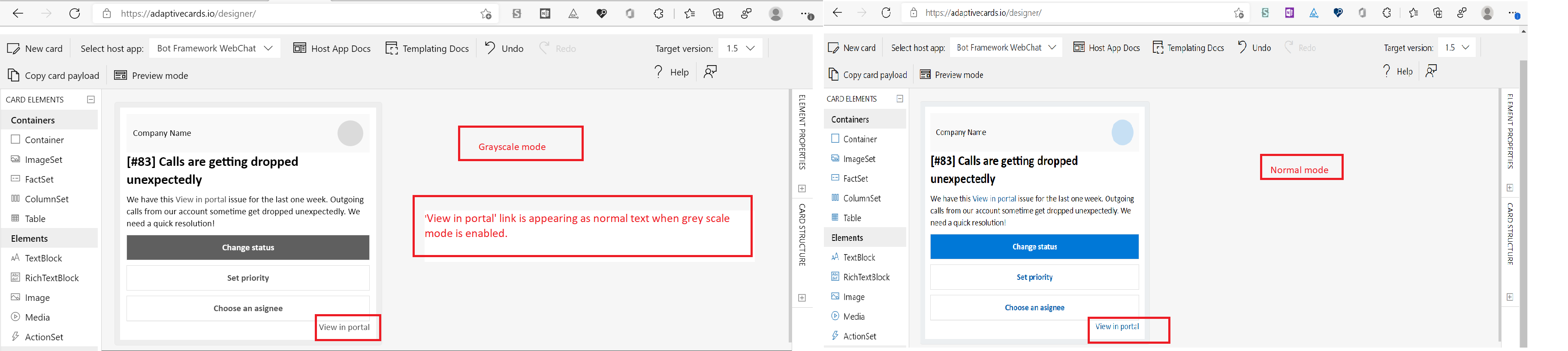
{Linked:Bug2509192}[Accessibility][Use of color -Workflow Notifications card]: 'View in portal' link is appearing as normal text when grey scale mode is enabled.[Rendering] Bug Title Here
Target Platforms
Other
SDK Version
1.5
Application Name
Adaptive Cards
Problem Description
Test Environment: OS Build: Windows 11 Version: Dev( Build 22526.1000) Browser: Edge Dev Version ( 98.0.1108.15) (Official build) (64-bit) URL: Designer | Adaptive Cards Screen reader: Narrator
Pre-requisites: Settings > Accessibility > Color Filters > Turn on color filters toggle button > select 'Greyscale' radio button
Repro Steps:
- Open the above URL and login with valid credentials.
- Workflow Notifications page will get displayed.
- Now, enable grey scale mode in settings and navigate to 'View in portal' link in 'company name' section
- Check whether the link is appearing as normal text or not.
Actual: "View in portal" link in 'Company name section' is appearing as normal text when grey scale mode is enabled.
Expected: "View in portal" link in 'Company name section' should not appear as normal text when grey scale mode is enabled. Links should be easily distinguishable from regular text. Styling options can include underline, a chevron, or a 3:1 contrast difference between the link text and static text (in addition to all text meeting 4:5:1 contrast requirement with the background).
User Impact: When links appear the same (or similar) to static text most users will have difficulty distinguishing between them which can lead to a frustrating user experience for everyone.
MAS Reference: MAS 1.4.1 – Use of Color.
“Have feedback to share on Bugs ? Please help fill Trusted Tester Bug Feedback (office.com) “
Screenshots
Card JSON
NA
Sample Code Language
No response
Sample Code
No response
