

 microsoft
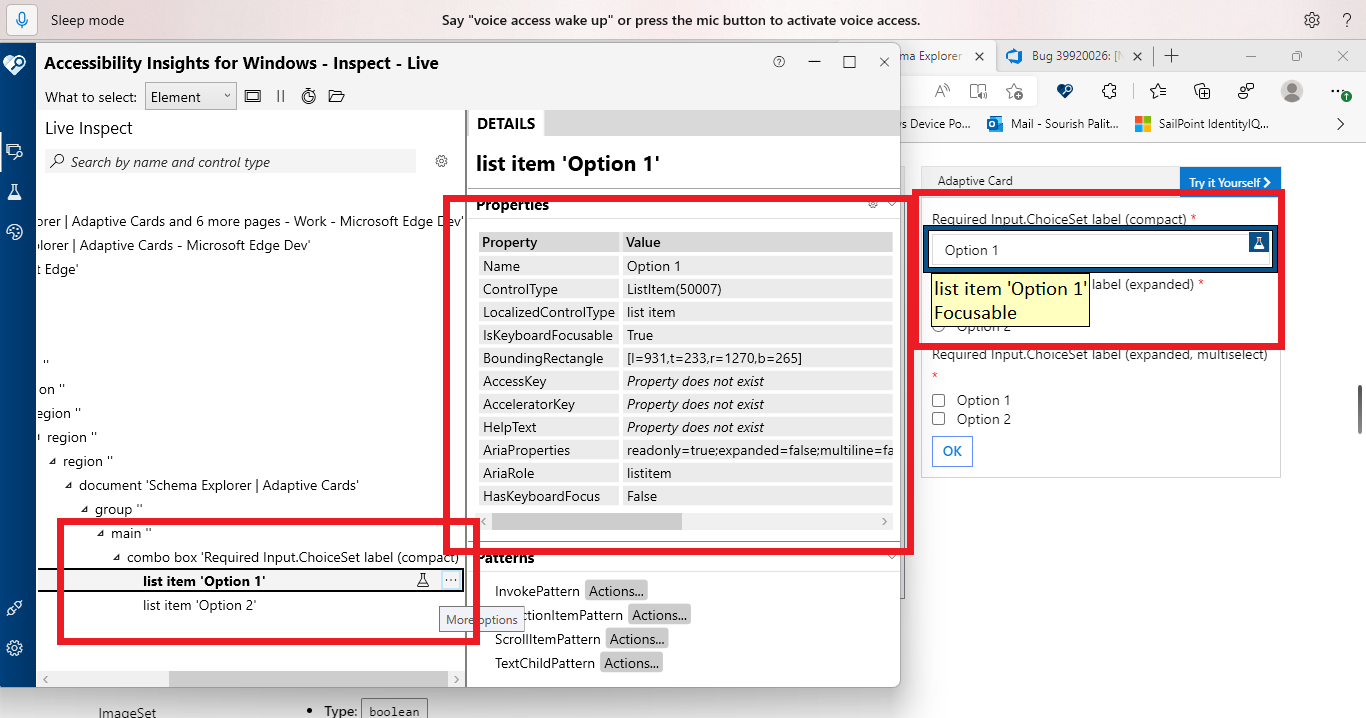
[Navigate to and select "Input.Time" list item in "Inputs" section.]: Voice Access is not showing numbers for 'Option 1' present under 'Please make selection' combo box
Target Platforms
Other
SDK Version
103
Application Name
Adaptive Card
Problem Description
https://microsoft.visualstudio.com/OS/_queries/edit/39920272/?triage=true
Test Environment: OS: 22H2 (OS Build 25120.1000) Browser: Edge Dev Browser Version: Version 103.0.1255.0 (Official build) dev (64-bit) URL: Adaptive Cards Tool: Voice Access
Repro Steps: Launch the above URL. Command: "Voice access wake up" Command: "Click Schema Explorer" for the top header. Command: 'Click Input.time' from under 'Inputs' label. Navigate till the second card present under this page. Command: 'Show Numbers'. Expand 'Please make selection' combo box. Command: 'Show Numbers'. Observe the issue for 'Option 1'. Actual Result: Voice Access is not showing numbers for 'Option 1' present under 'Please make selection' combo box.
Expected Result: Voice Access should show numbers for 'Option 1' present under 'Please make selection' combo box.
Note: This issue is repro throughout this page.
Observation: 'IsKeyboardFocusable' property is set as 'True' for 'Option 1'.
User Experience:
People with limited mobility (cerebral palsy, quadriplegia) who use Voice Access to use OneNote may not be able edit or type they will find difficulty in accessing 'Canvas area' and 'Canvas Title' edit field. Voice access users will get impact and will not able to interact with controls with pre-defined Voice access commands.
MAS Reference: No Disruption of Accessibility Features - Liquid (microsoft.com)
Have feedback to share on Bugs? Please help fill Trusted Tester Bug Feedback (office.com)"
To learn more about Voice Access and how an application can support its different modes, Refer: VoiceAccess Testing - OSGWiki
Screenshots
No response
Card JSON
NA
Sample Code Language
No response
Sample Code
No response

https://user-images.githubusercontent.com/96283152/173514358-11f2ebee-401c-4444-a17b-f2a4247aa851.mp4
We utilize the HTML select element for this control, so we have less control over its behavior.
This is error also occurs within documentation examples for the control.
@carlos-zamora Do you have ideas for how to fix this? Since the elements are already focusable, I'm not sure if there's a workaround.

Closing the issue since we determined offline that this is an issue with Voice Access.