

 microsoft
Rapid Application Publish - Permissions error
Please include the following with each issue:
1. Describe the bug At BCTechDays 2022, we were encouraged to make use of the existing tooling, including the 'Rapid Application Publish' feature. However, trying to do so results in various failures.
2. To Reproduce Steps to reproduce the behavior:
-
We're developing against sandboxes on our online CDX saas tenant (so no Docker involved, no onprem)
-
Apps are published in VS Code via 'Publish without Debugging'
-
A startupObject (page) has been configured in the launch.json
-
Normal publish works fine
-
Perform some minor changes (changing the content of a procedure, not the parameters, signature, ...)
-
Publish the app in VS Code via 'Rapid Application Publishing'
-
Following error occurs
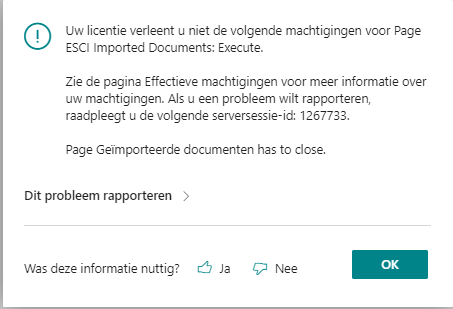
3. Expected behavior Rapid Application Publishing to work in more scenarios, or at least the error to be more clear.
4. Actual behavior
Error stack
Uw licentie verleent u niet de volgende machtigingen voor Page ESCI Imported Documents: Execute.

Zie de pagina Effectieve machtigingen voor meer informatie over uw machtigingen. Als u een probleem wilt rapporteren, raadpleegt u de volgende serversessie-id: 1267733.

Page Geïmporteerde documenten has to close.

Interne sessie-id:
0482deb6-693e-438d-92c5-34bd79b56dcf

Id van Application Insights-sessie:
8f9154ad-559b-4e0b-85ae-7ae1f0b44ab0

Id van clientactiviteit:
cd7fe0f1-05ce-49b4-a0c9-142cbdb453f5

Tijdstempel van fout:
2022-09-20T08:52:05.7232594Z
5. Versions:
- AL Language: v9.5.674382
- Business Central: Versie: US Business Central 20.4 (platform 20.0.44266.46375 + toepassing 20.4.44313.44365)

1.Just for curiosity, the user who did the publish has rights to Page ESCI Imported Documents on all companies and teh same is true for RAD? 2. Have you removed any application object, or have you done any change related to "ESCI Imported Documents". Can you maybe share teh rad.json. Not that it brings much info since I would need to debug your app for fully understanding teh problem. But the clientId here also gives some starting point.

- User is SUPER on all companies
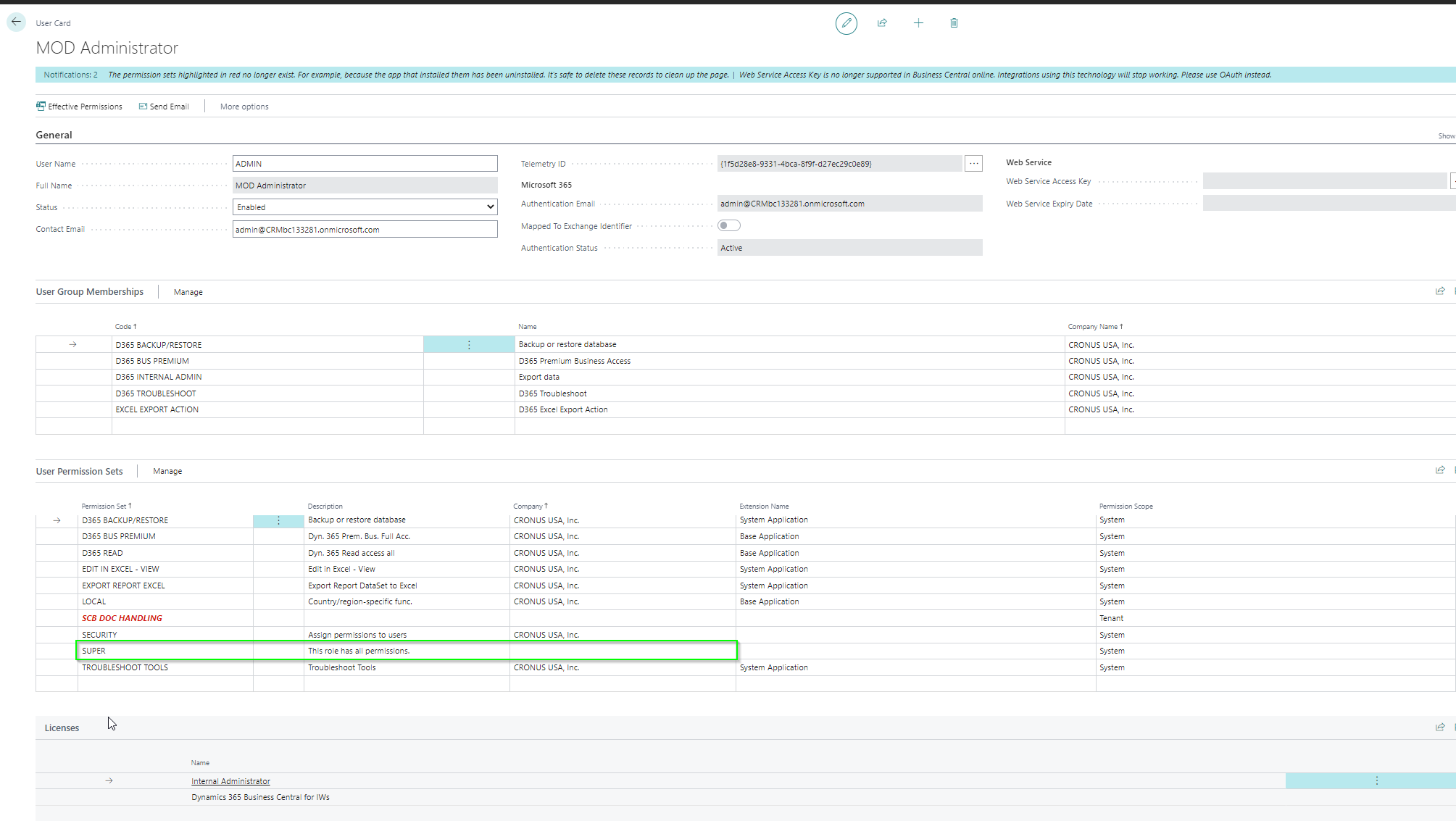
- Did not remove any application object. As far as I remember, I only changed some code lines inside a procedure, no signature changes.
Will try to use RAD bit more upcoming week and report any similar issues - included the rad.json content - in this thread.
@fvet
I do not have a repro for your issue. Well, I tried @tyurm s repro. I have no repro there.
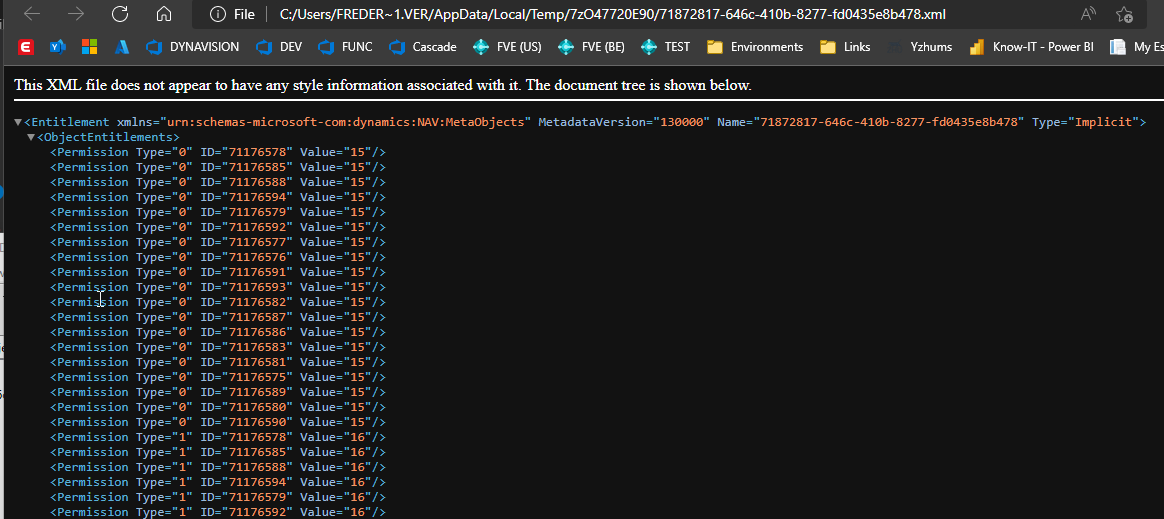
Can you check that the app that you try to publish with RAD has an Entitlement folder with
Hi @kalberes
I have checked xml file after first-regular publish, and after second-RAD publish, it is the same:
<?xml version="1.0" encoding="utf-8"?>
<Entitlement MetadataVersion="130000" Name="0fb1406e-8858-477f-85c0-e9faa1335453" Type="Implicit" xmlns="urn:schemas-microsoft-com:dynamics:NAV:MetaObjects">
  <ObjectEntitlements>
    <Permission Type="0" ID="50100" Value="15" />
    <Permission Type="1" ID="50100" Value="16" />
  </ObjectEntitlements>
</Entitlement>
Here you can find app file after RAD publishing: Default publisher_ALBug_1.0.0.0.zip
I have also tried to download source code from Sandbox after RAD publishing, and there were only these files in the archive (no table file):


@kalberes
Just checked, the app file used for RAD publishing contains an entitlement folder / XML file.
Last attempt when I tried to use the RAD publishing was no longer giving a permission error, but in fact, my extension seems to have disappeared from the UI instead.
Here's the repro steps:
- Opened my workspace (Core + dependend Item app)
- Core app got published (Full)
- Item app got published (Full)
- Open web client --> pages (Import template) found via Search
- Empty rad.json files for both apps
- Perform small table change (added field)
- Package app
- rad.json got updated
- Rapid Publish (item app) -> no error in VS Code
- Open web client --> Suddenly my extension seems to have dissappeared ? (no more pages in the search results)
- Only option to restore is doing a full publish again.
I would have expected VS Code to either complain that RAD publish is not supported for those cases, either for the RAD to do a good publish and properly update the extension on the server.
App file that got published during RAD contained only the changed table.

https://user-images.githubusercontent.com/25268332/194541836-5ea6670c-d2d0-44db-b4a9-ef40c19bf114.mp4
@fvet You should never manually delete the rad file, unless you reload the whole project. That is an internal file handled by the workspace. If you interact with it, while your project is opened then you can make things worse. Ok I can see from teh video that your app is gone. Is this a 21.X server? or 20.5?
@fvet You should never manually delete the rad file, unless you reload the whole project. That is an internal file handled by the workspace. If you interact with it, while your project is opened then you can make things worse.
I'm fully aware of that. I've not manipulated the file in any way. I meant to state that the 'rad.json was empty' after doing the full publish, so I just double checked the content of it to get a clean start to perform changes and do the RAD.
I do not understand the below Open web client --> Suddenly my extension seems to have disappeared ? (no more pages in the search results) Are you saying that if you open your extension management page the extension you have just published is not there? Or that the navigation(search) is not working after RAD publish?
The extension is still there (and it's marked as installed). However, none of my pages are accessible (the 'Imported Document' bookmark dissappeared from my rolecenter, the 'Import Template' pages do not show up in the search results, ...)
Server is BC 21.0
App seems 'gone' for the user, though still installed in the extension management.

Yes, we have just released a hotfix for 21.X, 21.0 but that will only be available for SAAS, in the next few days. RAD is broken on modified objects for teh 21 release of BC servers. OnPrem it will still be until the 21.1 release.
@tyurm That when you download the source after RAD you do not see the original app package (that you have in vscode) should be fine. You have only published the page. The table is there, its dll was loaded, its schema created, and it is "running". For some reason you get a permission issue. Like the entitlements are not reloaded. Will involve the team handling the permission system.
@fvet Can you please create a new github issue for this problem. That we accept it is another bug. One problem one bug, I guess the Core is there if you look in Extension management page, only uninstalled. What was your dependency publishing option?