
AL

AL copied to clipboard
 microsoft
Copies wrong sql statement
Please include the following with each issue:
1. Describe the bug When you debug and have enableSqlInformationDebugger: true or enableLongRunningSqlStatements: true in launch.json you get the databasestatistics section in the debugger pane. Here you can select a statement, right click and copy, but it seems that no matter which statement you copy, you always get the statement from SQL0.
2. To Reproduce Steps to reproduce the behavior:
- Add enableSqlInformationDebugger: true and enableLongRunningSqlStatements: true to launch.json
- Add a breakpoint anywhere in code after a few database reads.
- Start debugging.
- Execute the code to hit the breakpoint.
- Expand the database statistics in the debugger pane.
- Expand any statement except SQL0.
- Select the sql statement.
- Right click and select copy.
- Paste the statement anywhere.
- Now you will notice that you didn't paste the selected sql statement.
page 50001 "MyPage"
{
Caption = 'mypage';
PageType = Card;
ApplicationArea = All;
UsageCategory = Administration;
actions
{
area(Processing)
{
action(ActionName)
{
ApplicationArea = All;
trigger OnAction()
var
Customer: Record Customer;
Vendor: Record Vendor;
i:Integer;
begin
Customer.Get('10000');
Vendor.Get('10000');
i:=0; //Set breakpoint here
end;
}
}
}
}```
**Note:** Because the developers need to copy and paste the code snippet, including a code snippet as a media file (i.e. .gif) is not sufficient.
**3. Expected behavior**
I expect that the correct sql statement is copied.
**4. Actual behavior**
Notice the sql statement in SQL9:
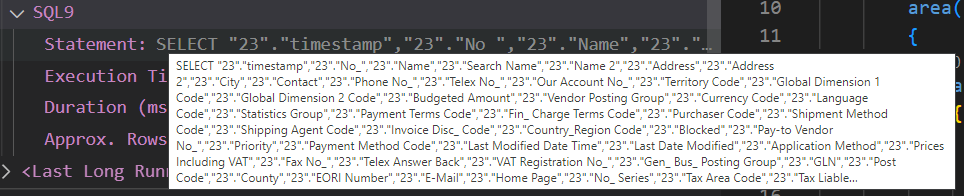
Select and copy.
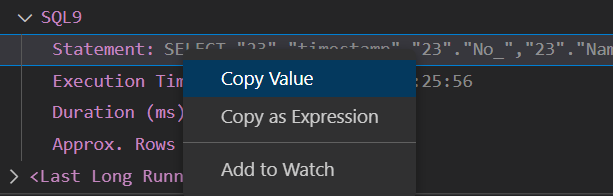
Paste and you get:

...a different sql statement. (SQL0)
**5. Versions:**
- AL Language: v9.4.663067
- Visual Studio Code: 1.71.1
- Business Central: 20.2.41144.41959
- List of Visual Studio Code extensions that you have installed:
Al Language
