
AL

AL copied to clipboard
 microsoft
Text overflow is not caught at build or runtime if implicitly converting Guid to Text or Code, AND it changes MaxStrLen!
With this code:
pageextension 50100 Test extends "Customer List"
{
    trigger OnAfterGetCurrRecord()
    var
        TestCode: Code[20];
    begin
        TestCode := '';
        Message('MaxStrLen is %1 /  StrLen is %2', MaxStrLen(TestCode), StrLen(TestCode));
        TestCode := Rec.SystemId;
        Message('MaxStrLen is %1 /  StrLen is %2', MaxStrLen(TestCode), StrLen(TestCode));
    end;
}
The assignment of Guid to TestCode: Code[20] does an implicit conversion of the Guid to Text, but:
- This is not warned at build time.
- Nor does it cause an overflow error at run time! Only if we then use the
Code[20]in another way, that will overflow, do we get a runtime error.
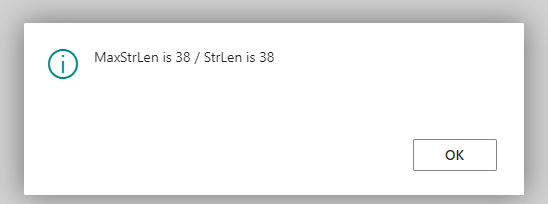
Worse... somehow the uncaught overflow of a 38-character string into the Code[20] causes the MaxStrLen() of said Code to change/increase to the overflowing length!!
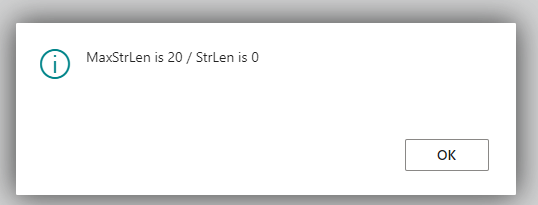
The first Message(), before the offending assignment, shows:
The second, after the assignment, shows:
Pretty please... please fix so that
- the implicit conversion of Guid causes code analysis warnings if the destination isn't long enough for the textual version;
- said conversion will also cause runtime errors due to the overflow, instead of silently 'working';
- the overflow should not be allowed, and certainly the
MaxStrLen()of the destination shouldn't be increased to match!!
Thank you!
Name: AL Language
Id: ms-dynamics-smb.al
Description: AL development tools for Dynamics 365 Business Central
Version: 9.4.663067
Publisher: Microsoft
VS Marketplace Link: https://marketplace.visualstudio.com/items?itemName=ms-dynamics-smb.al
